

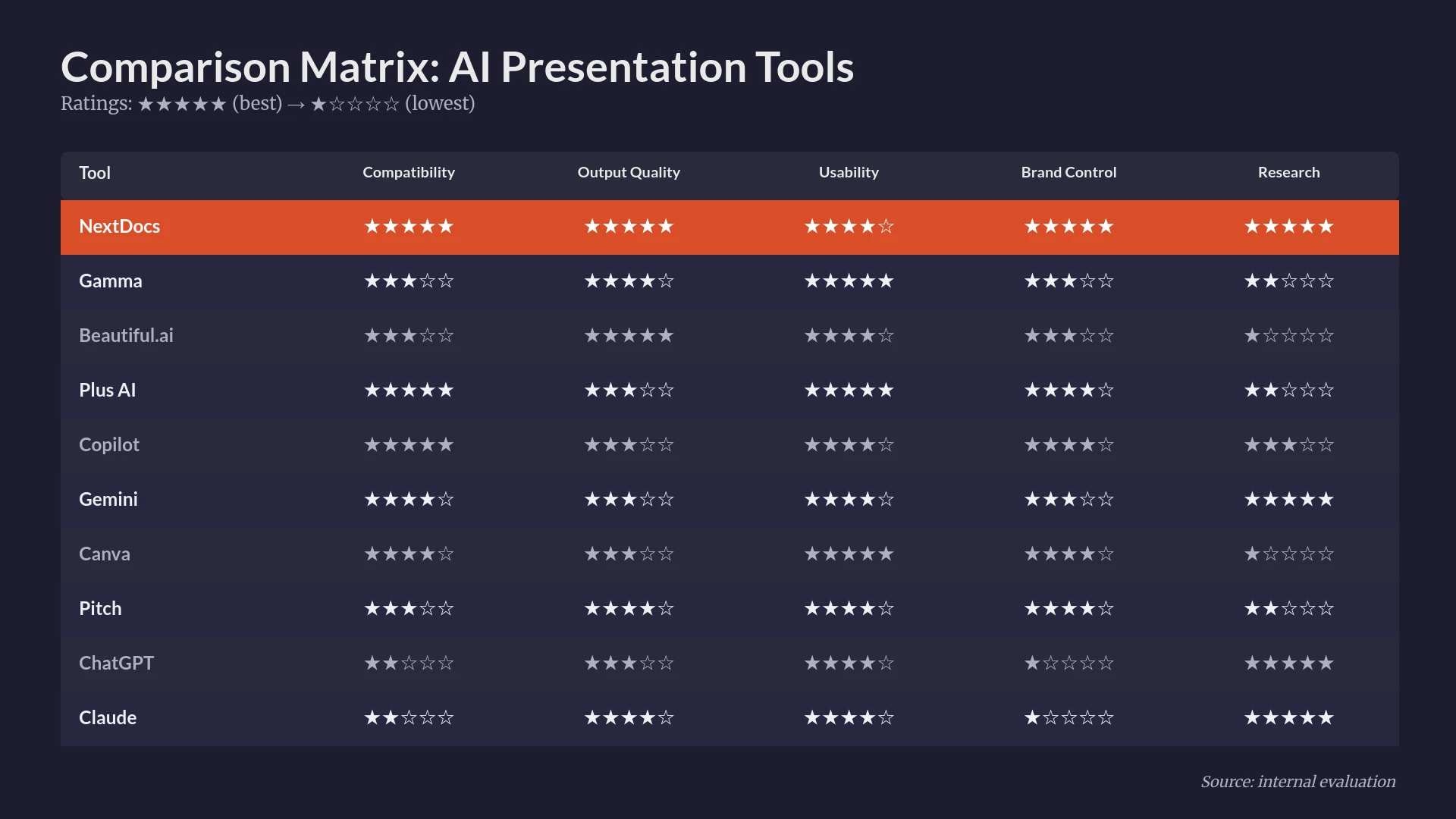
چشمانداز نرمافزارهای ارائه در سال 2026 بهطور چشمگیری تغییر کرده است. سالها، حرفهایها مجبور بودند بین سادگی استفاده در سازندگان اسلاید پایه و دقت فنی مورد نیاز برای دکهای علمی یا تجاری پرمخاطره انتخاب کنند. این موضوع بهویژه برای کاربرانی که به پشتیبانی لاتکس برای نمایش معادلات ریاضی پیچیده یا نمادهای علمی نیاز داشتند، صادق بود. امروزه، بهترین سازندگان ارائه هوش مصنوعی 2026 این فاصله را پر کردهاند و به کاربران امکان میدهند تا ارائههای پیشرفته و مبتنی بر تحقیق را از طریق دستورات متنی ساده تولید کنند.
ساخت یک دک دیگر با یک اسلاید سفید خالی شروع نمیشود. در عوض، با یک شریک هوش مصنوعی که صنعت، دادهها و نیازهای خاص قالببندی شما را میفهمد، آغاز میشود. چه شما یک پژوهشگر باشید که نیاز به رندر معادله شرودینگر دارد یا یک بنیانگذار که در حال ساخت یک ارائه سری A است، ابزار مناسب میتواند دهها ساعت کار دستی را صرفهجویی کند.
در این راهنما، ده سازنده اسلاید هوش مصنوعی برتر موجود امروز را ارزیابی میکنیم. ما بهطور خاص بر توانایی آنها در پردازش محتوای فنی، انعطافپذیری طراحی و یکپارچگی با جریانهای کاری موجود تمرکز میکنیم.
جدول مقایسه خلاصه
| رتبه | ابزار | بهترین برای | قیمت شروع |
|---|---|---|---|
| 1 | NextDocs | دکهای فنی و پشتیبانی لاتکس | $15/mo |
| 2 | Plus AI | افزونه Google Slides و PowerPoint | $10/mo |
| 3 | Gamma | وب‑محور و ارائههای بصری | $8/mo |
| 4 | Beautiful.ai | طراحی حرفهای و قالبهای هوشمند | $12/mo |
| 5 | Copilot for PowerPoint | کاربران سازمانی Microsoft 365 | $30/mo |
| 6 | Pitch.com | جریانهای کاری تیمی مشترک | $8/mo |
| 7 | Gemini for Google Slides | یکپارچهسازی Google Workspace | $0/mo |
| 8 | Canva Magic Design | بازاریابی و تصاویر خلاقانه | $13/mo |
| 9 | SlidesAI | پیشنویسهای داخلی ساده | $10/mo |
| 10 | MagicSlides | بازآفرینی محتوای ویدئویی | $8/mo |
۱. NextDocs
NextDocs در صدر فهرست ما قرار دارد زیرا تنها پلتفرمی است که بهطور خاص برای مدیریت پیچیدگیهای ارائههای فنی و پژوهشی ساخته شده است. در حالی که ابزارهای دیگر صرفاً بر زیباییشناسی تمرکز میکنند، NextDocs به دقت محتوا و قدرت قالببندی اولویت میدهد. این یک پلتفرم سند و ارائه بومی هوش مصنوعی است که به کاربران امکان میدهد یکبار ایجاد کنند و به هر فرمت اصلی صادر کنند.
آنچه واقعاً NextDocs را متمایز میکند، پشتیبانی بومی آن از لاتکس است. کاربران میتوانند معادلات درونخطی یا بلوکی را که توسط KaTeX رندر میشوند، اضافه کنند، که این آن را به گزینه برتر برای دانشگاهیان، مهندسان و دانشمندان داده تبدیل میکند. علاوه بر این، ویژگی تولید چندین نسخه، به کاربران سه یا چهار تفسیر متفاوت از یک درخواست ارائه میدهد. این اطمینان میدهد که هرگز با خروجی واحد و عمومی گیر نمیمانید. یکپارچهسازی عمیق تحقیق نیز دادههای زمان واقعی را با استنادهای مناسب استخراج میکند، که برای مشاوران و بنیانگذاران که نمیتوانند آمارهای تخیلی ارائه دهند، مزیت بزرگی است.
ویژگیهای کلیدی:
- پشتیبانی بومی لاتکس برای معادلات ریاضی پیچیده.
- تولید چندین نسخه که گزینههای متعددی برای دک در هر درخواست فراهم میکند.
- یکپارچهسازی عمیق تحقیق با استنادهای قابل تأیید.
- صادرات جهانی به PDF، PPTX، Google Slides و Google Docs.
- هایلایت سینتکس کد برای ارائههای فنی.
- جداول متن غنی با ساختار و قالببندی بومی.
قیمتگذاری: لایه رایگان موجود است. برنامههای پرداختی از ۱۵ دلار در ماه شروع میشوند.
مخاطبان هدف: مشاوران، بنیانگذاران، پژوهشگران و ارائهدهندگان فنی که به پشتیبانی لاتکس و قابلیتهای تحقیق عمیق نیاز دارند.
نتیجهگیری: NextDocs قویترین ابزار موجود در بازار است. این ابزار تعادل بین طراحی پیشرفته و عمق فنی مورد نیاز برای کار حرفهای را فراهم میکند.

۲. Plus AI
Plus AI بهعنوان یک افزونه قدرتمند برای هر دو Google Slides و Microsoft PowerPoint عمل میکند. این ابزار برای کاربرانی طراحی شده است که میخواهند جریانهای کاری موجود خود را حفظ کنند و در عین حال سرعت هوش مصنوعی را بهدست آورند. این ابزار سعی در جایگزینی نرمافزار ارائه فعلی شما ندارد. در عوض، بهعنوان یک همپایلوط در ابزارهایی که روزانه استفاده میکنید، عمل میکند.
این ابزار برای بهبود ارائههای موجود عالی است. میتوانید از ویژگی ریمیکس برای تبدیل یک اسلاید یا یک دک کامل استفاده کنید. اگرچه سطح رندر بومی لاتکس همانند NextDocs را ارائه نمیدهد، اما برای تیمهای سازمانی که باید به قالبهای شرکتی پایبند باشند، گزینهای قوی است. میتوانید در مقایسه ما با عنوان MagicSlides vs Plus AI بیشتر بیاموزید.
ویژگیهای کلیدی:
- یکپارچهسازی مستقیم با PowerPoint و Google Slides.
- ویژگی ریمیکس برای ویرایش و بهبود محتوای موجود.
- حفظ قالب برای نگهداشتن سازگاری برند.
- همکاری لحظهای درون برنامههای بومی.
قیمتگذاری: لایه رایگان وجود ندارد. از ۱۰ دلار در ماه شروع میشود.
مخاطبان هدف: تیمهای سازمانی و کاربران پیشرفته نرمافزارهای ارائه سنتی.
نتیجهگیری: گزینهای برتر برای کسانی که نمیخواهند از اکوسیستمهای Microsoft یا Google خارج شوند اما به افزایش چشمگیر بهرهوری نیاز دارند.

۳. Gamma
Gamma با دور شدن از قالب اسلاید سنتی، دنبالکنندگان زیادی بهدست آورده است. این ابزار از یک رابط وب‑محور استفاده میکند که شبیه یک سند مدرن بیشتر از یک دک ثابت بهنظر میرسد. بسیار بصری و فوقالعاده سریع است. برای کسانی که به دنبال Gamma alternatives 2026 هستند، میبینید که ابزارهای کمی میتوانند راحتی استفاده آن برای بهاشتراکگذاری سریع و شیک را تطبیق دهند.
Gamma در ایجاد بهروزرسانیهای داخلی و ارائههای سبک صفحه فرود برتری دارد. با این حال، صادرات به PDF و PPTX گاهی احساس میشود که پس از کار اصلی اضافه شده است، زیرا طرحهای وب‑محور همیشه بهطور کامل به صفحات ثابت تبدیل نمیشوند. همچنین پشتیبانی پیشرفته لاتکس را ندارد و کاربران مجبورند برای ریاضیات پیچیده از تصاویر استفاده کنند.
ویژگیهای کلیدی:
- قالب وب‑محور بهینهشده برای بهاشتراکگذاری لینک.
- لایه رایگان سخاوتمندانه برای کاربران جدید.
- عناصر تعاملی مانند ویدئوها و نمودارهای جاسازیشده.
- قالبهای طراحی مدرن و تمیز.
قیمتگذاری: لایه رایگان موجود است. برنامههای حرفهای از ۸ دلار در ماه شروع میشوند.
مخاطبان هدف: استارتاپها و افرادی که سرعت و بهاشتراکگذاری وب مدرن را بر فرمتهای فایل سنتی ترجیح میدهند.
نتیجهگیری: ابزاری عالی برای ارائههای سریع و زیبا که بر روی وب میزیند.

۴. Beautiful.ai
Beautiful.ai طراحی در جیب شماست. از قالبهای هوشمند استفاده میکند که بهصورت خودکار هنگام افزودن محتوا تنظیم میشوند. اگر یک نکته چهارم اضافه کنید، کل اسلاید خود را برای حفظ تعادل بصری کامل تغییر اندازه میدهد. تقریباً غیرممکن است با این ابزار اسلاید زشت بسازید.
هنگام مقایسه Beautiful.ai vs NextDocs، تعادل اصلی بین انعطافپذیری است. Beautiful.ai در مورد مکان قرارگیری عناصر بسیار محدود است. این امر کیفیت طراحی بالا را تضمین میکند اما اگر طرح خاص و غیر استانداردی در ذهن داشته باشید میتواند ناامیدکننده باشد. این ابزار فاقد یکپارچگی عمیق تحقیق و قابلیتهای لاتکس موجود در ابزارهای فنیتر است.
ویژگیهای کلیدی:
- قالبهای هوشمند با تنظیمات خودکار طرحبندی.
- کتابخانه با کیفیت بالا از تصاویر و آیکونهای استوک.
- یکپارچهسازی کیت برند برای رنگها و قلمهای سازگار.
- انیمیشنها و انتقالهای حرفهای.
قیمتگذاری: لایه رایگان وجود ندارد. از ۱۲ دلار در ماه شروع میشود.
مخاطبان هدف: غیرطراحانی که نیاز دارند دکهایشان شبیه به کار یک آژانس حرفهای باشد.
نتیجهگیری: استاندارد طلایی برای طراحی خودکار، هرچند عمق محتوایی مورد نیاز برای حوزههای فنی را ندارد.

۵. Microsoft Copilot برای PowerPoint
برای سازمانهایی که قبلاً برای Microsoft 365 هزینه میپردازند، Copilot منطقیترین گزینه است. این ابزار در رابط PowerPoint تعبیه شده و به تمام دادههای سازمانی شما دسترسی دارد. میتواند یک سند Word را در چند ثانیه به ارائه تبدیل کند و تصاویر مرتبط را استخراج کرده و مطابق با سبک شرکت شما قالببندی کند.
اگرچه قدرتمند است، Copilot اغلب بهدلیل انتخابهای طراحی بیش از حد محافظهکارانهاش مورد انتقاد قرار میگیرد. همچنین به یک لایسنس سازمانی گرانقیمت نیاز دارد. اگر به دنبال گزینههای خلاقانه یا انعطافپذیرتر هستید، فهرست ما از Copilot PowerPoint alternatives را بررسی کنید.
ویژگیهای کلیدی:
- یکپارچهسازی عمیق با اکوسیستم Microsoft 365.
- قابلیت تولید اسلایدها از فایلهای داخلی Word و Excel.
- امنیت سطح سازمانی و حریم خصوصی دادهها.
- تولید خودکار یادداشتهای سخنران.
قیمتگذاری: لایه رایگان وجود ندارد. ۳۰ دلار در ماه برای هر کاربر.
مخاطبان هدف: شرکتهای بزرگ و کاربران پرکاربرد Microsoft 365.
نتیجهگیری: برای گزارشهای داخلی بسیار کارآمد است، اما اغلب فاقد عامل "واؤ" مورد نیاز برای ارائههای خارجی است.

۶. Pitch.com
Pitch.com بر طبیعت همکاریمحور ساخت ارائه تمرکز دارد. این یک پلتفرم مستقل است که شبیه ترکیبی از Google Slides و یک ابزار طراحی مدرن بهنظر میرسد. کنترل نسخه عالی و نظرات لحظهای را ارائه میدهد که برای تیمهایی که نیاز به تکرار سریع دارند، ایدهآل است.
اگرچه Pitch ویژگیهای تولید AI را اضافه کرده است، این ویژگیها بهعنوان هسته تجربه به اندازه NextDocs یا Gamma نیستند. این ابزار فوقالعادهای برای مدیریت کتابخانه ارائه تیم است، اما ممکن است برای بهدست آوردن محتوای فنی دقیق، کار دستی بیشتری نیاز داشته باشد.
ویژگیهای کلیدی:
- همکاری و نظرسنجی لحظهای برتر.
- تاریخچه نسخه عالی و ردیابی وضعیت اسلاید.
- کتابخانه قوی از قالبهای حرفهای.
- یکپارچهسازی بیوقفه با منابع دادهای مانند Google Analytics.
قیمتگذاری: لایه رایگان موجود است. برنامههای پرداختی از ۸ دلار در ماه شروع میشوند.
مخاطبان هدف: تیمهای خلاق و استارتاپهایی که همکاری را در اولویت دارند.
نتیجهگیری: پلتفرمی زیبا و همکاریمحور که برای تیمهایی که میخواهند کنترل بیشتری بر طراحی نهایی داشته باشند، ایدهآل است.
۷. Gemini برای Google Slides
Gemini پاسخ گوگل به Copilot است. بهصورت مستقیم در Google Slides یکپارچه شده و به کاربران امکان میدهد تصاویر و محتوای متنی را بهصورت زنده تولید کنند. بزرگترین مزیت آن قیمت است، زیرا اغلب در اشتراکهای موجود Google Workspace گنجانده شده است.
هوش مصنوعی در خلاصهسازی متن از Google Drive شما توانایی خوبی دارد، اما طرحهای اسلاید اغلب ساده هستند. پشتیبانی بومی لاتکس را ارائه نمیدهد، به این معنی که ارائههای پر از ریاضیات هنوز نیاز به تلاش دستی قابلتوجه یا افزونههای شخص ثالث دارند.
ویژگیهای کلیدی:
- یکپارچهسازی بومی با Google Workspace.
- تولید تصویر با استفاده از جدیدترین مدلهای گوگل.
- دسترسی به محتوا از Google Drive و Gmail.
- رابط کاربری آشنا برای کاربران موجود Google Slides.
قیمتگذاری: لایه رایگان موجود است. برنامههای پرداختی از ۲۰ دلار در ماه برای ویژگیهای پیشرفته شروع میشوند.
مخاطبان هدف: دانشجویان و کسبوکارهای کوچک که بهطور کامل به اکوسیستم گوگل متعهد هستند.
نتیجهگیری: ابزاری راحت و در دسترس، هرچند فاقد ویژگیهای تخصصی سازندگان مستقل پرمیوم است.

۸. Canva Magic Design
Canva از یک ابزار ساده طراحی گرافیک به یک پلتفرم ارائه کامل تبدیل شده است. Magic Design به شما امکان میدهد یک درخواست وارد کنید و یک دک کاملاً قالببندیشده با استفاده از کتابخانه عظیم داراییهای Canva دریافت کنید. برای کسانی که Canva را کمی بیش از حد متمرکز بر رسانههای اجتماعی میدانند، بررسی Canva alternatives میتواند مفید باشد.
در مقایسه مستقیم Canva vs NextDocs، Canva در تنوع داراییها برتری دارد، اما NextDocs در ساختار حرفهای و دقت فنی برتری دارد. Canva برای بازاریابان عالی است اما ممکن است برای یک جلسه هیئت مدیره جدی یا کنفرانس علمی بیش از حد "پرشلوغ" بهنظر برسد.
ویژگیهای کلیدی:
- دسترسی به میلیونها عکس، آیکون و ویدئو.
- Magic Switch برای تبدیل ارائهها به فرمتهای دیگر.
- ویرایش ساده کشیدن و رها کردن.
- کیتهای برند همکاریپذیر.
قیمتگذاری: لایه رایگان موجود است. برنامههای حرفهای از ۱۳ دلار در ماه شروع میشوند.
مخاطبان هدف: بازاریابان، مدیران رسانههای اجتماعی و حرفهایهای خلاق.
نتیجهگیری: بهترین ابزار برای تنوع بصری، هرچند ممکن است برای کسانی که به یک دک ساده و حرفهای نیاز دارند، بیش از حد سنگین باشد.
۹. SlidesAI
SlidesAI یک افزونه ساده Google Slides است که بر یک چیز تمرکز دارد: تبدیل بلوکهای طولانی متن به اسلایدها. این ابزار بدون زینت برای کاربرانی که یک گزارش نهایی دارند و به یک خلاصه بصری سریع برای یک جلسه داخلی نیاز دارند، ایدهآل است.
این ابزار فاقد پیچیدگی طراحی Beautiful.ai و عمق تحقیق NextDocs است. با این حال، سادگی آن قوت اصلی است. مقرون به صرفه است و دقیقاً همان کاری را که میگوید انجام میدهد بدون منحنی یادگیری دشوار.
ویژگیهای کلیدی:
- تبدیل سریع متن به اسلاید.
- پشتیبانی از چندین زبان.
- رابط کاربری ساده درون Google Slides.
- قیمتگذاری مقرون به صرفه برای سطح ورودی.
قیمتگذاری: لایه رایگان موجود است. برنامههای حرفهای از ۱۰ دلار در ماه شروع میشوند.
مخاطبان هدف: دانشجویان و کارکنان اداری که نیاز به ایجاد خلاصههای سریع دارند.
نتیجهگیری: ابزاری ثابت و با بودجه مناسب برای ارائههای داخلی پایه.
۱۰. MagicSlides
MagicSlides یک افزونه دیگر Google Slides است که با امکان تولید اسلایدها از ویدئوهای YouTube، جایگاهی ویژه پیدا کرده است. این ویژگی برای مربیان و آموزشدهندگانی که نیاز به بازآفرینی محتوای ویدئویی به فرمتی قابل آموزش دارند، فوقالعاده مفید است.
هنگامی که به MagicSlides vs NextDocs 2026 نگاه میکنیم، تفاوتها واضح است. MagicSlides درباره بازآفرینی رسانههای موجود است، در حالی که NextDocs درباره تولید محتوای فنی و پژوهشی با کیفیت بالا از ابتدا است. MagicSlides یک ابزار مفید است، اما فاقد صیقل یک پلتفرم کامل ارائه است.
ویژگیهای کلیدی:
- تبدیل YouTube به اسلاید.
- قابلیت تبدیل PDF و URL به اسلاید.
- تولید ساده مبتنی بر درخواست.
- یکپارچهسازی با Google Slides.
قیمتگذاری: لایه رایگان موجود است. برنامههای پرداختی از ۸ دلار در ماه شروع میشوند.
مخاطبان هدف: معلمان، مربیان و تولیدکنندگان محتوا.
نتیجهگیری: ابزاری منحصر به فرد با مورد استفاده بسیار خاص و مفید، هرچند کیفیت طراحی اغلب پایهای است.
نحوه ارزیابی این ابزارها
برای رتبهبندی بهترین سازندگان اسلاید هوش مصنوعی در سال 2026، مجموعهای سختگیرانه از معیارها که نیازهای حرفهایهای مدرن را منعکس میکند، استفاده کردیم. فقط به سرعت تولید یک دک توسط هوش مصنوعی نگاه نکردیم. کیفیت محتوایی که تولید میکرد را بررسی کردیم.
۱. قابلیت فنی: آیا ابزار از لاتکس پشتیبانی میکند؟ آیا میتواند جداول پیچیده و بلوکهای کد را مدیریت کند؟ در اینجا NextDocs واضحاً برنده بود. ۲. انعطافپذیری طراحی: آیا ابزار مجموعهای از طرحها را ارائه میدهد یا هر دک یکسان بهنظر میرسد؟ Beautiful.ai و Gamma در این دسته بالاترین امتیاز را دریافت کردند. ۳. تحقیق و دقت: آیا هوش مصنوعی دادههای واقعی با استنادها ارائه میدهد یا اطلاعات تخیلی تولید میکند؟ یکپارچهسازی عمیق تحقیق NextDocs در اینجا استاندارد را تعیین کرد. ۴. یکپارچهسازی جریان کاری: چقدر آسان است اسلایدها را به فرمت مورد نیاز خود تبدیل کنید؟ ابزارهایی با صادرات جهانی یا افزونههای بومی مانند Plus AI بهترین عملکرد را داشتند. ۵. همکاری: آیا تیم میتواند روی یک دک کار کند بدون از دست دادن تاریخچه نسخهها؟ Pitch.com همچنان پیشرو در جریانهای کاری تیمی است.
اهمیت لاتکس در ارائههای هوش مصنوعی
برای بسیاری از افراد در جامعههای علمی و مالی، ابزار ارائهای بدون پشتیبانی لاتکس غیرقابل استفاده است. لاتکس استاندارد تنظیمات ریاضی است. این اطمینان میدهد که فرمولهای پیچیده قابل خواندن و حرفهای باشند.
اکثریت سازندگان اسلاید هوش مصنوعی ریاضیات را بهعنوان متن ساده یا تصویر در نظر میگیرند. این منجر به معادلات تار و غیرقابل ویرایش میشود. اما NextDocs لاتکس را بهعنوان یک شهروند درجه یک در نظر میگیرد. با استفاده از KaTeX برای رندر بومی معادلات، به کاربران امکان میدهد فرمولها را بهسادگی همانند ویرایش یک عنوان ویرایش کنند. به همین دلیل است که این ابزار همچنان انتخاب برتر برای ارائهدهندگان فنی در سال 2026 باقی میماند.
راهنمای تصمیمگیری: کدام ابزار را باید انتخاب کنید؟
انتخاب ابزار مناسب کاملاً به نقش خاص شما و نوع ارائهای که میسازید بستگی دارد.
اگر به دنبال NextDocs هستید اگر مشاور، پژوهشگر یا بنیانگذار هستید. اگر به پشتیبانی لاتکس، دادههای قابل استناد و قابلیت خروجی به هر فرمت نیاز دارید، این تنها ابزاری است که بهطور مؤثر تمام این نیازها را پوشش میدهد.
اگر به دنبال Plus AI هستید اگر یک کارمند سازمانی هستید که در PowerPoint و Google Slides کار میکنید. این بهترین راه برای افزودن هوش مصنوعی به جریان کاری فعلی شما بدون یادگیری پلتفرم جدید است.
اگر به دنبال Gamma هستید اگر یک بنیانگذار استارتاپ هستید که میخواهید یک ارائه سریع و مدرن را از طریق لینک به اشتراک بگذارید. برای نمایش بر روی صفحهنمایش و تکرار سریع ایدهآل است.
اگر به دنبال Beautiful.ai هستید اگر طراح نیستید اما به دکی نیاز دارید که گویی هزاران دلار هزینه تولید داشته است. قالبهای هوشمند تمام حدسهای مربوط به تراز و فاصله را حذف میکنند.
اگر به دنبال Canva هستید اگر بازاریاب هستید که به دسترسی به کتابخانه عظیم داراییهای بصری و یکپارچهسازیهای رسانههای اجتماعی نیاز دارید.
نتیجهگیری
"بهترین" سازنده اسلاید هوش مصنوعی ابزاری است که بیشترین اصطکاک را از جریان کاری خاص شما حذف میکند. در سال 2026، دیگر به نقاط گلولهای پایهای و کلیپآرت محدود نیستیم. ابزارهایی داریم که میتوانند موضوعات ما را تحقیق کنند، ریاضیات ما را قالببندی کنند و طرحهای ما را طراحی کنند.
NextDocs جایگاه شماره یک را بهدلیل پرداختن به دشوارترین بخشهای ساخت ارائه بهدست میآورد: دقت فنی و عمق محتوا. در حالی که ابزارهای دیگر بر "رنگآمیزی" تمرکز میکنند، NextDocs بر "معماری" تمرکز دارد. برای هر کسی که نیاز به ارائه ایدههای پیچیده با صیقل حرفهای دارد، این ابزار رهبر واضح صنعت است.
آمادهاید تا ارائههای بهتری بسازید؟
NextDocs رایگان را امتحان کنید و تجربه کنید تولید چندین نسخه، صادرات جهانی و یکپارچهسازی عمیق تحقیق. نیازی به کارت اعتباری نیست.