

The Evolution of Presentation Design in 2026
The landscape of professional communication has shifted dramatically. Only a few years ago, creating a professional deck required hours of manual labor, ranging from searching for icons to aligning text boxes. Today, generative AI has turned a simple text prompt into a full presentation. However, as the market becomes saturated with tools, the challenge has shifted from finding a tool to finding one that actually produces high quality results without a massive price tag.
Professionals now demand more than just generic slides. They need deep research, brand consistency, and the ability to export to various formats like PowerPoint or Google Slides. In this guide, we evaluate the best free AI presentation tools available in 2026. We have tested these platforms based on their ability to handle complex prompts, the accuracy of their data, and the flexibility of their design systems. Whether you are a startup founder preparing for a Series A or a student finishing a class project, this list identifies the software that will save you the most time.
For a deeper look at the industry landscape, you can read our best AI presentation builders 2026 report which covers the broader market trends.
Summary Comparison Table
| Rank | Tool | Best For | Starting Price |
|---|---|---|---|
| 1 | NextDocs | Research-heavy decks and multi-format exports | Free tier available |
| 2 | Gamma | Modern, web-native presentations | Free tier available |
| 3 | Gemini for Google Slides | Google Workspace users and internal drafts | Free tier available |
| 4 | Canva Magic Design | Social media and highly visual content | Free tier available |
| 5 | Pitch.com | Real-time team collaboration | Free tier available |
| 6 | Claude | Narrative planning and detailed outlines | Free tier available |
| 7 | ChatGPT | Rapid brainstorming and ideation | Free tier available |
| 8 | SlidesAI | Quick Google Slides drafts | Free tier available |
| 9 | MagicSlides | Converting YouTube videos to slides | Free tier available |
| 10 | Genspark | Deep web research and data compilation | Free tier available |
How We Evaluated These Tools
To maintain objectivity, we used a standard benchmark prompt across all platforms. We asked each tool to create a ten slide pitch deck for a fictional B2B SaaS company called DataFlow. The prompt required a problem statement, market size data, a competitive landscape, and a business model. We assessed how well the AI understood business context, how it handled data visualization, and how much manual editing was required after the initial generation.
Our criteria included compatibility with existing workflows, the quality of the written content, and the variety of design layouts. We also looked closely at brand control, which is the ability to apply specific colors and fonts across a deck. If you are comparing specific add-ins, you might find our plus ai vs slidesai 2026 comparison helpful for choosing between integrated tools.
1. NextDocs
NextDocs is the top choice for professionals who need more than a single take it or leave it result. While most AI tools generate one version of a presentation, NextDocs utilizes multi-variant generation. This means it provides several different interpretations of your prompt, allowing you to choose the structure or tone that fits best. It is an AI native platform built specifically to handle the complexities of professional documents and presentations.
One of the most significant advantages of NextDocs is its deep research integration. Instead of inventing plausible statistics, it pulls real data with citations from the web. This makes it ideal for consultants and founders who cannot afford to present incorrect information. Furthermore, it offers universal exports. You can create a deck once and export it as a PDF, a PowerPoint file, or a Google Slides presentation without losing formatting.
Key Features:
- Multi-variant generation provides multiple options per prompt.
- Deep research tools pull real figures and citations.
- Universal exports to PPTX, Google Slides, PDF, and Google Docs.
- Brand kit support ensures consistent styling across all slides.
- Multi-model support allows users to choose different AI engines for specific tasks.
Pricing: Free tier available. Paid plans start at $15 per month.
Best For: Overall use, research heavy decks, consultants, and sales teams.
Verdict: NextDocs is the most robust tool on this list. Its ability to provide multiple variants and high quality research makes it the superior choice for high stakes professional work.

2. Gamma
Gamma has gained popularity for its web native approach to presentations. Rather than following the traditional slide by slide format, Gamma uses "cards" that can be shared as a live webpage. It is an excellent tool for those who want a modern look without spending hours on design. The free tier is quite generous, which makes it a favorite among startups and students.
The tool is designed for speed. You can input an outline or a document, and Gamma will transform it into a visually appealing presentation in seconds. However, because it is web native, it can sometimes feel limited if you need a traditional file for an offline meeting. While it does support exports to PDF and PowerPoint, the formatting is sometimes less flexible than its web version. If you find Gamma is not quite right for your needs, check out these gamma alternatives 2026.
Key Features:
- Web native format that is easy to share via a simple link.
- Modern, responsive designs that look great on mobile and desktop.
- Fast generation from prompts or existing documents.
- Interactive elements like embedded videos and live charts.
Pricing: Free tier available. Pro plans start at $8 per month.
Best For: Budget conscious users, internal presentations, and web sharing.
Verdict: Gamma is the best free option for those who want a stylish, modern presentation that lives on the web. It is incredibly fast and user friendly.

3. Gemini for Google Slides
For those who live in the Google Workspace ecosystem, Gemini is the most convenient choice. It is a native add in that brings Google's powerful AI models directly into the Slides interface. This means you do not have to learn a new piece of software or export files between platforms. It can reference content from your Google Drive, making it useful for turning project notes into slides.
While it is convenient, the design output can be somewhat generic compared to standalone tools. It is excellent for quick drafts and internal updates, but it might require manual polishing for external client meetings. You can see how it stacks up against Microsoft's offering in our copilot powerpoint vs gemini google slides breakdown.
Key Features:
- Seamless integration with Google Drive and other Workspace apps.
- Built in image generation to create custom visuals for slides.
- No extra cost for many Workspace subscribers.
- Real time collaboration features that Google Slides users already know.
Pricing: Free tier available. Professional features start at $0 per month depending on your Workspace plan.
Best For: Google Workspace users and quick internal drafts.
Verdict: It is the ultimate convenience tool. If you already use Google Slides, Gemini is the logical starting point for AI assisted design.

4. Canva Magic Design
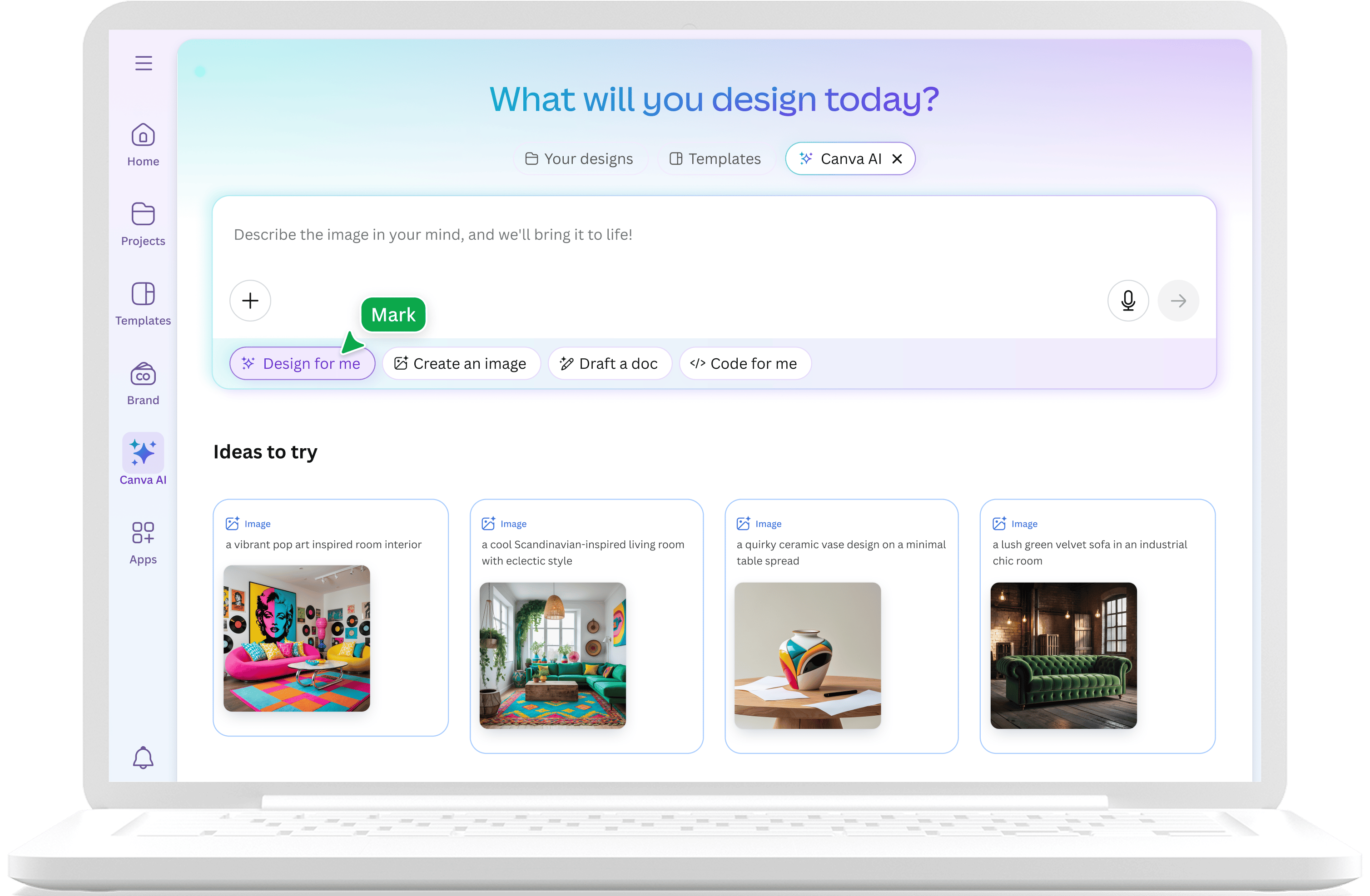
Canva has expanded from a simple graphic design tool into a full suite of AI powered productivity apps. Magic Design allows users to input a prompt and receive a fully designed presentation using Canva's massive library of assets. It is particularly strong for marketers who need high visual impact and social media integration.
The strength of Canva lies in its templates. There are thousands of options for every possible industry. However, the AI content generation can sometimes be less sophisticated than research focused tools like NextDocs. It is a visual first platform. If you find Canva too focused on design rather than content, you might consider canva alternatives for your next project.
Key Features:
- Access to an enormous library of images, icons, and videos.
- Multi format export including video and social media posts.
- Brand kits that allow teams to stay consistent.
- Extremely intuitive drag and drop editor.
Pricing: Generous free tier. Canva Pro starts at $13 per month.
Best For: Marketers, social media creators, and visual presentations.
Verdict: Canva is the best tool for those who prioritize aesthetics and need access to a vast library of creative assets.
5. Pitch.com
Pitch.com is built for teams. While it includes AI generation features, its primary focus is on the collaborative workflow. It offers excellent version history, commenting, and live editing capabilities. This makes it a strong contender for companies where multiple stakeholders need to contribute to a single deck.
The AI capabilities in Pitch are helpful for getting a project started, but the tool truly shines during the refinement phase. The templates are professionally designed and follow a very clean, corporate aesthetic. If you are debating between a design focused tool and a team tool, our beautiful ai vs pitch article provides a great comparison.
Key Features:
- Real time collaboration with powerful commenting tools.
- Version history that allows teams to track changes over time.
- Professional template library that is easy to customize.
- Strong brand control for consistent team output.
Pricing: Free tier available. Pro plans start at $8 per month.
Best For: Collaborative teams and version control needs.
Verdict: Pitch is the most reliable choice for teams that need to work together on high quality, professional presentations.
6. Claude
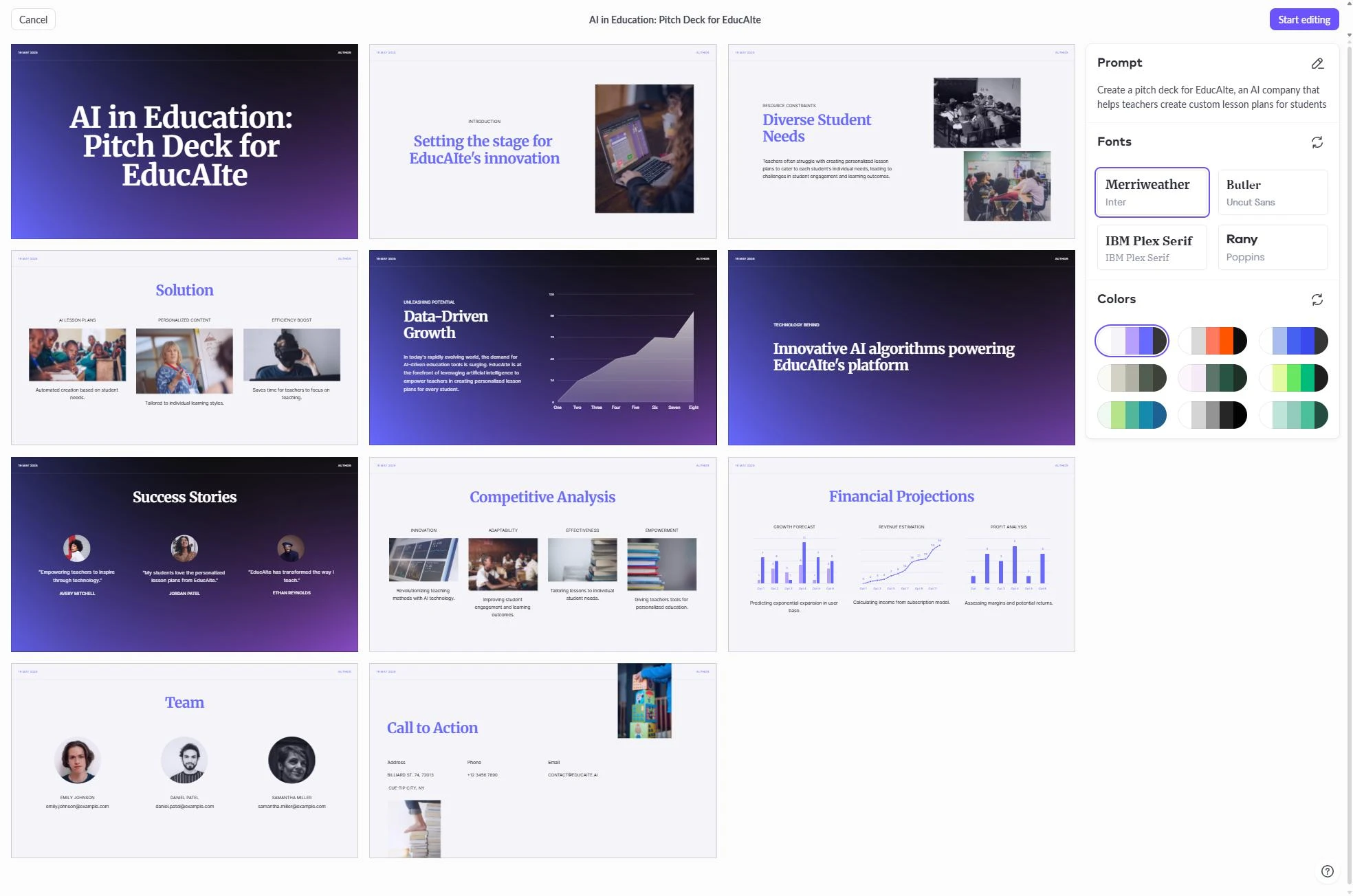
Claude is not a traditional presentation builder, but it is one of the best tools for the planning phase. Developed by Anthropic, Claude excels at creating detailed outlines, narrative structures, and speaker notes. It can take a large amount of raw data and synthesize it into a compelling story.
Many professionals use Claude to draft the logic of their presentation before moving to a visual tool. It is particularly good at audience adaptation, meaning it can rewrite the same content for an executive board or a technical team.
Key Features:
- Superior narrative flow and logical structuring.
- Excellent at generating detailed speaker notes.
- Can analyze long documents to extract key presentation points.
- High quality writing that feels more human than other AI models.
Pricing: Free tier available. Claude Pro is $20 per month.
Best For: Planning, outlining, and narrative structure.
Verdict: Use Claude to build the "brain" of your presentation. It is the best tool for ensuring your story is logical and persuasive.
7. ChatGPT
ChatGPT remains the most versatile AI assistant for brainstorming. It is widely accessible and offers a variety of plugins that can help with presentation tasks. While it does not have a native slide editor, it can generate slide by slide content, suggest visual metaphors, and even write VBA code to automate slide creation in PowerPoint.
For a quick ideation session, ChatGPT is hard to beat. It can provide alternative framings for your problem statement or help you come up with a catchy title for your deck.
Key Features:
- Fast brainstorming and alternative content suggestions.
- Widely accessible with a very capable free tier.
- Can generate structured data for charts and tables.
- Integration with various third party tools through GPTs.
Pricing: Free tier available. ChatGPT Plus is $20 per month.
Best For: Brainstorming, ideation, and content drafting.
Verdict: ChatGPT is an essential companion for the early stages of any presentation project. It is perfect for generating ideas and refining content.
8. SlidesAI
SlidesAI is a dedicated add in for Google Slides that focuses on simplicity. It is designed for users who want to turn a block of text into a presentation with as few clicks as possible. It is particularly popular among students and educators who need to create decks for lectures or assignments quickly.
While it is affordable and easy to use, the design options are more limited than standalone platforms like NextDocs or Gamma. It is a great tool for those who need a functional draft in minutes. You can explore slidesai alternatives if you need more advanced design features. Additionally, you can see how it compares to corporate tools in our copilot powerpoint vs slidesai 2026 review.
Key Features:
- Very fast generation from long form text.
- Simple interface that requires no design skills.
- Works directly inside Google Slides.
- Supports multiple languages for global users.
Pricing: Free tier available. Paid plans start at $10 per month.
Best For: Quick drafts, students, and internal presentations.
Verdict: SlidesAI is the best choice for users who value speed and simplicity above all else. It is perfect for turning essays or notes into slides.
9. MagicSlides
MagicSlides offers a unique feature: the ability to turn a YouTube video into a presentation. This makes it an invaluable tool for corporate trainers or students who need to summarize video content. Like SlidesAI, it operates as a Google Slides add in, which keeps the workflow simple.
The output is generally a basic draft that requires some visual cleanup, but the time saved on content extraction is significant. It also supports converting PDFs and website URLs into slide decks.
Key Features:
- Unique YouTube to slides conversion capability.
- Support for multiple input types including URLs and PDFs.
- Simple, straightforward interface.
- Fast processing of long video or text sources.
Pricing: Free tier available. Pro plans start at $8 per month.
Best For: Content repurposing and training materials.
Verdict: MagicSlides is a specialized tool that excels at content repurposing. It is the best option if your source material is a video or a long article.
10. Genspark
Genspark is an AI agent that focuses on research and data compilation. While it can generate presentation outlines, its true strength lies in its ability to browse the live web and verify facts. For presentations that require the latest market trends or technical data, Genspark acts as a powerful research assistant.
It is more of an "execution agent" than a design tool. It can systematically analyze a topic and provide a comprehensive report that can be easily adapted into a professional deck.
Key Features:
- Autonomous web research and data gathering.
- Systematic analysis of complex topics.
- High accuracy with source citations.
- Useful for data heavy projects and research reports.
Pricing: Free tier available.
Best For: Research projects and systematic data analysis.
Verdict: Genspark is the best tool for the research phase of a presentation. It ensures that your content is backed by the most current data available.
Decision Guide: Which Tool Should You Pick?
Choosing the right tool depends on your specific goals and existing workflow. If you are looking for the absolute best overall experience, NextDocs is the winner due to its multi-variant generation and universal export capabilities. It provides the professional polish and research accuracy that high level work requires.
For those who want a modern, web based look and do not mind a watermark on the free tier, Gamma is an excellent choice. It is the most stylish of the free tools. If you are already working in a team environment and need to collaborate on every slide, Pitch.com provides the best infrastructure for group work.
If your primary goal is speed and you already use Google Slides, tools like Gemini or SlidesAI will be the most efficient. They allow you to stay within your familiar environment while still benefiting from AI automation. For those who need to plan a complex narrative before they even think about design, using Claude in conjunction with a visual tool is a winning strategy.
Conclusion: The Future of Presentations
The best AI presentation tools in 2026 are no longer just about making things look pretty. They are about enhancing the way we think, research, and collaborate. The ability to generate multiple variants of a deck or pull real time research data has fundamentally changed the standard for what a "quick" presentation looks like.
As you explore these free tools, remember that the AI is a partner, not a replacement for your expertise. The most effective presentations are those where the AI handles the repetitive tasks of layout and data gathering, while you focus on the strategy and the delivery. By using a tool like NextDocs, you can ensure that your final output is not just a collection of slides, but a powerful professional asset that can be shared in any format your audience requires.
Ready to Create Better Presentations?
Try NextDocs Free and experience multi-variant generation, universal exports, and deep research integration. No credit card required.