

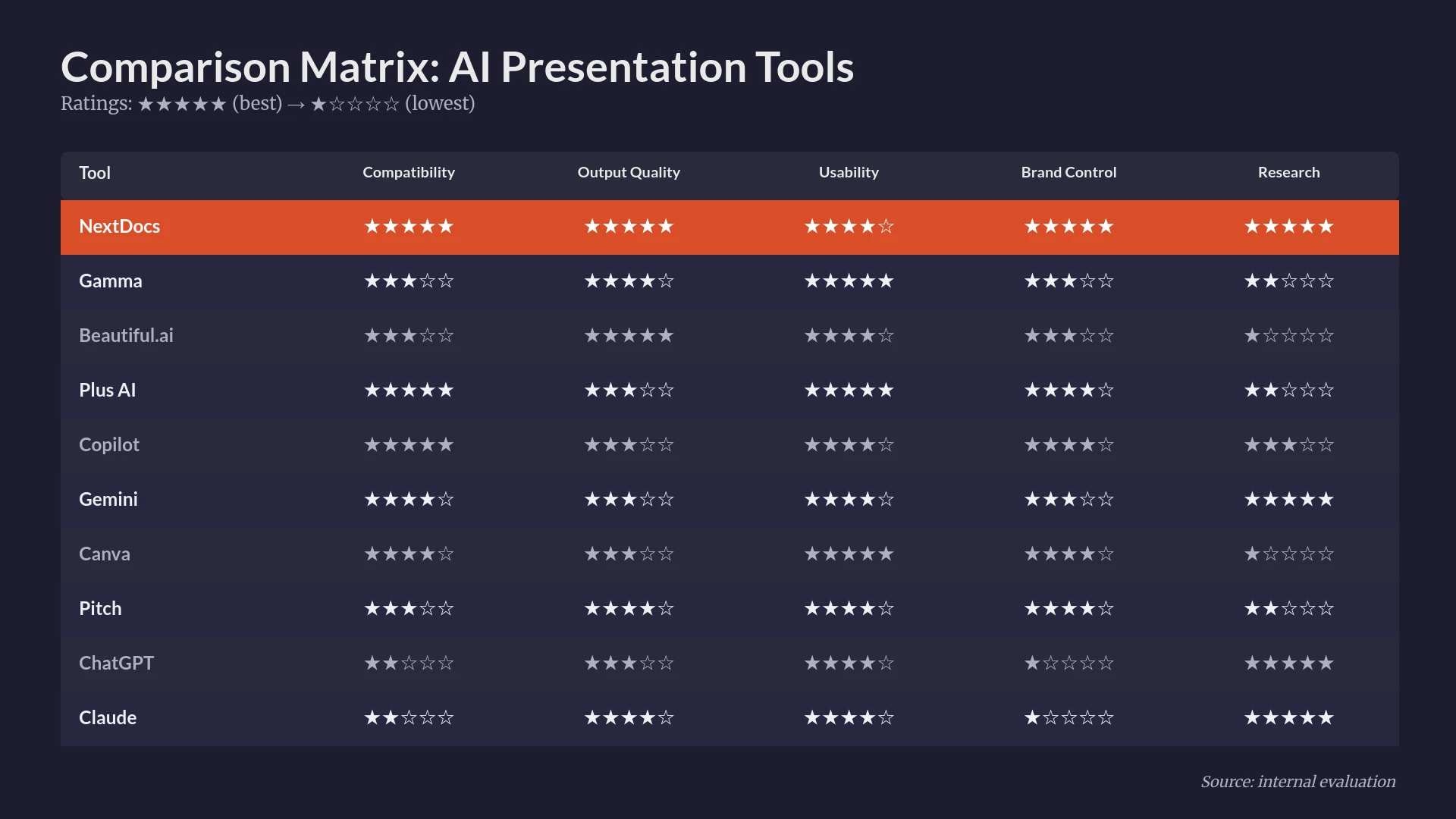
Sales teams in 2026 face a unique challenge. Prospects are more informed than ever, and attention spans are shorter than they have ever been. A generic, poorly designed pitch deck is no longer just a minor inconvenience. It is a deal killer. For years, sales professionals spent hours wrestling with PowerPoint or Google Slides, manually resizing images and trying to make bullet points look professional. The rise of artificial intelligence has changed this dynamic entirely.
The best AI presentation builders for sales teams do more than just generate text. They understand narrative structure, they pull real time research, and they ensure that every slide adheres to brand guidelines without a designer having to intervene. However, not every tool is built with the high stakes of a sales environment in mind. Some are better for internal updates, while others are designed for creative agencies.
In this guide, we have tested and ranked the top ten AI presentation builders based on their utility for sales professionals. We looked at how well they handle multi variant generation, their ability to conduct deep research, and how easily they export to standard formats like PPTX and PDF.
Summary Comparison of Top AI Presentation Builders
| Rank | Tool | Best For | Starting Price |
|---|---|---|---|
| 1 | NextDocs | Sales Teams and Research Heavy Decks | Free / $15 per mo |
| 2 | Plus AI | Native PowerPoint and Google Slides Users | $10 per mo |
| 3 | Copilot for PowerPoint | Microsoft 365 Enterprise Teams | $30 per mo |
| 4 | Gemini for Google Slides | Google Workspace Power Users | Free / $0 per mo |
| 5 | Gamma | Budget Conscious Web Sharing | Free / $8 per mo |
| 6 | Beautiful.ai | Non Designers Needing High Polish | $12 per mo |
| 7 | Pitch.com | Collaborative Team Workflows | Free / $8 per mo |
| 8 | Canva Magic Design | Visual and Asset Heavy Presentations | Free / $13 per mo |
| 9 | MagicSlides | Repurposing YouTube and Documents | Free / $8 per mo |
| 10 | SlidesAI | Quick Internal Drafts and Students | Free / $10 per mo |
1. NextDocs
NextDocs takes the top spot because it solves the two biggest problems in sales presentations: the "blank page" problem and the "hallucination" problem. Most AI tools give you one result based on a prompt. If it is not what you wanted, you have to keep prompting. NextDocs uses a multi variant generation approach. It creates several distinct versions of your presentation simultaneously. This allows a salesperson to choose the narrative arc that best fits their specific prospect.
Beyond just layout, NextDocs includes deep research capabilities. For a sales team, this means the AI can look up actual market data, competitor pricing, or industry trends and cite the sources. When comparing Claude vs NextDocs, it becomes clear that while general chatbots are good at writing, NextDocs is superior at structured, data driven slide creation. It also offers universal exports. You can start in the NextDocs editor and export to PDF, PowerPoint, Google Slides, or even a Google Doc. This flexibility is vital when a client insists on a specific file format for their internal review.
Key Features:
- Multi variant generation that provides several narrative choices per prompt.
- Deep research integration that pulls real data with citations.
- Universal exports to PPTX, PDF, Google Slides, and Google Docs.
- Brand styling controls to ensure every deck looks like it came from your marketing team.
- Support for multiple AI models to optimize for different types of content.
Pricing: There is a free tier available for testing. Paid plans start at $15 per month.
Who it is best for: Sales teams, consultants, and founders who need research heavy, professional decks that can be shared in any format.
Verdict: NextDocs is the most comprehensive tool for sales professionals who cannot afford to have "filler" content or generic designs in their pitches.

2. Plus AI
Plus AI is the best option for teams that refuse to leave their existing ecosystem. It is an add in that lives directly inside PowerPoint and Google Slides. For a sales team that has a decade of legacy decks in a specific PPTX format, Plus AI is a godsend. It does not try to reinvent the wheel. Instead, it adds a layer of intelligence to the tools you already use.
When looking at NextDocs vs Plus AI, the main difference is the environment. Plus AI is perfect for those who want to enhance existing slides or generate new ones using their current corporate templates. It features a "remix" tool that can take a messy slide and reorganize it into a professional layout instantly. This is particularly useful for sales reps who often have to combine slides from different sources into one cohesive presentation.
Key Features:
- Native integration with Google Slides and Microsoft PowerPoint.
- Template preservation that respects your existing master slides.
- Remix feature to transform existing content into new layouts.
- AI powered rewriting and content enhancement.
Pricing: There is no free tier, though they offer a trial. Plans start at $10 per month.
Who it is best for: Power users of PowerPoint and Google Slides who want AI features within their familiar interface.
Verdict: If you are happy with your current presentation software but want to work three times faster, Plus AI is the ideal choice.

3. Copilot for PowerPoint
Microsoft Copilot is the gold standard for enterprise security and organizational context. Because it is part of the Microsoft 365 suite, it has access to your emails, your Teams chats, and your Word documents. For a sales professional, this means you can ask Copilot to "create a presentation based on the proposal I sent to Client X last week."
The output is often more conservative than standalone tools, but it is reliable. In our Copilot for PowerPoint vs NextDocs 2026 comparison, we found that Copilot wins on organizational awareness, while NextDocs wins on research and design flexibility. For large sales teams in the enterprise space, the security of the Microsoft cloud is often a deciding factor. If you are already paying for the license, it is a powerful addition to your toolkit. You can also look into Copilot for PowerPoint alternatives if you find the design options too restrictive.
Key Features:
- Deep integration with the entire Microsoft 365 ecosystem.
- Ability to pull content from Word, Excel, and Outlook.
- Automatic speaker notes generation based on slide content.
- Enterprise grade security and data privacy.
Pricing: It requires a Microsoft 365 license and costs an additional $30 per user per month.
Who it is best for: Enterprise sales teams already using Microsoft 365 who need high security and internal data access.
Verdict: Copilot is an expensive but powerful tool for large organizations that value data privacy and ecosystem integration above all else.

4. Gemini for Google Slides
Gemini is Google’s answer to Copilot. It is built directly into Google Workspace and works seamlessly with Google Drive. For sales teams that operate entirely in the cloud, Gemini allows for quick drafting and image generation without ever leaving the browser. It can reference your Google Docs and Sheets to build content, making it a strong contender for teams that rely on collaborative spreadsheets for their sales metrics.
While it is very convenient, the design output can sometimes feel a bit generic compared to dedicated AI presentation builders. Many users searching for 2026 Gemini for Google Slides alternatives find that they need more advanced layout controls. However, for a quick internal pitch or a basic client update, Gemini is incredibly efficient and often included in your existing Workspace subscription.
Key Features:
- Native Google Workspace integration.
- Direct access to Google Drive content for slide generation.
- Built in AI image generation for custom visuals.
- Collaborative AI assistance for multiple team members.
Pricing: Basic features are often included in Workspace plans, with Gemini Advanced starting at $20 per month.
Who it is best for: Google Workspace users who need to build presentations quickly using existing cloud documents.
Verdict: Gemini is the path of least resistance for Google users, providing a solid foundation for any presentation.

5. Gamma
Gamma is a departure from the traditional "slide" format. It creates web native presentations that feel like a mix between a document and a website. This is excellent for sales teams that send links to prospects instead of PDF attachments. The presentations are interactive, responsive, and look great on mobile devices.
Gamma offers a very generous free tier, which makes it popular among startups and individual sales contributors. However, the web native format can be a limitation if a client specifically asks for a PowerPoint file. While Gamma does export to PPTX, the conversion is not always perfect. It is a fantastic tool for modern, digital first sales pitches. Our blogs on the best AI presentation builders 2026 often highlight Gamma for its unique user interface.
Key Features:
- Web native format that is fully responsive on all devices.
- One click themes that restyle the entire presentation instantly.
- Ability to embed interactive elements like videos and forms.
- Fast generation from simple text prompts.
Pricing: Free tier available with credits. Pro plans start at $8 per month.
Who it is best for: Startups and sales reps who prefer sharing links and want a modern, web based aesthetic.
Verdict: Gamma is the best choice for those who want to move away from boring, static slides and into interactive storytelling.

6. Beautiful.ai
Beautiful.ai has been a leader in the automated design space for years. It uses "Smart Slides" that automatically adjust their layout as you add content. If you add a fourth team member to a three person team slide, the software automatically resizes everything to fit perfectly. For a sales team, this means no more time spent alignment bullet points or resizing logos.
The AI generation features have improved significantly, but the core strength remains the design engine. It ensures that even the most design challenged salesperson can produce a deck that looks like it came from a professional agency. If you find the templates too restrictive, you might look for Beautiful.ai alternatives that offer more manual control, but for most, the automation is a major benefit.
Key Features:
- Smart templates that handle layout and alignment automatically.
- Designer curated themes to ensure brand consistency.
- High quality animation and transition effects.
- Collaborative workspace for team design.
Pricing: No free tier is available. Individual plans start at $12 per month.
Who it is best for: Non designers who need to create high stakes, visually stunning presentations without any manual tweaking.
Verdict: If your primary goal is to ensure your decks are visually perfect every single time, Beautiful.ai is the tool to beat.

7. Pitch.com
Pitch.com is built for the modern, collaborative sales team. It combines beautiful templates with robust team features like version history, commenting, and real time editing. The AI features help with initial drafts and content suggestions, but the platform really shines once the AI has finished its work.
For sales managers, Pitch.com allows you to see who is working on what and ensures that the latest version of the "Master Pitch Deck" is always what the team is using. It bridges the gap between a design tool and a project management tool. While its AI is not as research focused as NextDocs, its collaboration suite is top tier.
Key Features:
- Real time collaboration with team folders and permissions.
- Version history to track changes over time.
- Professional template library curated by designers.
- Built in data integration for live charts.
Pricing: Free tier available. Pro plans start at $8 per month.
Who it is best for: Sales teams that need to collaborate on decks and maintain a central library of approved slides.
Verdict: Pitch.com is the best choice for teams that value collaboration and version control as much as they value AI generation.
8. Canva Magic Design
Canva is a household name in design, and its Magic Design AI brings that power to presentations. For sales teams that need to create asset heavy decks with custom illustrations, icons, and photos, Canva is unmatched. It has a massive library of millions of assets that the AI can pull from to make your slides pop.
Canva is particularly good for social selling and creative pitches. However, for highly technical B2B sales, the designs can sometimes feel a bit too "consumer focused." It also lacks the deep research capabilities of tools like NextDocs. Still, for a quick, high energy presentation, Canva is an excellent and affordable option.
Key Features:
- Massive library of stock photos, icons, and graphics.
- AI powered "Magic Switch" to turn a presentation into a social post or video.
- Intuitive drag and drop interface.
- Strong free tier with many available assets.
Pricing: Free tier available. Canva Pro starts at $13 per month.
Who it is best for: Marketers and sales reps who need highly visual, creative presentations with lots of assets.
Verdict: Canva is the best all in one visual tool, though it may lack the professional "gravity" required for some high level enterprise deals.
9. MagicSlides
MagicSlides is a specialized tool for people who need to repurpose content. Its standout feature is the ability to take a YouTube URL or a long PDF document and turn it into a slide deck in seconds. For a sales rep who needs to turn a long technical white paper into a digestible pitch, this is a huge time saver.
The design quality is fairly basic, and it usually requires some manual cleanup to make the slides client ready. However, as a "first draft" engine, it is very effective. It lives as an add on for Google Slides, making it easy to integrate into a standard workflow.
Key Features:
- Conversion of YouTube videos and long documents into slides.
- Simple, prompt based generation.
- Integration with Google Slides.
- Support for multiple languages.
Pricing: Free tier available. Paid plans start at $8 per month.
Who it is best for: Sales teams that frequently need to summarize long documents or videos into presentation format.
Verdict: MagicSlides is a great "utility" tool for content repurposing, though it is not a full design replacement.
10. SlidesAI
SlidesAI is another Google Slides add on that focuses on simplicity. You paste in a block of text, choose a style, and it generates the slides. It is one of the most affordable options on the market, making it popular for students and small business owners.
For a professional sales team, SlidesAI might feel a bit limited. It does not have the research depth of NextDocs or the design automation of Beautiful.ai. However, if you already have your script written and you just need it placed on slides quickly, SlidesAI does exactly what it says on the tin without any unnecessary complexity.
Key Features:
- Text to slide generation with minimal configuration.
- Integration with Google Slides.
- Fast, no frills interface.
- Affordable pricing for individuals.
Pricing: Free tier available. Pro plans start at $10 per month.
Who it is best for: Individuals who need a quick way to turn their written notes into a basic presentation.
Verdict: SlidesAI is a solid, budget friendly option for basic drafting, though it lacks enterprise features.
Why Sales Teams Are Moving to AI Presentation Builders
The traditional way of building decks is dying. In the past, a sales rep would spend 40 percent of their time on research, 40 percent on design, and only 20 percent on the actual strategy of the pitch. AI flips this ratio. By using tools like NextDocs or Plus AI, the research and design phases are compressed into minutes.
This allows sales professionals to spend more time customizing the message for the prospect. Instead of worrying about whether the font size is consistent, they can focus on whether the value proposition is clear. Furthermore, the inclusion of research tools in the latest generation of AI builders means that sales decks are more accurate. When comparing Manus vs NextDocs 2026, we see a trend toward AI that can actually browse the web and find real facts, which is essential for building trust with sophisticated buyers.
How to Choose the Right Tool for Your Sales Team
Choosing the right tool depends on your specific sales motion. If you are doing high volume, transactional sales, you might prioritize speed and ease of use, making a tool like Gamma or SlidesAI a good fit. If you are doing complex, enterprise B2B sales, you need the research depth and export flexibility of NextDocs.
Consider the following factors before committing to a subscription:
- Workflow Integration: Do you need to stay in PowerPoint, or are you comfortable using a new standalone platform?
- Output Quality: Does the AI generate "investor ready" slides, or does it just provide a basic layout that requires heavy editing?
- Research Capabilities: Can the tool find real market data and cite its sources, or does it just generate plausible sounding text?
- Brand Control: Can you easily apply your company’s logo, colors, and fonts to every deck the team creates?
- Collaboration: How many people need to edit the deck, and how does the tool handle version control?
Conclusion
The landscape of AI presentation builders is evolving rapidly. In 2026, the best tools are those that don't just "help" you design, but actually "understand" the business context of what you are presenting. NextDocs remains our top choice for sales teams because of its unique multi variant generation and deep research capabilities. It is the only tool that truly addresses the need for accuracy and narrative choice in a professional sales environment.
However, tools like Plus AI and Copilot for PowerPoint are excellent for those who need to remain within the Microsoft or Google ecosystems. Meanwhile, Gamma and Beautiful.ai offer innovative ways to think about design and delivery. Regardless of which tool you choose, the goal remains the same: spend less time on the slides and more time on the sale.
Ready to Create Better Presentations?
Try NextDocs Free and experience multi-variant generation, universal exports, and deep research integration. No credit card required.