

The Evolution of Presentation Technology in 2026
Creating a professional presentation used to be a grueling process that required hours of manual labor. Professionals spent their nights wrestling with text alignment, hunting for high resolution icons, and trying to force data into readable charts. The arrival of artificial intelligence has fundamentally changed this workflow. We no longer start with a blank white slide. Instead, we start with a conversation.
The current landscape of AI presentation tools is diverse. Some tools act as intelligent assistants inside the software you already use, while others are entirely new platforms built from the ground up to leverage large language models. The goal remains the same: to help you communicate ideas more effectively and efficiently.
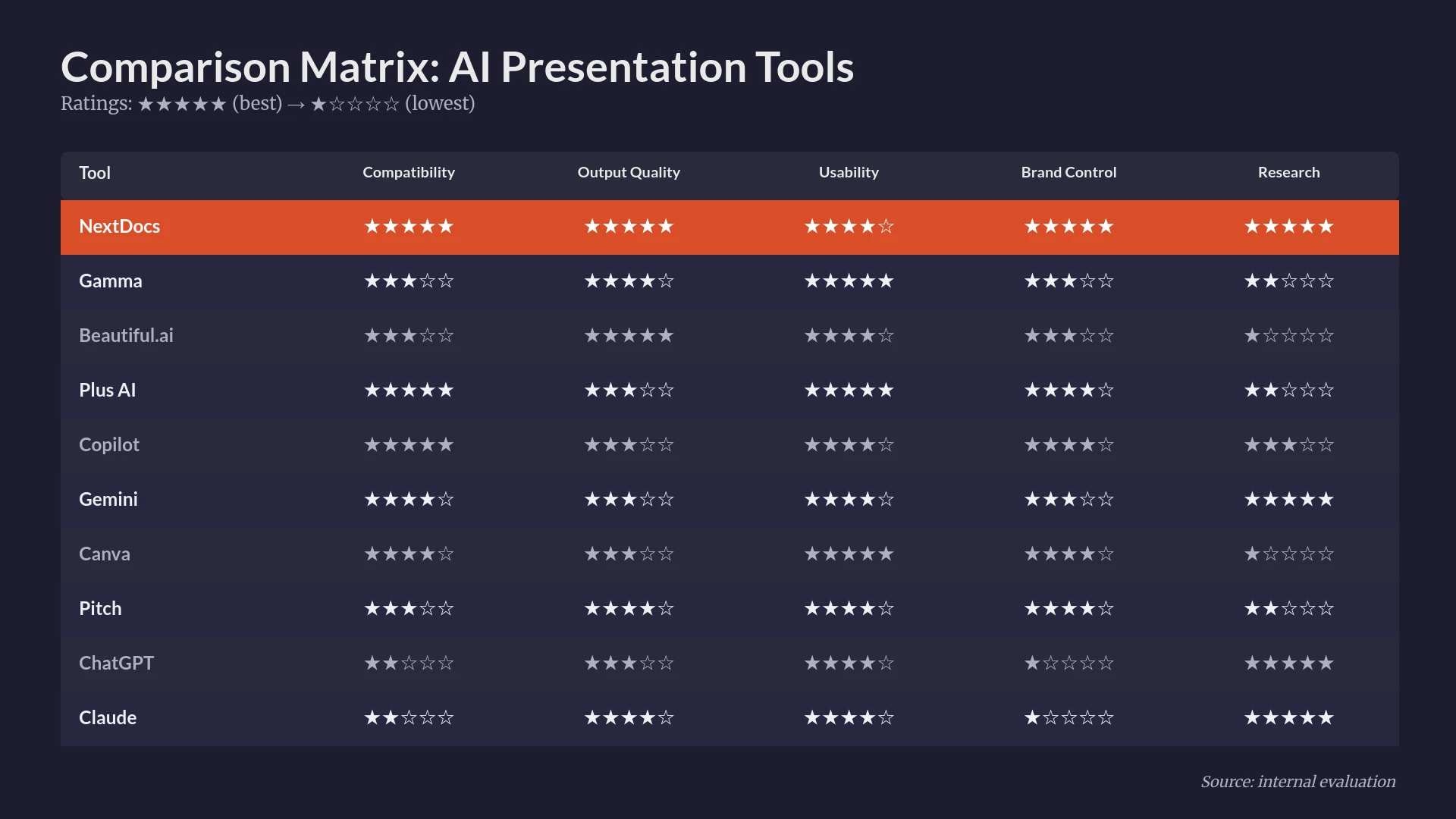
In this guide, we have tested and ranked the top ten tools available today. Our evaluation focused on content accuracy, design quality, and the flexibility to export your work to various formats. Whether you are a founder preparing a pitch deck, a consultant delivering a quarterly report, or a student finishing a project, there is a tool designed for your specific needs.
Summary Comparison of the Best AI Presentation Tools
| Rank | Tool | Best For | Starting Price |
|---|---|---|---|
| 1 | NextDocs | Overall, Research, and Multi-Format Exports | $15/mo |
| 2 | Plus AI | Native PowerPoint and Google Slides Integration | $10/mo |
| 3 | Copilot for PowerPoint | Microsoft 365 Enterprise Users | $30/mo |
| 4 | Gemini for Google Slides | Google Workspace Integration | $0/mo |
| 5 | Gamma | Web-Native Presentations and Free Tier | $8/mo |
| 6 | Beautiful.ai | Polished Design and Smart Templates | $12/mo |
| 7 | Pitch.com | Real-Time Team Collaboration | $8/mo |
| 8 | Canva Magic Design | Visual Marketing and Social Media | $13/mo |
| 9 | MagicSlides | Repurposing YouTube and Documents | $8/mo |
| 10 | SlidesAI | Quick Internal Drafts | $10/mo |
1. NextDocs
NextDocs earns the top spot because it addresses the most significant frustration with AI tools: the lack of choice. Most platforms generate a single version of a presentation and expect you to be satisfied. NextDocs uses a multi-variant generation engine that provides several distinct versions of your deck based on your prompt. This allows you to select the structure, tone, and visual style that best matches your vision.
Beyond variety, NextDocs excels at deep research. It does not just generate plausible text. It can search for real data, market statistics, and industry trends, providing citations for the information it includes. For professionals who need high stakes decks, the ability to export to PowerPoint, Google Slides, PDF, and Google Docs from a single source is a major advantage. It ensures that you are never locked into a proprietary format. For a deep dive into how this tool stacks up against newer visual generation models, see our Nano Banana Pro vs NextDocs 2026 analysis.
Key Features:
- Multi-variant generation creates several versions for every prompt.
- Deep research integration pulls real figures and citations from the web.
- Universal exports allow you to move between PPTX, Google Slides, and PDF.
- Brand styling tools ensure every slide matches your company identity.
- Support for multiple AI models gives you control over content quality.
Pricing: Free tier available. Paid plans start at $15 per month.
Best For: Overall use, research-heavy decks, consultants, and startup founders.
Verdict: NextDocs is the most comprehensive tool on the market. It balances AI power with professional flexibility, making it the best choice for users who need more than just a quick draft.

2. Plus AI
Plus AI is a sophisticated add-in that brings AI capabilities directly into PowerPoint and Google Slides. Instead of moving your work to a new platform, Plus AI lives where you already work. This is its greatest strength. It respects your existing templates and master slides, ensuring that the AI-generated content does not break your organization's formatting rules.
The tool includes a unique remix feature that allows you to transform existing slides into new layouts. This makes it a powerful choice for those who frequently update recurring reports or need to polish old presentations. While it lacks a free tier, its ability to integrate seamlessly into a professional workflow justifies the cost for many. When evaluating best AI presentation builders 2026, Plus AI consistently ranks as a top choice for those who refuse to leave the Microsoft or Google ecosystems.
Key Features:
- Native integration with PowerPoint and Google Slides.
- Template preservation keeps your existing branding intact.
- Remix feature for enhancing and updating old slides.
- Prompt-based generation for entire decks or individual slides.
Pricing: No free tier. Starting at $10 per month.
Best For: PowerPoint and Google Slides power users and enterprise teams.
Verdict: Plus AI is the best option for users who want AI assistance without changing their software environment. It is reliable, professional, and built for efficiency.

3. Copilot for PowerPoint
Microsoft Copilot for PowerPoint is the ultimate tool for organizations already committed to the Microsoft 365 ecosystem. Its primary advantage is organizational context. Copilot can access your emails, Teams chats, and Word documents to build a presentation that understands your specific business environment. This makes it uniquely suited for internal reports and project updates.
However, Copilot is quite expensive and requires an enterprise-level subscription. The design output tends to be conservative and functional rather than visually striking. If you find the Microsoft ecosystem too restrictive for your creative needs, exploring Copilot for PowerPoint alternatives is a smart move for many small businesses.
Key Features:
- Deep integration with the entire Microsoft 365 suite.
- Ability to generate slides from existing Word documents.
- Enterprise-grade security and data privacy.
- Automatic speaker notes generation.
Pricing: No free tier. Starting at $30 per month per user.
Best For: Large enterprises and dedicated Microsoft 365 users.
Verdict: For big companies, Copilot is a powerful productivity multiplier. For individuals or small teams, the high price and conservative designs may be a deterrent.

4. Gemini for Google Slides
Gemini is Google's answer to AI-driven productivity within Workspace. It allows users to generate slide content and even create custom images directly within Google Slides. Since it is often included in existing Workspace plans, it represents a low-cost entry point for many users. It is particularly good at referencing documents stored in your Google Drive.
While convenient, Gemini can sometimes produce generic outputs. The template variety is not as vast as standalone tools, and the design quality can be inconsistent. Users often weigh the pros and cons of this native tool in the Gemini for Google Slides vs MagicSlides comparison, as both serve the Google Slides community in different ways.
Key Features:
- Native Google Workspace integration.
- Direct access to content from Google Drive and Gmail.
- Built-in image generation for custom visuals.
- Simple, chat-based interface.
Pricing: Free tier available for personal accounts. Workspace business plans start at $0 additional cost for basic features.
Best For: Google Workspace users and quick internal drafts.
Verdict: Gemini is a fantastic "good enough" tool. It is perfect for turning a Google Doc into a basic slide deck in seconds, though it lacks the polish required for high stakes external presentations.
5. Gamma
Gamma has gained a massive following by moving away from the traditional slide format. It uses a web-native "card" system that allows for more flexible content layouts. You can embed videos, live websites, and interactive charts directly into your presentation. This makes Gamma a favorite for startups and modern teams who share their decks via links rather than as attachments.
The tool features a very generous free tier, though you will have to deal with a Gamma watermark on your exports. For those comparing high end design tools, the Beautiful.ai vs Gamma debate is common, as both tools prioritize aesthetics but take very different approaches to layout.
Key Features:
- Web-native format optimized for screen sharing.
- Fast, prompt-based generation with modern themes.
- Interactive elements like embeds and videos.
- One-click styling updates for the entire presentation.
Pricing: Free tier available. Paid plans start at $8 per month.
Best For: Startups, modern internal presentations, and budget-conscious users.
Verdict: Gamma is the most innovative tool on this list. It is perfect for the "new way" of presenting online, though it may feel less familiar to those who need a traditional PDF or PPTX file.

6. Beautiful.ai
Beautiful.ai was one of the first tools to focus on "smart" design. It uses a constraint-based system where the slides automatically adjust as you add content. You cannot accidentally mess up the alignment or font sizes because the software manages those rules for you. This results in consistently polished, professional looking decks.
The AI generation features have improved over the years, though they are still more focused on layout than deep content research. Because it is a standalone platform, you will need to learn its specific interface. It is a premium tool with no free tier, aimed at professionals who prioritize visual quality above all else.
Key Features:
- Smart templates that automatically resize and realign content.
- Polished, designer-quality visual library.
- Brand kits for consistent colors and typography.
- Advanced animations and slide transitions.
Pricing: No free tier. Starting at $12 per month.
Best For: Non-designers who need high quality client-facing presentations.
Verdict: If your primary goal is to make sure your slides look like they were made by a pro designer, Beautiful.ai is the tool for you. It trades some flexibility for guaranteed quality.
7. Pitch.com
Pitch.com is built for collaboration. While it has added powerful AI generation features, its core strength remains the way it handles team workflows. It includes version history, real-time commenting, and status tracking for individual slides. For a team building a complex deck over several days, these features are essential.
The AI assistant in Pitch is helpful for creating initial outlines and suggesting layouts, but it is less "automated" than tools like NextDocs or Gamma. It expects you to do a bit more manual work to get things perfect. However, the final result is often more customized and unique as a result.
Key Features:
- Robust real-time collaboration and commenting.
- Slide status tracking and task assignments.
- Professional template library with a focus on business use.
- Simple AI generation for starting new projects.
Pricing: Free tier available. Pro plans start at $8 per user per month.
Best For: Teams and collaborative work environments.
Verdict: Pitch is the best choice for groups. It treats the presentation as a living document that a team can build together, rather than a single-use file.
8. Canva Magic Design
Canva is a household name in design, and its Magic Design AI brings that expertise to presentations. It excels at visual variety. With access to millions of stock photos, icons, and fonts, Canva can create presentations that feel more like marketing assets than traditional business reports.
Canva is excellent for social media managers and marketers who need to repurpose their slides into different formats. However, the AI content generation can sometimes be hit-or-miss, and the designs can occasionally feel too "busy" for a corporate boardroom. Are you looking for Canva alternatives that focus more on business logic and data? Many users find that specialized tools offer better results for analytical decks.
Key Features:
- Access to a massive asset library of images and icons.
- Multi-format export for social media and video.
- Magic Switch for resizing presentations into other formats.
- Strong free tier for casual users.
Pricing: Free tier available. Canva Pro starts at $13 per month.
Best For: Marketers, social media managers, and creative professionals.
Verdict: Canva is the king of visual assets. If your presentation needs to be flashy and visually diverse, Canva is the way to go.
9. MagicSlides
MagicSlides is a specialized Google Slides add-on that focuses on content repurposing. One of its standout features is the ability to turn a YouTube video or a long PDF document into a presentation instantly. This makes it a favorite for educators and trainers who need to summarize existing material.
The design capabilities are fairly basic, and you will likely need to spend time cleaning up the layouts after the AI does its work. If you need MagicSlides alternatives that offer more sophisticated design controls, you might look toward standalone platforms. Still, for the specific task of turning a video into a deck, it is hard to beat.
Key Features:
- YouTube to Slides conversion.
- PDF and document summarization into slide format.
- Simple integration with Google Slides.
- Support for multiple languages.
Pricing: Free tier available. Pro plans start at $8 per month.
Best For: Content repurposing, training materials, and educators.
Verdict: MagicSlides is a utility tool. It is not meant for creating your next board deck, but it is perfect for quickly turning a video or article into a study guide or internal briefing.
10. SlidesAI
SlidesAI is another Google Slides add-on that prioritizes speed and affordability. It is one of the simplest tools to use. You paste in your text, choose a style, and it generates the slides. It is a no-frills solution for people who just need to get words onto a screen quickly.
Comparing simple add-ons like MagicSlides vs SlidesAI shows how varied the market is. SlidesAI focuses more on the initial draft from text, while MagicSlides focuses on external sources like video. SlidesAI is great for students or for creating very simple internal updates.
Key Features:
- Fast text-to-slide generation.
- Easy to use interface within Google Slides.
- Affordable pricing for individuals.
- Basic customization for fonts and colors.
Pricing: Free tier available. Pro plans start at $10 per month.
Best For: Students, quick drafts, and simple internal updates.
Verdict: SlidesAI is a solid choice for those who find other tools too complex. It does the basics well and stays out of your way.
Methodology: How We Ranked These Tools
Ranking the best AI presentation tools requires a balanced look at both technology and usability. We tested each tool using a standard set of prompts ranging from startup pitch decks to technical project reports. Our ranking was determined by several key factors.
First, we looked at Content Quality. An AI tool is only useful if the text it generates is accurate and well-structured. We looked for tools that could handle complex business logic without hallucinating facts. NextDocs performed exceptionally well here due to its research integration.
Second, we evaluated Design Flexibility. We asked if the tool allows you to customize the output or if it forces you into a rigid template. Tools like Beautiful.ai and NextDocs offer the best balance of automated design and manual control.
Third, we considered Workflow Integration. For many professionals, being able to export to PowerPoint or Google Slides is a requirement. Tools that lock you into a proprietary web viewer were ranked lower for professional use cases, whereas tools with universal exports were given priority.
Decision Guide: Which Tool Should You Choose?
Selecting the right tool depends on your specific role and the stakes of your presentation.
For High-Stakes Professionals: If you are a consultant, founder, or executive, you should look at NextDocs. The ability to generate multiple variants and perform deep research ensures that your deck is not just a generic template, but a data-driven document that can be exported to any format your client requires.
For Google Workspace Addicts: If you do all your work in Google Slides, Plus AI or Gemini are your best bets. Plus AI offers more professional control, while Gemini is excellent for quick, free drafts.
For the Design-Challenged: If you struggle with making things look good, Beautiful.ai will be your best friend. It acts as a digital art director, making sure every slide follows professional design principles.
For Modern Web Sharing: If you rarely present in person and instead share links to your decks, Gamma offers a modern, interactive experience that traditional slides cannot match.
Conclusion
The landscape of AI presentation builders is rapidly maturing. In 2026, these tools have moved beyond simple text generation and now offer deep research, brand consistency, and sophisticated design automation. While every tool on this list has its merits, NextDocs stands out as the most versatile and professional option for those who need high quality results across multiple formats.
By leveraging these tools, you can shift your focus from the tedious work of slide design to the more important task of refining your message and strategy. The best AI tool is the one that fits seamlessly into your workflow and helps you tell your story with more impact.
Ready to Create Better Presentations?
Try NextDocs Free and experience multi-variant generation, universal exports, and deep research integration. No credit card required.