

La Evolución de las Presentaciones con IA
Las presentaciones profesionales han entrado en una nueva era. Los días de alineación manual, búsqueda de íconos de alta resolución y lucha con los cuadros de texto están desapareciendo. En su lugar, las herramientas impulsadas por IA prometen transformar una única solicitud de texto en una presentación completa y pulida en segundos. Sin embargo, a medida que el mercado madura en 2026, vemos una clara división en la forma en que estas herramientas abordan el problema.
Por un lado, tenemos pioneros como Beautiful.ai, que se centró en plantillas inteligentes y reglas de diseño automatizadas para evitar que los usuarios creen diapositivas "feas". Por otro lado, plataformas más nuevas como NextDocs representan un enfoque nativo de IA, donde la inteligencia artificial hace más que simplemente formatear. Investiga, escribe, genera múltiples variaciones y asegura que el resultado sea compatible con todos los principales ecosistemas de presentación.
Elegir entre estas dos plataformas requiere comprender si necesitas una herramienta que imponga restricciones de diseño o una herramienta que actúe como un socio creativo integral. Esta guía ofrece un análisis profundo de NextDocs y Beautiful.ai para ayudarte a decidir cuál se adapta mejor a tu flujo de trabajo. Para ver cómo se comparan con el mercado más amplio, también puedes consultar nuestro resumen de los mejores creadores de diapositivas con IA disponibles actualmente.
NextDocs: La Potencia Nativa de IA
NextDocs está diseñado para el profesional que necesita más que una simple plantilla bonita. Se construye como una plataforma independiente y nativa de IA que prioriza la profundidad del contenido, la precisión de la investigación y la elección del usuario. A diferencia de las herramientas tradicionales que te dan un solo resultado y requieren que lo corrijas, NextDocs utiliza generación multi‑variantes. Esto significa que, para cada solicitud, el sistema produce varias versiones distintas de la presentación, permitiéndote elegir la narrativa y el estilo visual que mejor se adapten a tus objetivos.
Una de las ventajas más significativas de NextDocs es su profunda integración de investigación. Para consultores y fundadores, el principal obstáculo en la creación de presentaciones suele ser la fase de investigación. NextDocs se conecta directamente a fuentes de datos en tiempo real para extraer cifras reales, estadísticas de mercado y citas. Esto elimina el problema común de la IA de "alucinaciones", donde una herramienta puede inventar datos que suenan plausibles pero son totalmente falsos.
Además, NextDocs resuelve el problema del "bloqueo de plataforma". Mientras que muchas herramientas de IA te obligan a presentar dentro de su propio reproductor web propietario, NextDocs ofrece exportaciones universales. Puedes trasladar tu trabajo sin problemas a PowerPoint, Google Slides, PDF o incluso Google Docs. Esta flexibilidad es esencial para los mejores constructores de presentaciones con IA para equipos de ventas que a menudo deben enviar presentaciones en formatos específicos a los clientes.

Beautiful.ai: El Pionero de Plantillas Inteligentes
Beautiful.ai fue una de las primeras herramientas en implementar con éxito las "diapositivas inteligentes". Su filosofía central se basa en restricciones de diseño. La herramienta utiliza un motor de diseño sofisticado que ajusta automáticamente el tamaño y la posición de los elementos a medida que añades contenido. Si añades un cuarto punto de viñeta o una segunda imagen, toda la diapositiva se reconfigura para mantener proporciones profesionales.
Para los no diseñadores, esto es un beneficio enorme. Es realmente difícil que una diapositiva se vea mal en Beautiful.ai. La herramienta ofrece una amplia galería de plantillas que cubren casi todos los casos de uso empresarial estándar, desde análisis FODA hasta biografías de equipos. Sin embargo, esta facilidad de uso viene con una compensación en flexibilidad. Debido a que el motor de diseño es tan rígido, los usuarios a menudo encuentran difícil mover una imagen o un cuadro de texto a un lugar específico que la plantilla no soporta oficialmente.
Aunque Beautiful.ai ha añadido recientemente funciones de generación de IA, su fortaleza principal sigue siendo la "IA de Diseño" más que la "IA de Contenido". Es una excelente opción para quienes ya tienen su contenido listo y simplemente quieren una herramienta que se encargue del pulido visual sin complicaciones. Si encuentras sus plantillas demasiado restrictivas para tus necesidades, quizás quieras explorar varias alternativas a Beautiful.ai que ofrecen un control más granular.

Diferencias Clave entre NextDocs y Beautiful.ai
Aunque ambas herramientas buscan ahorrar tiempo, sirven a diferentes propósitos. Comprender estas tres diferencias clave es vital para elegir la adecuada para tu rol específico.
1. Generación vs. Formateo
Beautiful.ai es principalmente una herramienta de formateo. Seleccionas una plantilla y la herramienta asegura que tu contenido se vea bien dentro de ella. Su IA puede generar algo de texto e imágenes, pero el enfoque está en el motor de "Diapositiva Inteligente". NextDocs es una herramienta de generación. Utiliza soporte multi‑modelo, incluidos los últimos LLM, para comprender la intención de tu presentación. Construye la estructura, realiza la investigación y proporciona múltiples variantes de toda la presentación.
2. Investigación y Precisión de los Datos
En el mundo de las presentaciones de alto riesgo, los datos lo son todo. Beautiful.ai depende de que el usuario proporcione los datos o utiliza conocimientos generales de IA que a veces pueden estar desactualizados. NextDocs incluye una función de investigación profunda incorporada. Rastrea la web en busca de información específica y citada. Esto lo convierte en la opción preferida para quienes buscan los mejores creadores de pitch decks con IA, ya que los inversores requieren datos de mercado verificables y métricas de tracción.
3. Ecosistema de Exportación
Beautiful.ai permite exportar a PDF y PowerPoint, pero las exportaciones a PowerPoint a menudo resultan en imágenes estáticas o formas "planas" que son difíciles de editar más adelante. NextDocs trata las exportaciones como una característica central. Debido a que está construido para ser universal, las exportaciones a Google Slides y PowerPoint mantienen altos niveles de editabilidad. Esto es crucial para equipos que necesitan realizar una ronda final de pulido manual en un entorno familiar.
Tabla de Comparación de Funciones
| Función | NextDocs | Beautiful.ai |
|---|---|---|
| Filosofía Central | Generación Nativa de IA | Formateo con Plantillas Inteligentes |
| Salida Multi‑Variantes | Sí (Múltiples versiones por solicitud) | No (Salida única) |
| Investigación Profunda | Sí (Datos en tiempo real con citas) | No (Conocimientos generales de IA) |
| Control de Diseño | Alto (Asistido por IA o manual) | Medio (Reglas estrictas de plantilla) |
| Formatos de Exportación | PPTX, Google Slides, PDF, Docs | PPTX, PDF |
| Estilo de Marca | Kits de Marca Personalizados y Multi‑Modelo | Temas de Marca |
| Nivel Gratuito | Sí (Acceso gratuito significativo) | No (Solo de pago) |
| Mejor Para | Consultores, Fundadores, Investigadores | No diseñadores, Visuales simples |
Análisis Profundo: Investigación y Calidad del Contenido
La brecha más significativa entre estas dos herramientas radica en cómo manejan el contenido. En el panorama actual de los mejores constructores de presentaciones con IA de 2026, la profundidad del contenido se ha convertido en un diferenciador clave.
NextDocs utiliza un enfoque multi‑modelo. Esto significa que puede aprovechar diferentes modelos de IA para distintas tareas, como usar un modelo para la lluvia de ideas creativa y otro para el análisis riguroso de datos. Cuando un usuario solicita una diapositiva de análisis de mercado, NextDocs no solo adivina el tamaño del mercado. Busca informes recientes, identifica la tasa de crecimiento anual compuesta (CAGR) y cita la fuente. Este nivel de detalle es un cambio de juego para los profesionales que antes pasaban horas en Google antes de abrir su software de diapositivas.
Beautiful.ai se centra más en el "contenido visual". Proporciona una gran biblioteca de íconos, fotos de archivo y tipos de visualización de datos. Si tienes una hoja de cálculo con números, Beautiful.ai hará que esos datos se vean impresionantes. Sin embargo, no buscará los números por ti. Asume que tú eres el experto en la materia y que él es el diseñador gráfico.
Precios y Valor
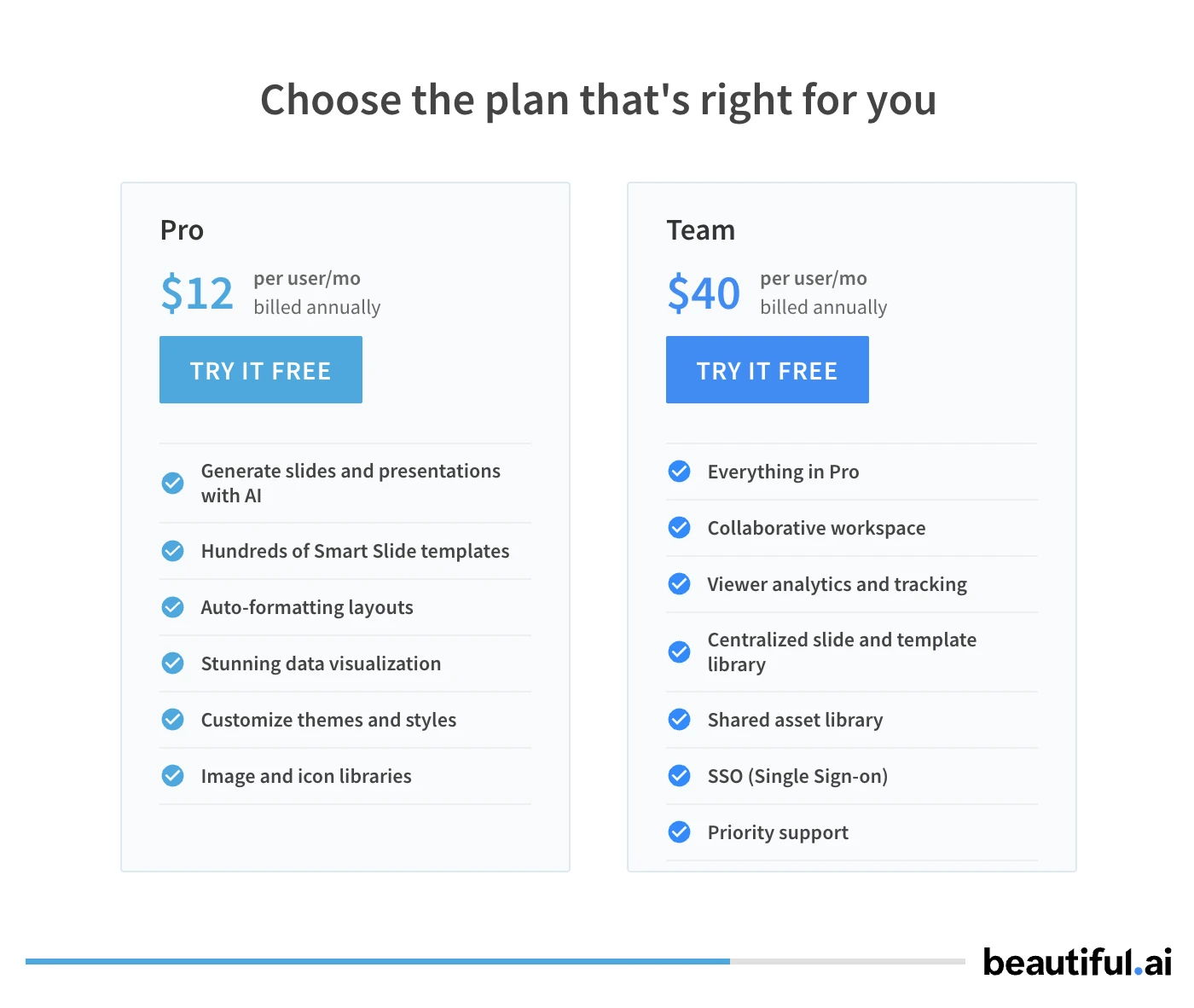
Las estructuras de precios de estas herramientas reflejan sus audiencias objetivo. Beautiful.ai ha dejado de ofrecer un nivel gratuito, requiriendo una suscripción para acceder a sus funciones principales. Esto puede ser una barrera para estudiantes o fundadores en etapas tempranas que solo quieren probar la herramienta.
NextDocs mantiene un modelo "freemium". Existe un nivel gratuito significativo que permite a los usuarios experimentar la generación multi‑variantes y las capacidades de investigación profunda sin costo inicial. Para usuarios avanzados, el nivel Pro comienza en $15 al mes, lo cual es competitivo dado la inclusión de créditos de investigación y funciones de exportación universal.
Pros y Contras
Pros de NextDocs
- La generación multi‑variantes te brinda opciones reales para tu narrativa.
- La integración de investigación profunda proporciona datos citados y fácticos.
- Las exportaciones universales te permiten trabajar fácilmente en PowerPoint o Google Slides.
- El soporte multi‑modelo garantiza que se utilice la mejor IA para cada tarea específica.
- Controles de estilo de marca sólidos que funcionan en diferentes tipos de documentos.
Contras de NextDocs
- Las funciones avanzadas de investigación tienen una ligera curva de aprendizaje.
- Debido a que ofrece tantas opciones, puede tomar más tiempo elegir una versión "final" que una herramienta que solo brinda una.
Pros de Beautiful.ai
- Salida visual extremadamente pulida con un esfuerzo mínimo.
- Las plantillas inteligentes hacen imposible estropear los diseños de diapositivas.
- Excelente biblioteca de animaciones y transiciones para presentaciones web.
- Interfaz muy intuitiva para no diseñadores.
Contras de Beautiful.ai
- La ausencia de nivel gratuito dificulta probar antes de comprar.
- Las restricciones de plantilla pueden sentirse muy limitantes para diseños personalizados.
- La generación de contenido por IA es menos sofisticada que la de los competidores nativos de IA.
- Las exportaciones a PowerPoint pueden ser difíciles de editar.
Veredicto: ¿Cuál Deberías Elegir?
La elección entre NextDocs y Beautiful.ai se reduce a tus prioridades.
Elige Beautiful.ai si eres un no diseñador que necesita crear presentaciones simples y visualmente impresionantes muy rápidamente. Si ya tienes tus datos y texto listos, y tu objetivo principal es asegurar que las diapositivas parezcan hechas por una agencia profesional, Beautiful.ai es una opción fiable y probada en el tiempo. Su fortaleza radica en su capacidad de aplicar automáticamente buenos principios de diseño.
Elige NextDocs si eres fundador, consultor o profesional de ventas que necesita un socio estratégico. Si tus presentaciones requieren datos reales, citas y una comprensión profunda de temas empresariales complejos, NextDocs es la herramienta superior. Su generación multi‑variantes garantiza que nunca te conformes con un borrador genérico, y sus capacidades de exportación universal permiten colaborar con cualquier persona, sin importar el software que utilice.
NextDocs está diseñado para el profesional de 2026 que ve la IA no solo como un formateador, sino como un investigador y co‑autor. Al proporcionar múltiples interpretaciones de una solicitud y respaldarlas con datos del mundo real, NextDocs va más allá de la "plantilla inteligente" y entra en el ámbito de la verdadera creación asistida por IA.
¿Listo para Crear Mejores Presentaciones?
Prueba NextDocs Gratis y experimenta la generación multi‑variantes, exportaciones universales e integración de investigación profunda. No se requiere tarjeta de crédito.