

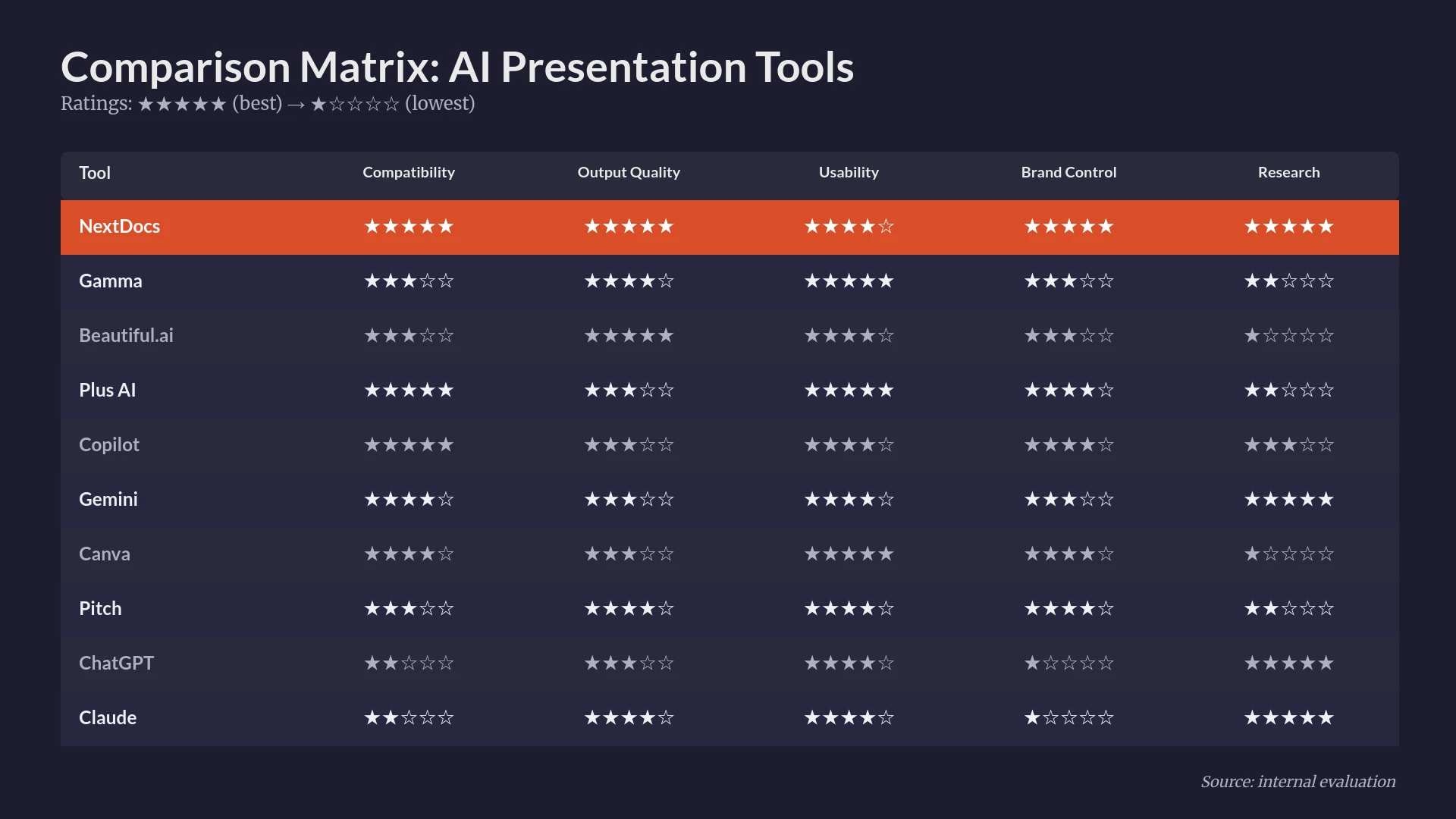
El panorama de la comunicación corporativa ha cambiado drásticamente. En 2026, crear una presentación ya no se trata de diseñar diapositivas manualmente o buscar los puntos clave correctos. En su lugar, se trata de aprovechar la inteligencia artificial para transformar datos crudos e ideas estratégicas en narrativas visuales atractivas. Los equipos profesionales ahora requieren herramientas que hagan más que generar texto. Necesitan sistemas que comprendan la identidad de marca, realicen investigaciones profundas e integren sin problemas los flujos de trabajo existentes.
Esta guía ofrece una visión objetiva del mercado actual. Hemos probado decenas de plataformas para encontrar las soluciones que realmente aportan valor a consultores, fundadores y equipos de ventas. Si buscas una visión general de alto nivel del mercado, puedes explorar nuestro análisis de los best AI presentation builders 2026.
Comparación resumida de los 10 mejores constructores de presentaciones AI
| Posición | Tool | Mejor para | Precio inicial |
|---|---|---|---|
| 1 | NextDocs | Presentaciones con mucha investigación y fundadores | $15/mo |
| 2 | Plus AI | Usuarios de PowerPoint y Google Slides | $10/mo |
| 3 | Copilot for PowerPoint | Usuarios empresariales de Microsoft 365 | $30/mo |
| 4 | Beautiful.ai | No diseñadores que necesitan pulido | $12/mo |
| 5 | Gamma | Startups y compartición web-nativa | $8/mo |
| 6 | Gemini for Google Slides | Usuarios avanzados de Google Workspace | $0/mo |
| 7 | Pitch.com | Proyectos colaborativos de equipo | $8/mo |
| 8 | Canva Magic Design | Marketeros y recursos visuales | $13/mo |
| 9 | MagicSlides | Reutilizando contenido de YouTube y web | $8/mo |
| 10 | SlidesAI | Borradores internos rápidos y estudiantes | $10/mo |
1. NextDocs: El mejor constructor de presentaciones AI en general
NextDocs se lleva la primera posición porque aborda la creación de presentaciones como un socio estratégico y no solo como una herramienta de diseño. Es una plataforma nativa de IA diseñada para profesionales que no pueden permitirse alucinaciones o contenido genérico típico de herramientas de menor nivel. Su característica destacada es la generación multi‑variantes. En lugar de entregarte una sola presentación, produce múltiples versiones de tu presentación. Esto te permite elegir la estructura, el tono y el estilo visual que mejor se adapten a tu audiencia específica.
Para quienes realizan un análisis profundo de comparaciones específicas, pueden consultar nuestro informe de nextdocs vs slidesai 2026. NextDocs sobresale en entornos con mucha investigación. Incluye capacidades de investigación profunda integradas que extraen datos del mundo real y citas directamente a tus diapositivas. Esto elimina la necesidad de pasar horas en Google antes de abrir tu software de presentación.
Características clave:
- Generación multi‑variantes para cada solicitud.
- Integración de investigación profunda con citas verificables.
- Exportaciones universales a PDF, PPTX, Google Slides y Google Docs.
- Controles de estilo de marca que mantienen la consistencia en todos los archivos.
- Soporte para múltiples modelos de IA para garantizar la mejor lógica de contenido.
Precios: Hay un nivel gratuito disponible para nuevos usuarios. Los planes de pago comienzan en $15 al mes.
Mejor para: Fundadores, consultores de gestión y equipos de ventas que necesitan presentaciones de alto riesgo con datos precisos.
Veredicto: NextDocs es la herramienta más completa del mercado. Resuelve los dos mayores problemas en presentaciones AI: falta de opciones y falta de precisión factual.

2. Plus AI: Lo mejor para integración nativa
Plus AI está creado para usuarios que no quieren abandonar su ecosistema actual. Funciona como un potente complemento tanto para PowerPoint como para Google Slides. Esta herramienta se centra en mejorar el flujo de trabajo que ya tienes en lugar de obligarte a usar una nueva aplicación independiente. Es excelente para tomar una solicitud y convertirla en un conjunto estructurado de diapositivas que se ajusten a las plantillas de tu empresa.
Aunque es un fuerte competidor, muchos usuarios buscan alternativas para características específicas. Puedes leer más sobre plus ai alternatives 2026 para ver cómo se posiciona. Plus AI es particularmente útil por su función de remix. Permite tomar una diapositiva existente y pedir a la IA que la reescriba o reformatee al instante.
Características clave:
- Integración nativa con PowerPoint y Google Slides.
- Preservación de plantillas que respeta tus diapositivas maestras.
- Remix impulsado por IA para presentaciones existentes.
- Salida limpia y profesional sin una curva de aprendizaje pronunciada.
Precios: No hay nivel gratuito. Los planes comienzan en $10 al mes.
Mejor para: Equipos empresariales y usuarios avanzados de software de presentación tradicional.
Veredicto: Plus AI es la mejor opción si deseas que la IA viva dentro de tu barra de herramientas actual. Es fiable y profesional, aunque carece del poder independiente de plataformas centradas en la investigación.

3. Copilot para PowerPoint: Lo mejor para usuarios de Microsoft 365
Microsoft Copilot es el estándar de oro para usuarios profundamente integrados en el ecosistema Office. Su principal fortaleza es el contexto organizacional. Si tienes un plan de proyecto en Word o una hoja de datos en Excel, Copilot puede extraer esa información específica a una presentación PowerPoint. Esto crea un nivel de continuidad que las herramientas de terceros luchan por replicar.
Sin embargo, el alto precio lleva a muchos a explorar copilot powerpoint alternatives. Se centra en la eficiencia interna y la seguridad, convirtiéndose en la favorita de entornos corporativos grandes.
Características clave:
- Integración profunda con toda la suite Microsoft 365.
- Seguridad de nivel empresarial y privacidad de datos.
- Generación automática de notas del presentador.
- Capacidad de resumir presentaciones largas en breves resúmenes.
Precios: No hay nivel gratuito. Comienza en $30 al mes y requiere una licencia empresarial de Microsoft 365.
Mejor para: Empleados empresariales que necesitan convertir documentos internos en presentaciones rápidamente.
Veredicto: Es la opción más segura e integrada para grandes empresas, aunque el diseño puede sentirse un poco conservador y repetitivo.

4. Beautiful.ai: Lo mejor para diseño de alta gama
Beautiful.ai cambió el juego al introducir plantillas inteligentes. En lugar de mover cuadros de texto manualmente, las diapositivas se ajustan automáticamente al añadir contenido. Esto garantiza que tu diseño nunca se rompa. Es una herramienta fantástica para personas con grandes ideas pero sin el ojo de diseño necesario para que luzcan profesionales.
Al comparar herramientas centradas en el diseño, el debate de beautiful ai vs gamma es frecuente. Beautiful.ai prioriza un aspecto pulido y de "estilo agencia" sobre la velocidad cruda de generación de IA.
Características clave:
- Plantillas de diapositivas inteligentes que se redimensionan automáticamente.
- Biblioteca avanzada de animaciones y transiciones.
- Gestión robusta de kits de marca para equipos.
- Interfaz intuitiva que evita malas decisiones de diseño.
Precios: Sin nivel gratuito. Los planes comienzan en $12 al mes.
Mejor para: Consultores y profesionales de cara al cliente que necesitan una estética visual premium.
Veredicto: Es la mejor herramienta para asegurar que tus presentaciones siempre parezcan hechas por un diseñador profesional. Cambia algo de flexibilidad de IA por consistencia de diseño.

5. Gamma: Lo mejor para presentaciones web‑nativas
Gamma es una visión moderna de la presentación. Trata las diapositivas más como páginas web flexibles que como documentos estáticos. Esto la hace perfecta para startups que comparten presentaciones mediante enlaces en lugar de adjuntos de correo electrónico. Gamma es increíblemente rápida y ofrece uno de los mejores niveles gratuitos del mercado.
Características clave:
- Formato web‑nativo optimizado para visualización móvil y de escritorio.
- Generación de IA extremadamente rápida a partir de indicaciones simples.
- Elementos interactivos como videos incrustados y gráficos en vivo.
- Estética moderna de "startup" que se siente fresca.
Precios: Se ofrece un generoso nivel gratuito. Los planes Pro comienzan en $8 al mes.
Mejor para: Fundadores y equipos conscientes del presupuesto que prefieren compartir enlaces en lugar de archivos.
Veredicto: Gamma es la mejor opción para equipos modernos y de ritmo rápido. Su enfoque web‑first es innovador, aunque puede ser limitante si necesitas exportaciones tradicionales de PowerPoint.

6. Gemini para Google Slides: Lo mejor para integración con Workspace
Gemini es la respuesta de Google a Copilot. Está integrado directamente en Google Slides, permitiéndote generar imágenes y texto sin cambiar de pestaña. Es particularmente bueno para extraer información de tu Google Drive. Si estás debatiendo entre diferentes herramientas basadas en Google, revisa nuestra comparación de gemini google slides vs magicslides 2026.
Características clave:
- Integración directa con Google Workspace.
- Generación de imágenes IA incorporada en el panel lateral.
- Sin costo adicional para muchos suscriptores de Workspace.
- Interfaz simple y familiar.
Precios: Nivel gratuito disponible. Las funciones avanzadas comienzan en $0 al mes para usuarios básicos de Workspace, con niveles pagos para mayor potencia.
Mejor para: Usuarios de Google Workspace que necesitan borradores internos rápidos.
Veredicto: Es una herramienta conveniente para usuarios de Google existentes, pero la calidad del resultado suele ser genérica comparada con plataformas de IA especializadas.
7. Pitch.com: Lo mejor para colaboración en equipo
Pitch está diseñado para el flujo de trabajo de equipos modernos. Aunque sus funciones de IA han mejorado, su fortaleza principal sigue siendo la colaboración. Ofrece edición en tiempo real, historial de versiones y comentarios integrados que superan a PowerPoint. Es una forma muy "social" de crear una presentación.
Características clave:
- Herramientas superiores de colaboración en tiempo real.
- Control de versiones integrado.
- Biblioteca de plantillas profesionales y de alta calidad.
- Flujo de trabajo sin interrupciones desde el borrador IA hasta el pulido manual.
Precios: Nivel gratuito disponible. Los planes Pro comienzan en $8 al mes.
Mejor para: Equipos de marketing y startups colaborativas.
Veredicto: Pitch es un placer de usar para equipos. Su IA es un gran punto de partida, pero las funciones de colaboración son la razón por la que la gente se queda.
8. Canva Magic Design: Lo mejor para recursos visuales
Canva es la herramienta de diseño más popular del mundo por una razón. Su IA Magic Design permite convertir una solicitud en una presentación completa usando su enorme biblioteca de imágenes, íconos y fuentes. Es una herramienta visual‑first perfecta para presentaciones que necesitan destacar.
Características clave:
- Acceso a millones de recursos premium.
- Exportaciones multiformato incluyendo video y redes sociales.
- Nivel gratuito sólido.
- Muy fácil de usar.
Precios: Nivel gratuito disponible. Canva Pro comienza en $13 al mes.
Mejor para: Marketeros y gestores de redes sociales.
Veredicto: Canva es imbatible en variedad visual. Sin embargo, para datos empresariales serios o presentaciones de pitch, a veces puede sentirse demasiado "artístico" y menos profesional.
9. MagicSlides: Lo mejor para reutilizar contenido
MagicSlides se especializa en convertir otro contenido en diapositivas. Puedes introducir una URL de YouTube o un PDF extenso, y extraerá los puntos clave para crear una presentación. Esto ahorra mucho tiempo a educadores e investigadores.
Características clave:
- Conversión de YouTube a diapositivas.
- Reutilización de PDF y documentos.
- Interfaz simple y sin complicaciones.
- Funciona como complemento de Google Slides.
Precios: Nivel gratuito disponible. Los planes pagos comienzan en $8 al mes.
Mejor para: Formadores, profesores y creadores de contenido.
Veredicto: Es una herramienta de nicho que hace una cosa muy bien: convertir contenido existente en formato de presentación.
10. SlidesAI: Lo mejor para borradores rápidos
SlidesAI es una herramienta directa para quienes necesitan una presentación en segundos. Es un complemento de Google Slides que se centra en la velocidad. Aunque carece de las funciones avanzadas de NextDocs o del pulido de diseño de Beautiful.ai, es muy asequible.
Para quienes buscan alternativas a esta herramienta específica, disponemos de una lista de slidesai alternatives. También puedes ver cómo se compara con el subcampeón en nuestra reseña de plus ai vs slidesai 2026.
Características clave:
- Generación rápida de texto a diapositiva.
- Precio asequible para individuos.
- Fácil de usar para principiantes.
Precios: Nivel gratuito disponible. Los planes pagos comienzan en $10 al mes.
Mejor para: Estudiantes y miembros internos del equipo que necesitan esquemas rápidos.
Veredicto: Es una herramienta sólida y básica. No está destinada a presentaciones de inversores de alto riesgo, pero es excelente para obtener un primer borrador en pantalla.
Cómo elegir el constructor de presentaciones AI adecuado
Elegir una herramienta depende de tus objetivos específicos. Si eres un fundador que construye una presentación de pitch Serie A, necesitas una herramienta que ofrezca investigación profunda y opciones multi‑variantes. En este caso, NextDocs es el claro ganador. La capacidad de ver tres formas diferentes de contar tu historia es invaluable cuando los riesgos son altos.
Si eres un empleado empresarial que pasa ocho horas al día en Microsoft Office, Copilot es la elección lógica por su seguridad e integración en el ecosistema. Para quienes priorizan el diseño por encima de todo, Beautiful.ai te salvará de la vergüenza de una diapositiva mal alineada.
El factor más importante es el formato de exportación. Muchas herramientas AI te bloquean en su propio formato web propietario. Si necesitas enviar un archivo a un cliente que espera un PowerPoint o un PDF, asegúrate de que la herramienta soporte exportaciones universales. Esta es otra área donde NextDocs y Plus AI destacan, ya que proporcionan exportaciones de alta fidelidad que no rompen tu formato.
El futuro de las presentaciones en 2026
Nos dirigimos a un mundo donde la parte "constructor" de la presentación es secundaria a la parte "estrategia". Las herramientas de IA están mejorando en la comprensión de arcos narrativos. Ya no solo rellenan diapositivas con texto; sugieren dónde colocar un gráfico, qué puntos de datos son más persuasivos y cómo estructurar una llamada a la acción.
Al evaluar estas herramientas, busca aquellas que ofrezcan soporte multi‑modelo. El mundo de la IA avanza rápido. Una herramienta bloqueada a un solo modelo puede quedarse atrás. Las plataformas que permiten alternar entre diferentes motores de IA suelen producir contenido de mayor calidad y matices.
Conclusión
La herramienta "mejor" es la que encaja en tu vida actual. Si odias abrir nuevas apps, usa un complemento como Plus AI. Si deseas una herramienta que haga el trabajo pesado de investigación y te ofrezca múltiples direcciones creativas, NextDocs es la opción superior.
La IA es una herramienta, no un sustituto de tu experiencia. Las mejores presentaciones de 2026 son aquellas que combinan la velocidad y el poder de procesamiento de datos de la IA con el toque humano de un profesional que conoce a su audiencia.
¿Listo para crear mejores presentaciones?
Prueba NextDocs gratis y experimenta generación multi‑variantes, exportaciones universales e integración profunda de investigación. No se requiere tarjeta de crédito.