

บทนำ
ภูมิทัศน์ของการนำเสนอระดับมืออาชีพได้เปลี่ยนแปลงอย่างรวดเร็วในปี 2026 ช่วงเวลาที่ต้องนั่งมองสไลด์ว่างเปล่าและปรับขนาดกล่องข้อความด้วยตนเองเกือบหมดไปแล้ว ปัจจุบัน ทางเลือกของมืออาชีพ ผู้ก่อตั้ง และที่ปรึกษาไม่ใช่เรื่องว่าจะใช้ปัญญาประดิษฐ์หรือไม่ แต่เป็นเครื่องมือใดที่เหมาะสมกับเวิร์กโฟลว์ของพวกเขามากที่สุด
ชื่อเสียงในวงการนี้มีอยู่สองชื่อคือ NextDocs และ SlidesAI แม้ว่าทั้งคู่จะสัญญาว่าจะแปลงคำสั่งข้อความเป็นงานนำเสนอที่สมบูรณ์แบบ แต่พวกเขาก็เป็นตัวแทนของแนวคิดที่แตกต่างกันในด้านการออกแบบซอฟต์แวร์ SlidesAI ทำงานเป็นส่วนเสริมเบา ๆ สำหรับแพลตฟอร์มที่มีอยู่ ในขณะที่ NextDocs เป็นแพลตฟอร์มอิสระที่พัฒนาขึ้นเพื่อการสร้างงานนำเสนอระดับมืออาชีพที่ต้องการความแม่นยำสูง
บทความนี้จะเจาะลึกคุณสมบัติ ราคา และประสิทธิภาพของทั้งสองเครื่องมือ ไม่ว่าคุณจะเป็นผู้นำฝ่ายขายที่เตรียมรายงานรายไตรมาส หรือผู้ก่อตั้งสตาร์ทอัปที่สร้างพรีเซนเทชัน Series A การเข้าใจความแตกต่างเหล่านี้จะช่วยให้คุณเลือกพันธมิตรที่เหมาะสมกับกระบวนการสร้างสรรค์ของคุณมากขึ้น สำหรับข้อมูลเพิ่มเติมเกี่ยวกับตลาดโดยรวม คุณสามารถสำรวจคำแนะนำของเราเกี่ยวกับ เครื่องมือสร้างงานนำเสนอด้วย AI ที่ดีที่สุดในปี 2026
ภาพรวมของ NextDocs
NextDocs เป็นแพลตฟอร์มเอกสารและงานนำเสนอที่พัฒนาขึ้นโดยเฉพาะสำหรับมืออาชีพที่ต้องการมากกว่ารูปแบบเทมเพลตทั่วไป แตกต่างจากเครื่องมือแบบดั้งเดิมที่เพียงเพิ่มฟีเจอร์ AI บนอินเทอร์เฟซเก่า NextDocs ถูกออกแบบจากพื้นฐานเพื่อเข้าใจความซับซ้อนของการเล่าเรื่องทางธุรกิจและการวิจัยที่อิงข้อมูล
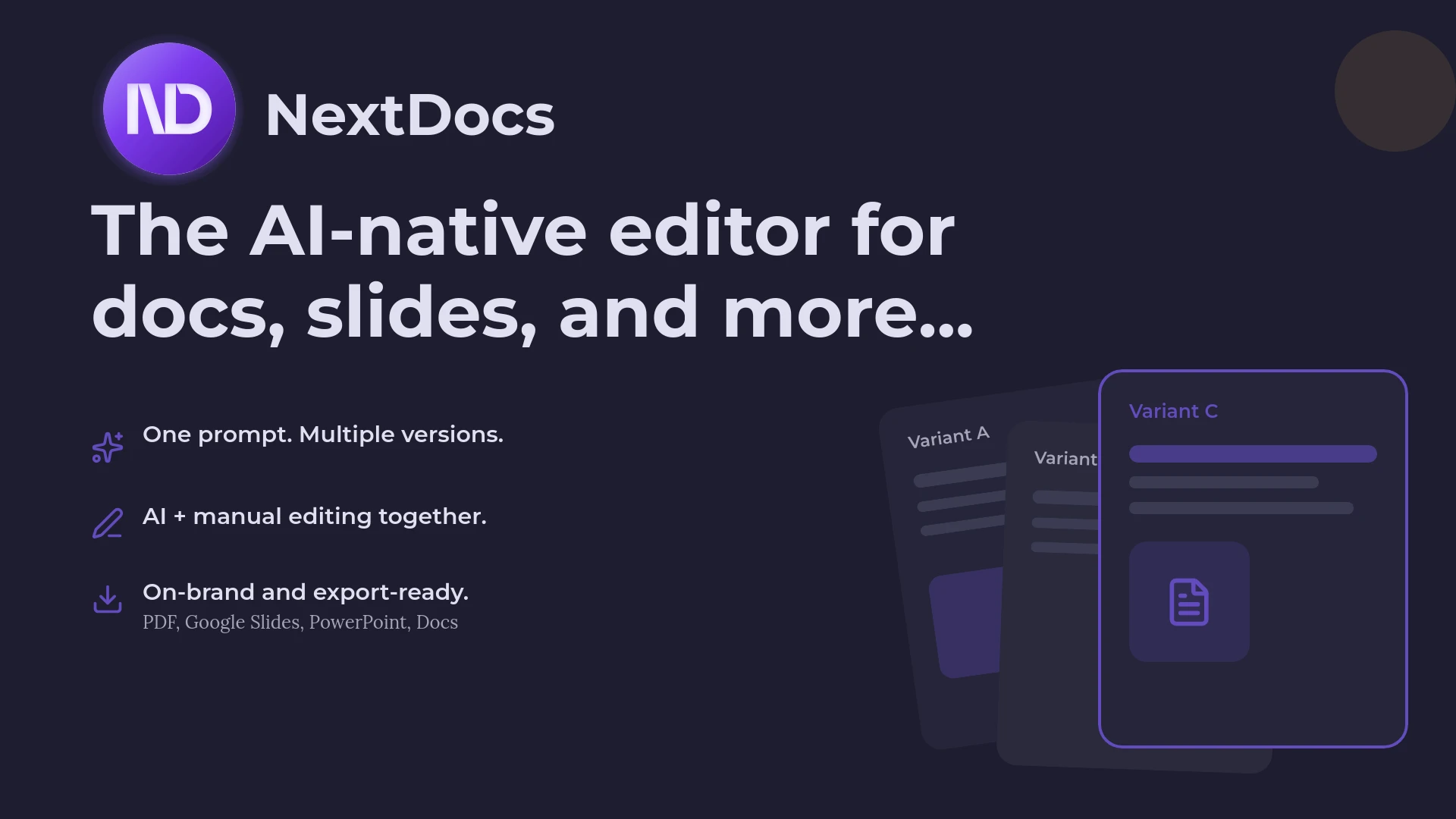
ปรัชญาหลักของ NextDocs คือ "ทางเลือกและการควบคุม" ซึ่งรับรู้ว่าสิ่งแรกที่ AI สร้างขึ้นมานั้นมักจะไม่สมบูรณ์แบบ เพื่อแก้ไขปัญหานี้ NextDocs ใช้ระบบสร้างหลายเวอร์ชัน เมื่อคุณป้อนคำสั่ง ระบบจะสร้างเวอร์ชันต่าง ๆ ของงานนำเสนอที่มีมุมมองและสไตล์ภาพที่แตกต่างกัน ทำให้ผู้ใช้สามารถเป็นผู้อำนวยการสร้างสรรค์ได้มากกว่าการเป็นเพียงผู้ป้อนคำสั่ง
นอกจากนี้ NextDocs ยังแก้ปัญหาการสร้างข้อมูลผิดพลาดจาก AI โดยการบูรณาการความสามารถในการวิจัยลึกเข้าไปในกระบวนการสร้างสไลด์ ซึ่งสามารถดึงข้อมูลแบบเรียลไทม์และให้การอ้างอิงข้อมูล ทำให้เป็นตัวเลือกยอดนิยมสำหรับผู้ที่ต้องการสนับสนุนข้อเสนอของตนด้วยข้อเท็จจริง โดยมักถูกอ้างอิงว่าเป็นหนึ่งใน เครื่องมือสร้างงานนำเสนอด้วย AI ที่ดีที่สุดสำหรับทีมขาย เนื่องจากความเน้นความถูกต้องและความสอดคล้องของแบรนด์

ภาพรวมของ SlidesAI
SlidesAI ใช้วิธีการที่แตกต่างโดยทำงานเป็นส่วนเสริมสำหรับ Google Slides และ Microsoft PowerPoint ออกแบบมาเพื่อความรวดเร็วและความสะดวกสบาย โดยมุ่งเป้าหมายผู้ใช้งานที่ต้องการอยู่ในระบบนิเวศที่คุ้นเคยโดยไม่ต้องเปลี่ยนแพลตฟอร์ม สำหรับเครื่องมือที่คล้ายกัน คุณสามารถดูรายการ ส่วนเสริม AI สำหรับ PowerPoint ที่ดีที่สุดในปี 2026
เป้าหมายหลักของ SlidesAI คือการลดแรงเสียดทานในขั้นตอนร่างแรก ผู้ใช้สามารถวางข้อความยาว ๆ หรือให้หัวข้อง่าย ๆ แล้วเครื่องมือจะจัดสรรเนื้อหาให้โดยอัตโนมัติในหลายสไลด์ เป็นที่นิยมในกลุ่มนักเรียนและทีมภายในที่ต้องการสร้างงานนำเสนอ "พอประมาณ" อย่างรวดเร็วและในราคาที่ต่ำกว่า
แม้จะไม่มีความสามารถในการวิจัยลึกและสร้างหลายเวอร์ชันเหมือนแพลตฟอร์มที่แข็งแกร่งกว่า แต่ความเรียบง่ายก็เป็นจุดแข็งที่สุดของมัน ซึ่งไม่ต้องการการเรียนรู้ที่ซับซ้อน ทำให้เป็นหนึ่งใน เครื่องสร้างสไลด์ AI ราคาย่อมเยาที่สุดในปี 2026 สำหรับผู้ใช้งานทั่วไป อย่างไรก็ตาม ผู้ใช้มักพบว่าผลลัพธ์การออกแบบค่อนข้างพื้นฐานและต้องปรับแต่งด้วยตนเองเพื่อให้ได้มาตรฐานที่พร้อมสำหรับลูกค้า
ความแตกต่างหลัก
ความแตกต่างที่สำคัญที่สุดระหว่างสองเครื่องมือนี้อยู่ในประเภทของมัน SlidesAI เป็นส่วนเสริม ซึ่งจำกัดอยู่ในข้อจำกัดของแอปพลิเคชันต้นทาง เช่น Google Slides ในขณะที่ NextDocs เป็นแพลตฟอร์มอิสระ ซึ่งให้เสรีภาพในการนำเสนอเครื่องมือแก้ไขแบบ AI-native ที่สามารถจัดการเลย์เอาต์และภาพข้อมูลได้อย่างชาญฉลาดมากขึ้น
อีกหนึ่งความแตกต่างสำคัญคือการจัดการเนื้อหา SlidesAI ทำหน้าที่เป็นสรุปและฟอร์แมทเทอร์ มันรับเนื้อหาที่คุณป้อนและวางไว้บนสไลด์ ในขณะที่ NextDocs ทำหน้าที่เป็นพันธมิตรด้านการวิจัย สามารถเข้าเว็บไซต์ ค้นหาข้อมูลตลาดปัจจุบัน สถิติทางการเงิน และข่าวสารต่าง ๆ พร้อมอ้างอิงแหล่งที่มาอย่างถูกต้อง
สุดท้าย ความยืดหยุ่นในการส่งออกเป็นจุดที่แตกต่างกันอย่างมาก เนื่องจาก NextDocs เป็นแพลตฟอร์มอิสระ จึงมีเครื่องยนต์ส่งออกแบบสากลในตัว คุณสามารถสร้างพรีเซนเทชันครั้งเดียวแล้วส่งออกเป็น PDF, ไฟล์ PowerPoint, ชุด Google Slides หรือแม้แต่ Google Doc ที่มีโครงสร้าง หากคุณต้องการทางเลือกอื่นนอกจาก SlidesAI คุณอาจพบว่ารายการ ทางเลือกของ SlidesAI ของเราเป็นประโยชน์
ตารางเปรียบเทียบคุณสมบัติ
| คุณสมบัติ | NextDocs | SlidesAI |
|---|---|---|
| ประเภท | แพลตฟอร์มอิสระที่ใช้ AI | ส่วนเสริม (Google Slides/PPT) |
| ประเภทการสร้าง | หลายเวอร์ชัน (3-4 ตัวเลือก) | การสร้างแบบครั้งเดียว |
| เครื่องมือวิจัย | การวิจัยลึกพร้อมการอ้างอิง | การประมวลผลข้อความพื้นฐาน |
| รูปแบบการส่งออก | PDF, PPTX, Google Slides, Docs | Google Slides, PPTX |
| การควบคุมแบรนด์ | ชุดเครื่องมือและการจัดสไตล์ขั้นสูง | การเลือกสีและฟอนต์พื้นฐาน |
| การสนับสนุนโมเดล | หลายโมเดล (GPT-4, Claude ฯลฯ) | การรวมโมเดลเดียว |
| เหมาะสำหรับ | ที่ปรึกษา, ผู้ก่อตั้ง, ฝ่ายขาย | นักเรียน, ทีมภายใน |
| ความง่ายในการเรียนรู้ | ปานกลาง (ฟีเจอร์ขั้นสูง) | ต่ำ (ใช้งานง่ายมาก) |
การวิเคราะห์เชิงลึก: คุณภาพเนื้อหาและการวิจัย
ในโลกมืออาชีพ งานนำเสนอมีคุณภาพเท่ากับข้อมูลที่บรรจุอยู่ นี่คือจุดที่ความแตกต่างระหว่างเครื่องมือทั้งสองชัดเจนที่สุด
SlidesAI พึ่งพาข้อมูลที่คุณป้อนเป็นหลัก หากคุณวางรายงานละเอียด มันจะสามารถแยกย่อยข้อมูลเป็นจุด ๆ ได้ดี แต่ถ้าคุณให้คำสั่งสั้น ๆ เช่น "สร้างการวิเคราะห์ตลาดของอุตสาหกรรมชาร์จไฟฟ้า EV" มันจะสร้างเนื้อหาทั่วไปตามข้อมูลการฝึกสอน ซึ่งข้อมูลเหล่านี้อาจล้าสมัยหรือขาดตัวเลขเฉพาะที่จำเป็นในการโน้มน้าวใจผู้บริหาร
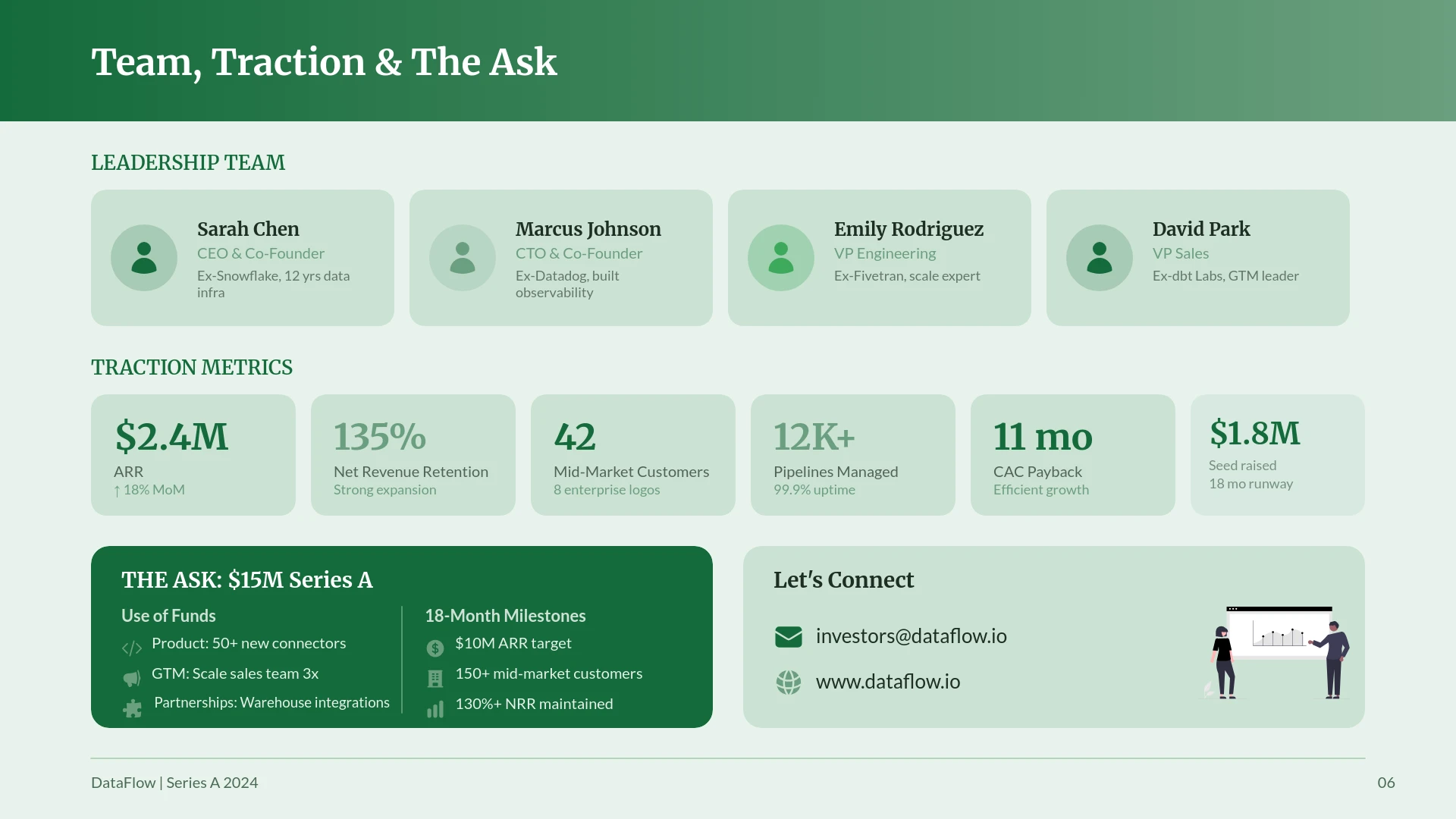
NextDocs มองคำสั่งเป็นจุดเริ่มต้นของภารกิจวิจัย สถาปัตยกรรม AI-native ช่วยให้มันสามารถท่องเว็บเพื่อค้นหาข้อมูลรายงานล่าสุด ข้อมูลทางการเงิน และข่าวสารต่าง ๆ เมื่อสร้างสไลด์เกี่ยวกับขนาดตลาด มันไม่ได้เดาเลขเพียงอย่างเดียว แต่จะค้นหาแหล่งข้อมูล อ้างอิง และสร้างภาพประกอบรอบข้อมูลนั้น ระดับความลึกนี้สำคัญสำหรับผู้ที่ต้องการความน่าเชื่อถือสูง
กระบวนการทำงานและความยืดหยุ่นในการส่งออก
ประสิทธิภาพของเวิร์กโฟลว์เป็นอีกหนึ่งด้านที่ NextDocs และ SlidesAI แตกต่างกัน SlidesAI ถูกสร้างขึ้นเพื่อเวิร์กโฟลว์ "ทำครั้งเดียวเสร็จ" คุณรันเครื่องมือ มันสร้างสไลด์ แล้วคุณก็กลับไปยังอินเทอร์เฟซ Google Slides แบบเดิม ในขณะที่อาจรวดเร็ว แต่ก็อาจทำให้หงุดหงิดหากการสร้างครั้งแรกไม่ตรงเป้า เพราะคุณอาจต้องเริ่มใหม่หรือแก้ไขสไลด์ทีละอัน
NextDocs นำเสนอเวิร์กโฟลว์แบบวนซ้ำมากขึ้น เนื่องจากสร้างหลายเวอร์ชัน คุณสามารถเห็นสามวิธีในการนำเสนอข้อมูลของคุณทันที คุณอาจชอบเลย์เอาต์ของเวอร์ชัน A แต่โทนของเวอร์ชัน B แพลตฟอร์มนี้อนุญาตให้คุณผสมผสานหรือใช้เครื่องมือแก้ไขแบบ AI-native เพื่อปรับแต่งองค์ประกอบเฉพาะโดยไม่ทำลายการออกแบบที่เหลือ
เครื่องยนต์ส่งออกใน NextDocs ก็เป็นข้อได้เปรียบสำคัญสำหรับทีมยุคใหม่ ในหลายสภาพแวดล้อมขององค์กร ผู้มีส่วนได้ส่วนเสียหนึ่งอาจต้องการไฟล์ PowerPoint สำหรับการประชุมอย่างเป็นทางการ อีกคนหนึ่งต้องการลิงก์ Google Slides สำหรับการทำงานร่วมกัน และอีกคนหนึ่งต้องการ PDF สำหรับการอ่านอย่างรวดเร็ว NextDocs จัดการการแปลงเหล่านี้ได้ในตัว เพื่อให้ฟอนต์ เลย์เอาต์ และภาพคงความสอดคล้องกันในทุกแพลตฟอร์ม หากคุณกำลังมองหาทางเลือกอื่นนอกจาก SlidesAI คุณอาจพบว่ารายการ ทางเลือกของ SlidesAI ของเราเป็นประโยชน์
การเปรียบเทียบราคา
ราคาของเครื่องมือ AI ในปี 2026 เริ่มแข่งขันกันมากขึ้น แต่คุณค่าขึ้นอยู่กับความต้องการของมืออาชีพ
ราคาของ SlidesAI
SlidesAI เป็นตัวเลือกที่ราคาย่อมเยากว่ามาก มีแผนฟรีที่อนุญาตให้สร้างพรีเซนเทชันได้จำนวนจำกัดต่อเดือน พร้อมข้อจำกัดด้านจำนวนตัวอักษร ราคาสำหรับแผนชำระเงินเริ่มต้นประมาณ 10 ดอลลาร์ต่อเดือน ทำให้เป็นตัวเลือกที่น่าสนใจสำหรับนักเรียนหรือบุคคลที่ต้องการสร้างพรีเซนเทชันไม่กี่ชุดต่อปีและไม่ต้องการฟีเจอร์การวิจัยหรือการสร้างแบรนด์ขั้นสูง
ราคาของ NextDocs
NextDocs มีแผนฟรีให้ทดลองใช้ระบบสร้างหลายเวอร์ชันและเครื่องมือวิจัย แผนระดับมืออาชีพเริ่มต้นที่ 15 ดอลลาร์ต่อเดือน แม้ว่าจะมีราคาสูงกว่า SlidesAI เล็กน้อย แต่ราคานี้สะท้อนถึงพลังการประมวลผลเพิ่มเติมสำหรับการวิจัยเชิงลึก การสนับสนุนหลายโมเดล และเครื่องยนต์ส่งออกแบบสากล สำหรับที่ปรึกษาและทีมขาย การประหยัดเวลาจากการวิจัยและการจัดรูปแบบมักจะคุ้มค่ากับค่าบริการในโปรเจกต์เดียว
ข้อดีและข้อเสีย
ข้อดีของ NextDocs
- การสร้างหลายเวอร์ชัน: คุณได้รับหลายเวอร์ชันให้เลือก ลดความเสี่ยงจากการพึ่งพา AI เพียงอย่างเดียว
- การวิจัยลึก: ดึงข้อมูลและการอ้างอิงจากเว็บ เพื่อความถูกต้องและทันสมัย
- การส่งออกแบบสากล: ย้ายระหว่าง PDF, PPTX และ Google Slides ได้อย่างราบรื่น
- การออกแบบมืออาชีพ: AI เข้าใจเลย์เอาต์ทางธุรกิจได้ดีกว่าเครื่องเสริมทั่วไป
- การจัดสไตล์แบรนด์: เครื่องมือที่แข็งแกร่งเพื่อให้สไลด์ตรงกับภาพลักษณ์ของบริษัท
ข้อเสียของ NextDocs
- ความซับซ้อนในการเรียนรู้: ฟีเจอร์ขั้นสูงต้องใช้เวลาศึกษามากกว่าการใช้งานง่ายแบบคลิกเดียว
- ราคา: เป็นเครื่องมือระดับพรีเมียมที่มีราคาสูงกว่าเครื่องมือเสริมพื้นฐาน
ข้อดีของ SlidesAI
- ใช้งานง่าย: ถ้าคุณใช้ Google Slides ได้ ก็ใช้ SlidesAI ได้ง่าย ๆ
- ความรวดเร็ว: สร้างร่างแรกได้อย่างรวดเร็วจากข้อความเดิม
- ราคาย่อมเยา: เป็นหนึ่งในตัวเลือกที่คุ้มค่าที่สุดในตลาด
- ไม่ต้องเปลี่ยนแพลตฟอร์ม: อยู่ใน Google Slides หรือ PowerPoint ได้โดยตรง
ข้อเสียของ SlidesAI
- การออกแบบจำกัด: สไลด์อาจดูซ้ำซากหรือเป็นเทมเพลต
- เนื้อหาพื้นฐาน: ไม่มีความสามารถในการวิจัยลึกหรือยืนยันข้อเท็จจริง
- ผลลัพธ์เดียว: หาก AI ทำผิดพลาด คุณมีตัวเลือกจำกัดในการแก้ไข
- การปรับแต่ง: การแก้ไขด้วยตนเองใน Google Slides หลังสร้างอาจยุ่งยาก
คำตัดสินและคำแนะนำ
การเลือกใช้ NextDocs หรือ SlidesAI ขึ้นอยู่กับความสำคัญของงานนำเสนอของคุณ
เลือก SlidesAI หาก คุณเป็นนักเรียน ครู หรือทีมภายในที่ต้องเปลี่ยนเอกสารเป็นสไลด์ง่าย ๆ อย่างรวดเร็ว หากเป้าหมายหลักคือการประหยัดเวลาในงานนำเสนอระดับต่ำและคุณคุ้นเคยกับ Google Slides แล้ว SlidesAI เป็นตัวเลือกที่ใช้งานได้ดีและคุ้มค่า
เลือก NextDocs หาก คุณเป็นมืออาชีพที่งานของคุณขึ้นอยู่กับคุณภาพของผลลัพธ์ หากคุณเป็นที่ปรึกษา ผู้ก่อตั้ง หรือพนักงานขาย ความสามารถในการสร้างหลายเวอร์ชันและสนับสนุนข้อมูลวิจัยที่เป็นหลักฐานเป็นตัวเปลี่ยนเกม ฟีเจอร์ส่งออกสากลเพียงอย่างเดียวก็ทำให้มันเป็นตัวเลือกที่เหนือกว่า สำหรับทีมที่ทำงานในระบบซอฟต์แวร์ต่าง ๆ
ในที่สุด NextDocs ก็เสนอทางออกที่สมบูรณ์และ "อนาคตพร้อม" สำหรับสภาพแวดล้อมการทำงานในปี 2026 มันก้าวข้ามการทำงานอัตโนมัติธรรมดา ไปสู่การเป็นพันธมิตรด้านความคิดสร้างสรรค์และการวิจัยอย่างแท้จริง
พร้อมสร้างงานนำเสนอที่ดีกว่าแล้วหรือยัง?
ทดลองใช้ NextDocs ฟรี และสัมผัสกับการสร้างหลายเวอร์ชัน การส่งออกแบบสากล และการบูรณาการการวิจัยลึก โดยไม่ต้องใช้บัตรเครดิต