

The Evolution of Presentation Design in 2026
The landscape of professional presentations has shifted dramatically over the last few years. The days of manual pixel pushing, where consultants and founders spent hours aligning text boxes and hunting for high resolution icons, are largely behind us. In their place, a new generation of AI presentation builders has emerged. These tools promise to turn a simple text prompt or a rough outline into a polished, investor ready deck in seconds.
Two of the most prominent names in this space are Gamma and Beautiful.ai. While both aim to simplify the creation process, they take fundamentally different approaches to design and user experience. Gamma leans into a web native, flexible card system that feels modern and fluid. Beautiful.ai focuses on smart templates and rigid design rules to ensure every slide looks like it was created by a professional designer.
Choosing between them requires understanding your specific needs. Are you looking for a tool that gives you the freedom to experiment with layouts, or do you want a system that makes the design decisions for you? In this detailed comparison, we will break down the features, pricing, and performance of Gamma and Beautiful.ai, while also looking at how NextDocs provides a more robust alternative for those who need deeper research and multi format flexibility.
For a broader look at the market, you can explore our list of the best AI presentation builders 2026 to see how these tools stack up against the entire field.
Gamma: The Modern, Web Native Contender
Gamma has rapidly become a favorite for startups and individual creators. It breaks away from the traditional slide metaphor, using what it calls cards. These cards are flexible and can expand to fit content, making them feel more like a modern website than a static PowerPoint file. This approach is particularly effective for internal presentations, project updates, and content meant to be shared via a link.
The AI generation in Gamma is notably fast. When you provide a prompt, the tool quickly outlines a narrative and populates cards with text and images. The default designs are clean, minimalist, and inherently mobile responsive. This makes Gamma one of the best AI presentation builders with collaboration 2026 for teams that need to move quickly and share work across different devices.
However, Gamma has limitations when it comes to traditional workflows. Because it is web native, exporting to PDF or PowerPoint can sometimes lead to formatting issues or a loss of the interactive elements that make the tool unique. For users who need a classic file to present offline or email to a conservative client, these web native limitations can be a hurdle.

Beautiful.ai: The Intelligent Design Assistant
Beautiful.ai takes a more structured approach. It is built on a foundation of smart templates. These are not just static layouts, they are programmed with design rules. If you add a fourth item to a three column list, the tool automatically resizes every element on the slide to maintain perfect balance and alignment. This makes it nearly impossible to create an ugly slide.
For professionals who are not designers but need to produce high stakes materials, Beautiful.ai is a powerful ally. It is particularly popular among enterprise AI pitch deck builders because it enforces brand consistency and professional aesthetics without requiring manual intervention. The tool focuses on the presentation as a cohesive unit, ensuring that fonts, colors, and transitions remain consistent from the first slide to the last.
The trade off for this polish is flexibility. Beautiful.ai can sometimes feel restrictive. If the smart template doesn't have a specific layout you need, it can be difficult to force the tool to deviate from its internal logic. While the AI generation has improved, it often feels more like a template picker than a truly creative partner.

NextDocs: A New Standard for Professional Decks
While Gamma and Beautiful.ai offer excellent starting points, many professionals find themselves needing more control and better data integration. This is where NextDocs enters the conversation. NextDocs was designed to solve the two biggest complaints about AI presentation tools: the lack of choice and the lack of factual accuracy.
Unlike other tools that give you a single output, NextDocs uses multi variant generation. When you enter a prompt, the AI provides several different interpretations of that prompt. This allows you to choose the structure and tone that best fits your vision, rather than being forced to accept the first thing the AI produces. It is a significant step forward for AI presentation builders for sales teams who need to tailor their message to different stakeholders.
Furthermore, NextDocs integrates deep research capabilities. It does not just generate plausible sounding text. It can pull real data with citations, ensuring that your market size slides and competitive analyses are grounded in fact. When combined with universal export options to PDF, PPTX, Google Slides, and even Google Docs, it provides a level of versatility that neither Gamma nor Beautiful.ai currently matches.

Key Differences at a Glance
The choice between Gamma and Beautiful.ai often comes down to your philosophy on design and your technical requirements.
Design Philosophy
Gamma treats the presentation like a living document. It is fluid and adaptable. Beautiful.ai treats the presentation like a curated gallery. It is precise and governed by rules. If you enjoy the process of tweaking and trying new layouts, Gamma will feel more natural. If you want the tool to take the wheel and handle the aesthetics entirely, Beautiful.ai is the better fit.
AI Generation and Content
Gamma is excellent at generating a narrative flow from a simple prompt. It feels creative and fast. Beautiful.ai is better at organizing existing ideas into a professional format. While both use AI, Gamma feels more like a co writer, while Beautiful.ai feels more like a design department.
Export and Compatibility
Beautiful.ai has a slight edge for those who live in the Microsoft ecosystem, as its exports to PowerPoint are generally more stable. Gamma is built for the web, so while it offers PPTX exports, the results can feel like a compromise. For those who need total flexibility across all formats, looking into gamma alternatives 2026 or beautiful ai alternatives like NextDocs is highly recommended.
Feature Comparison Table
| Feature | Gamma | Beautiful.ai | NextDocs |
|---|---|---|---|
| Primary Format | Web Native Cards | Professional Slides | Multi-Variant Documents |
| AI Generation | Narrative & Layout | Template-Based | Research-Driven & Multi-Variant |
| Design Flexibility | High (Fluid) | Low (Smart Templates) | High (AI + Manual Control) |
| Free Tier | Yes (Generous) | No | Yes |
| Export Formats | PDF, PPTX | PPTX, PDF | PDF, PPTX, Google Slides, Docs |
| Research Tools | Basic | None | Deep Research with Citations |
| Brand Control | Basic Themes | Advanced Brand Kits | Universal Brand Kits |
| Best For | Fast, Modern Sharing | Polished Design Quality | Professional, Data-Heavy Decks |
Pricing Comparison
Pricing is a significant differentiator between these two platforms, especially for individual users and small teams.
Gamma Pricing
Gamma offers a genuinely generous free tier that allows you to test the platform and create several presentations without paying. This makes it an attractive option for students or early stage startups. Their paid plans start at approximately $8 per month, which removes the Gamma watermark and provides more advanced AI credits. It is one of the most budget friendly options on the market.
Beautiful.ai Pricing
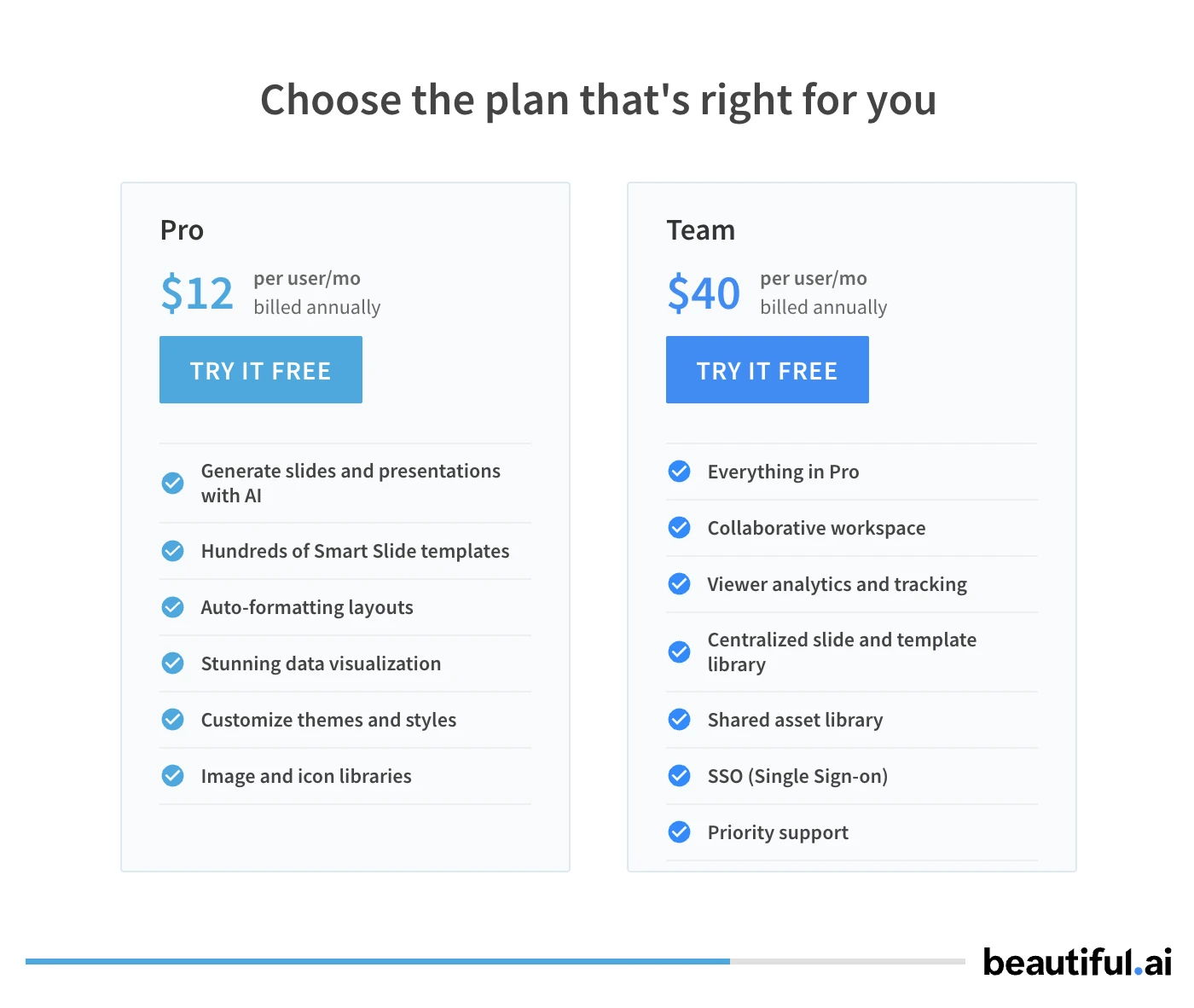
Beautiful.ai does not offer a traditional free tier. While they sometimes provide a limited trial, you generally have to pay to use the tool effectively. Their Pro plans start at $12 per month, billed annually. For teams, the price increases significantly, reflecting their focus on the enterprise market. This higher price point is justified by the time saved in design, but it can be a barrier for casual users.
Pros and Cons
Gamma
Pros:
- The free tier is excellent for testing and small projects.
- The web native format is perfect for sharing via a single link.
- Fast generation speeds help you go from idea to draft in minutes.
- The interface is modern and very easy to learn.
Cons:
- The watermark on the free tier is quite prominent.
- Exporting to PowerPoint can lead to layout issues.
- It lacks the deep design "intelligence" found in Beautiful.ai.
- Brand customization is somewhat limited on lower tiers.
Beautiful.ai
Pros:
- The smart templates are best in class for ensuring design quality.
- It is nearly impossible to create a slide that looks unprofessional.
- Strong brand kit features for maintaining company standards.
- Animations and transitions are smooth and high quality.
Cons:
- There is no permanent free tier available.
- The templates can feel restrictive if you want a custom layout.
- AI generation is less focused on content research.
- The learning curve for mastering specific smart templates can be high.
Verdict: Which Tool Should You Use?
The decision between Gamma and Beautiful.ai depends on your priorities as a presenter.
Choose Gamma if you are looking for a fast, modern way to share information. It is the ideal tool for internal team updates, startup pitches that will be viewed on mobile devices, or anyone who wants a generous free tier to get started. Its fluid nature makes it fun to use and incredibly efficient for drafting.
Choose Beautiful.ai if visual polish is your primary concern. If you are a consultant or an executive who needs every slide to look like it came from a design agency, the smart templates in Beautiful.ai are worth the subscription cost. It removes the stress of alignment and spacing, allowing you to focus entirely on your message.
Choose NextDocs if you need a professional, all in one solution that bridges the gap between these two. If your work requires real research, multiple design options for every slide, and the ability to export to any format without losing quality, NextDocs is the superior choice. It is built for the professional who cannot afford to have AI hallucinate data or be locked into a single file format.
Regardless of which tool you select, the transition to AI assisted design will undoubtedly save you hours of work. The key is to pick the tool that matches your existing workflow while giving you the creative edge you need to stand out.
Ready to Create Better Presentations?
Try NextDocs Free and experience multi-variant generation, universal exports, and deep research integration. No credit card required.