

The Evolution of Enterprise Presentations in 2026
The landscape of corporate presentation design has shifted fundamentally over the last two years. In the past, creating a high-stakes deck required a choice between hours of manual labor in PowerPoint or expensive design agency fees. Today, AI slide makers have matured into sophisticated enterprise platforms that handle everything from deep market research to brand-aligned visual storytelling.
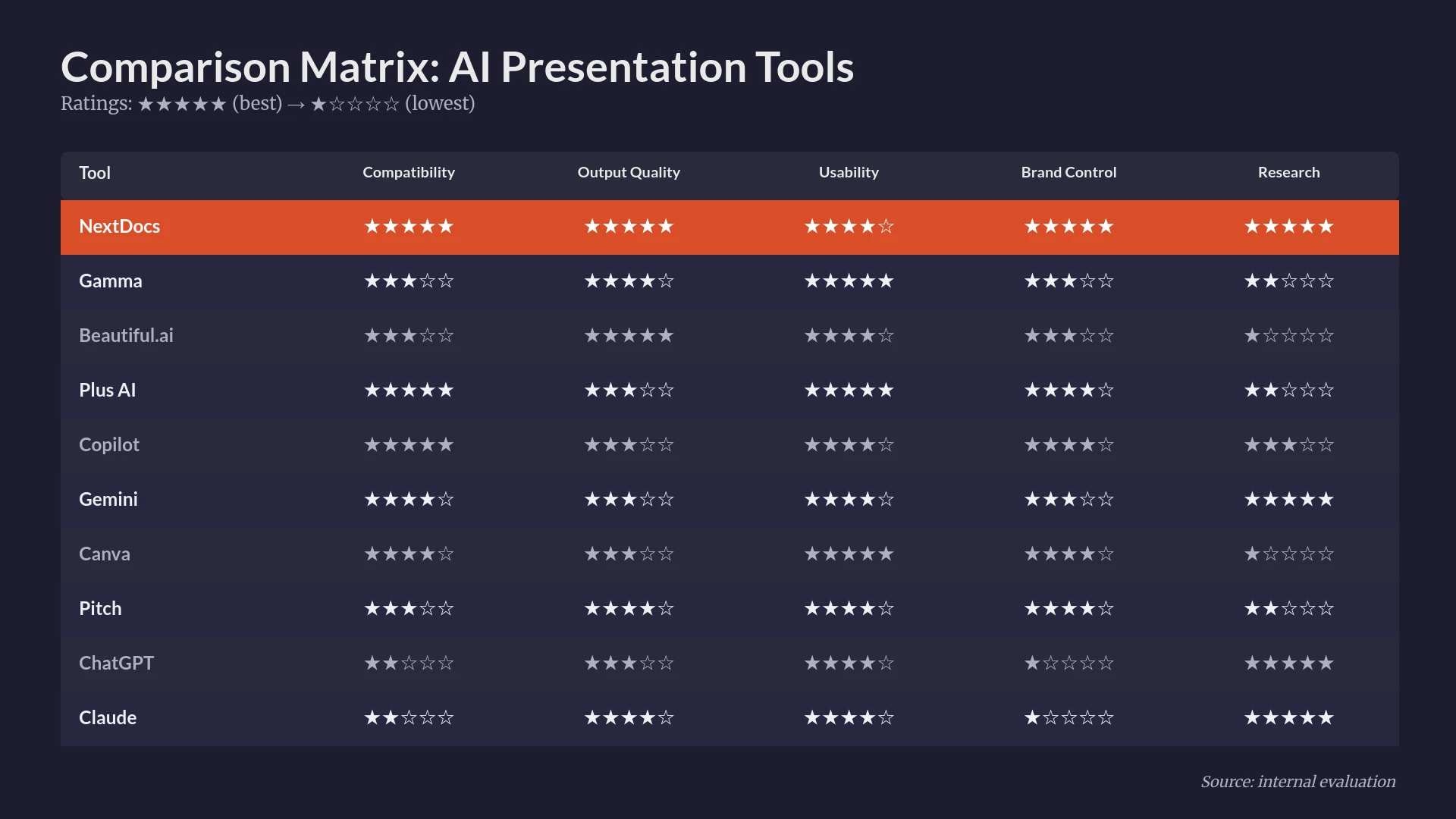
For enterprise users, the criteria for a top-tier tool have evolved. It is no longer enough to simply generate a few bullet points on a slide. Modern professionals require tools that understand organizational context, provide verified data, and offer flexible export options to maintain compatibility across global teams. Reliability and output variety are the new benchmarks for success.
In this guide, we evaluate the top 10 AI slide makers available today. We focus on tools that provide significant value to consultants, founders, and sales teams who cannot afford to settle for generic, AI-generated fluff.
Summary Comparison Table
| Rank | Tool | Best For | Starting Price |
|---|---|---|---|
| 1 | NextDocs | Overall Enterprise Use | $15/mo |
| 2 | Plus AI | Native Add-in Workflow | $10/mo |
| 3 | Copilot for PowerPoint | Microsoft 365 Security | $30/mo |
| 4 | Gemini for Google Slides | Workspace Power Users | $0/mo |
| 5 | Gamma | Modern Web Presentations | $8/mo |
| 6 | Beautiful.ai | Automated Design Quality | $12/mo |
| 7 | Pitch.com | Collaborative Team Work | $8/mo |
| 8 | Canva Magic Design | Visual Asset Libraries | $13/mo |
| 9 | MagicSlides | Repurposing Content | $8/mo |
| 10 | SlidesAI | Simple Internal Drafts | $10/mo |
1. NextDocs
NextDocs represents the pinnacle of AI-native presentation design for the enterprise sector. Unlike traditional tools that treat AI as a secondary feature, NextDocs is built around a multi-variant generation engine. This means that for every prompt, the system creates several distinct versions of the presentation. Users can select the narrative arc and visual style that best fits their specific meeting, which effectively eliminates the frustration of being stuck with a single, mediocre AI output.
The platform excels at research-heavy decks. It features a deep research integration that pulls real-world data and provides citations. This is a critical requirement for consultants and founders who need to back up their claims with facts rather than plausible-sounding hallucinations. Furthermore, its universal export capabilities allow teams to move seamlessly between PDF, PPTX, Google Slides, and Google Docs. For a deeper look at how this compares to other market leaders, you can read our best AI presentation builders 2026 roundup.
Key Features:
- Multi-variant generation for diverse layout and content choices.
- Deep research engine with automated citations and data sourcing.
- Universal exports to PowerPoint, Google Slides, and PDF.
- Brand styling controls that enforce company colors and typography.
- Multi-model support allowing users to leverage different AI engines.
Pricing: Free tier available. Pro plans start at $15 per month.
Best For: Consultants, founders, and sales teams who require research-backed, high-quality decks that can be exported to any format.
Verdict: NextDocs is the most robust tool for professionals who need more than just a template. Its ability to provide multiple options and verified data makes it the top choice for 2026.

2. Plus AI
Plus AI is widely recognized as the premier add-in for professionals who refuse to leave their native environment. It functions as a direct extension within Google Slides and PowerPoint. This approach is perfect for enterprise users who have existing templates and master slides that must be preserved. Plus AI does not try to reinvent the wheel. Instead, it adds a layer of intelligence to the tools you already use daily.
One of its most praised features is the remix tool. This allows users to take an existing slide and instantly transform its layout or tone while keeping the core information intact. It is especially useful for teams that need to update recurring reports or sales collateral. When deciding between a standalone tool and an add-in, many users find our comparison of NextDocs versus Plus AI particularly helpful for understanding the workflow differences.
Key Features:
- Native integration with Google Slides and Microsoft PowerPoint.
- Template preservation that respects existing master slides.
- Remix feature for instant slide layout transformations.
- AI-powered rewriting and content enhancement.
Pricing: No free tier. Starting at $10 per month.
Best For: Power users of PowerPoint and Google Slides who want AI assistance without changing their software ecosystem.
Verdict: The best choice for those who want to stay within traditional presentation software while gaining modern AI speed.

3. Copilot for PowerPoint
Microsoft Copilot for PowerPoint is the enterprise standard for organizations heavily invested in the Microsoft 365 ecosystem. Its primary strength lies in organizational context awareness. Because it has access to your company's documents, emails, and chats, it can generate presentations based on internal project data. This level of security and integration is often a requirement for large-scale corporate deployments.
While its design output can be somewhat conservative compared to standalone AI builders, its ability to generate speaker notes and summarize long internal documents into concise slides is unmatched. For those looking for more creative freedom, exploring alternatives to Copilot for PowerPoint might be necessary, as Microsoft tends to prioritize function over aesthetic flair.
Key Features:
- Deep integration with Microsoft 365 and SharePoint data.
- Enterprise-grade security and compliance protocols.
- Automated speaker notes based on slide content.
- Document-to-slide conversion from Word files.
Pricing: No free tier. Starting at $30 per month per user.
Best For: Large enterprises requiring maximum security and deep integration with Microsoft 365.
Verdict: A powerful, if expensive, utility for internal corporate communications and data-driven reporting.

4. Gemini for Google Slides
Gemini is Google's answer to the AI presentation race. It is built directly into Google Workspace, making it a frictionless choice for teams that live in Google Drive. Gemini excels at pulling content from other Workspace apps. If you have a project brief in Google Docs, Gemini can synthesize that information into a presentation outline and generate accompanying images within seconds.
The tool is still evolving, and while it is highly convenient, the design layouts can sometimes feel generic. It is a fantastic tool for quick internal drafts and brainstorming sessions. For a detailed breakdown of how it stacks up against more specialized tools, see our Gemini versus NextDocs comparison.
Key Features:
- Seamless integration with Google Workspace.
- Direct access to content within Google Drive.
- Built-in AI image generation for custom visuals.
- Real-time collaboration features familiar to Slides users.
Pricing: Free tier available. Starting at $0 for basic features with Workspace.
Best For: Google Workspace users who need a fast way to turn documents into slide drafts.
Verdict: The most convenient option for Google users, though it lacks the advanced design depth of standalone platforms.
5. Gamma
Gamma has gained a massive following by moving away from the traditional slide format in favor of a web-native experience. Instead of static pages, Gamma creates fluid "cards" that feel like a mix between a presentation and a modern website. This makes it an excellent choice for startups and internal teams that want to share decks via a link rather than a file attachment.
The platform is incredibly fast and features a very generous free tier. It is often compared to other design-forward tools, and you can see more in our Beautiful.ai vs Gamma analysis. While its export to PowerPoint has improved, the tool is best experienced in its native web format.
Key Features:
- Web-native format optimized for mobile and desktop viewing.
- Fast, prompt-based generation with modern themes.
- Interactive elements like embedded videos and forms.
- Simple, drag-and-drop editor for quick adjustments.
Pricing: Free tier available. Pro plans start at $8 per month.
Best For: Startups, marketing teams, and anyone looking for a modern, web-first presentation style.
Verdict: A refreshing departure from traditional slides that is perfect for digital-first communication.

6. Beautiful.ai
Beautiful.ai was one of the first players in the automated presentation space. Its core philosophy is "smart slides." Instead of traditional text boxes that you have to resize manually, Beautiful.ai uses templates that automatically adjust as you add content. This ensures that your slides always follow the rules of good design, regardless of how much text or data you include.
While its AI generation features have been updated, the tool remains focused on design constraints that prevent users from making "ugly" slides. This makes it a favorite for non-designers. If you find its templates too restrictive, you might consider alternatives to Beautiful.ai that offer more manual control.
Key Features:
- Smart templates that auto-adjust to content volume.
- Polished, professional design aesthetics out of the box.
- Advanced animation and transition capabilities.
- Brand kits for consistent enterprise identity.
Pricing: No free tier. Starting at $12 per month.
Best For: Non-designers who need to produce high-end, polished presentations for clients.
Verdict: The most reliable tool for ensuring every slide looks like it was made by a professional designer.
7. Pitch.com
Pitch.com focuses on the collaborative aspect of presentation building. It is designed for teams that need to work together in real-time. With features like version history, integrated commenting, and a vast library of professionally curated templates, it bridges the gap between a design tool and a project management platform.
Its AI capabilities help with initial drafting and slide layout suggestions, but the real power lies in its workflow. It is built for the "modern team" that values transparency and iterative design. It is a strong contender for companies that have moved away from the legacy Microsoft ecosystem.
Key Features:
- Superior real-time collaboration and commenting.
- Deep version history for tracking changes across teams.
- Extensive library of high-quality templates.
- AI-assisted slide generation and content suggestions.
Pricing: Free tier available. Starting at $8 per month.
Best For: Collaborative teams and startups that prioritize design and internal feedback loops.
Verdict: An excellent choice for organizations that value teamwork and modern aesthetics over traditional corporate file formats.
8. Canva Magic Design
Canva is a household name in design, and its Magic Design feature brings AI power to its massive library of assets. For enterprise users, Canva offers a "one-stop-shop" where you can create presentations, social media graphics, and print materials all in one place. The AI can take a simple prompt and generate a full deck using Canva's distinctive visual style.
The main drawback for some enterprise users is that Canva designs can occasionally look too "templated" or casual for high-stakes investor meetings. However, for marketing and internal communications, the sheer volume of available icons, photos, and videos is unbeatable.
Key Features:
- Access to millions of premium assets and templates.
- Multi-format exports including video and social media.
- AI-powered Magic Design for instant deck creation.
- Brand Hub for managing enterprise assets.
Pricing: Free tier available. Pro plans start at $13 per month.
Best For: Marketers and small business owners who need a wide variety of visual content.
Verdict: The best all-in-one visual suite, though it can feel less "corporate" than specialized presentation tools.
9. MagicSlides
MagicSlides is a specialized tool designed for content repurposing. One of its most unique features is the ability to turn a YouTube video or a long-form article directly into a presentation. This makes it a favorite for educators, trainers, and content creators who need to transform existing media into a digestible slide format.
While it lacks the sophisticated design engines of NextDocs or Beautiful.ai, it is highly efficient at the specific task of summarization and conversion. You can see how it compares to its closest rival in our MagicSlides vs SlidesAI comparison.
Key Features:
- Video-to-slide conversion from YouTube URLs.
- Document-to-slide transformations for long text.
- Simple, no-frills interface for quick drafting.
- Direct integration as a Google Slides add-on.
Pricing: Free tier available. Starting at $8 per month.
Best For: Trainers and content creators who frequently repurpose existing video or text content.
Verdict: A niche but highly effective tool for rapid content conversion.
10. SlidesAI
SlidesAI is another Google Slides add-on that focuses on speed and affordability. It is one of the most straightforward tools on this list. You paste your text, select a general style, and the AI generates the slides. It is perfect for students or professionals who need a "rough draft" to work from and do not require complex design features.
Because it is so simple, it can lack the creative depth found in other platforms. Users often find themselves needing to do significant manual cleanup. If you find its features too basic, there are many SlidesAI alternatives that offer more robust AI design capabilities.
Key Features:
- Fast text-to-slide generation.
- Easy-to-use interface within Google Slides.
- Support for multiple languages.
- Affordable pricing for individuals and students.
Pricing: Free tier available. Starting at $10 per month.
Best For: Quick internal presentations and students who need a starting point for their work.
Verdict: A solid, budget-friendly option for simple slide generation, though it lacks enterprise-grade polish.
Choosing the Right Tool for Your Workflow
Selecting the best AI slide maker in 2026 requires an honest assessment of your daily workflow. The tools listed above fall into three distinct categories:
Standalone Platforms
Tools like NextDocs and Gamma are built from the ground up to leverage AI. They offer the most creative freedom and the most powerful AI features, such as multi-variant generation and deep research. These are best for users who want the highest quality output and are willing to work in a new, albeit more powerful, interface.
Native Add-ins
Plus AI, Copilot, and Gemini are perfect for those who are already comfortable in PowerPoint or Google Slides. They bring AI to your existing workspace, which is ideal for maintaining legacy templates and ensuring that every team member can open and edit the files without learning new software.
Design and Collaboration Specials
Beautiful.ai and Pitch.com occupy a middle ground. They offer specialized design engines or collaboration features that make them stand out for specific use cases, such as client-facing work or team-based projects.
Final Verdict
For the modern enterprise professional, NextDocs stands out as the winner in 2026. Its multi-variant generation solves the "one-size-fits-all" problem that plagues most AI tools, and its universal export ensures you are never locked into a single ecosystem. Most importantly, its deep research capabilities provide the factual foundation that high-stakes presentations require.
If you are looking for a tool that lives inside your current software, Plus AI is the strongest add-on choice, while Copilot remains the necessary choice for organizations where security and Microsoft integration are the top priorities.
No matter which tool you choose, the era of staring at a blank white slide is officially over. AI has turned presentation building from a chore into a strategic exercise in curation and storytelling.
Ready to Create Better Presentations?
Try NextDocs Free and experience multi-variant generation, universal exports, and deep research integration. No credit card required.