

مقدمه
ایجاد یک دک پیتچ قبلاً فرآیندی طاقتفرسا بود که نیاز به روزها تحقیق، تخصص طراحی و تنظیمات بیپایان قالب داشت. در سال 2026، این چشمانداز بهطور کامل تغییر کرده است. هوش مصنوعی اکنون به مؤسسان، مشاوران و تیمهای فروش اجازه میدهد تا ارائههای حرفهای را در کسری از زمان تولید کنند. با این حال، همه ابزارهای ارائه هوش مصنوعی یکسان نیستند. برخی اسلایدهای کلی و تکراری تولید میکنند، در حالی که دیگران خروجیهای عمیقتحقیق، سازگار با برند و واقعی ارائه میدهند که واقعاً سرمایهگذاران را جذب میکند.
ما چندین هفته زمان صرف کردیم تا بیش از ۱۵ سازنده ارائه هوش مصنوعی را تست کنیم و ابزارهایی را که در سطح رایگان بهترین نتایج را میدهند شناسایی کنیم. این ابزارها را با استفاده از یک پرسشنامه استاندارد ارزیابی کردیم. هدف ساخت یک دک پیتچ ۱۰ اسلایدی برای یک استارتاپ خیالی B2B SaaS به نام DataFlow بود که خطوط داده را برای شرکتهای متوسط خودکار میکند. ما به دنبال جریان منطقی روایت، دادههای دقیق بازار و حرفهایگری بصری بودیم.
راهنمای زیر بر اساس تستهای دقیق ما، ۱۰ ابزار برتر را بررسی میکند. برای نگاهی گستردهتر به صنعت، میتوانید مرور best AI presentation builders 2026 ما را نیز ببینید.
جدول مقایسه خلاصه
| رتبه | ابزار | بهترین برای | قیمت شروع |
|---|---|---|---|
| 1 | NextDocs | کلی، تحقیق، چندفرمت | Free / $15/mo |
| 2 | Gemini for Google Slides | یکپارچگی با Google Workspace | Free / $0/mo |
| 3 | Gamma | ارائههای وب-محور | Free / $8/mo |
| 4 | Pitch.com | گردش کار تیمی تعاملی | Free / $8/mo |
| 5 | Canva Magic Design | تصاویر و داراییهای اجتماعی | Free / $13/mo |
| 6 | Claude | روایت و طرحریزی | Free / $20/mo |
| 7 | ChatGPT | طوفان فکری و ایدهپردازی | Free / $20/mo |
| 8 | Genspark | تحقیق عمیق وب | Free / $0/mo |
| 9 | MagicSlides | بازاستفاده از محتوای موجود | Free / $8/mo |
| 10 | SlidesAI | پیشنویس داخلی سریع | Free / $10/mo |
1. NextDocs
NextDocs به عنوان برترین پلتفرم سند و ارائه بومی هوش مصنوعی برجسته میشود. برخلاف ابزارهای سنتی که فقط هوش مصنوعی را بهعنوان یک ویژگی جانبی اضافه میکنند، NextDocs حول مفهوم تولید چندمتغیره ساخته شده است. وقتی یک پرسشنامه میدهید، سیستم چند نسخه متفاوت از دک را تولید میکند. این به شما اجازه میدهد تا قوس روایت یا سبک طراحی که بهترین تطابق را با دیدگاه شما دارد انتخاب کنید، بهجای اینکه مجبور به استفاده از یک خروجی ثابت باشید.
یکی از مهمترین قوتهای آن یکپارچهسازی عمیق تحقیق است. اکثر ابزارهای هوش مصنوعی آمارهای محتمل اما اغلب نادرست تولید میکنند. NextDocs ارقام واقعی بازار را همراه با ارجاعها استخراج میکند، که برای مؤسسانی که باید اندازه بازار خود را به سرمایهگذاران سری A ثابت کنند، بسیار ارزشمند است. علاوه بر این، پلتفرم صادرات جهانی ارائه میدهد. میتوانید یک بار دک را ایجاد کنید و آن را به PDF، PowerPoint، Google Slides یا Google Docs صادر کنید بدون اینکه قالببندی از دست برود. هنگام مقایسه NextDocs vs Plus AI، انعطافپذیری این گزینههای صادرات و عمق تحقیق، NextDocs را به انتخاب برتر برای جلسات پرمخاطره تبدیل میکند.
ویژگیهای کلیدی:
- تولید چندمتغیره برای انتخابهای متنوع چیدمان و محتوا.
- یکپارچهسازی تحقیق عمیق با دادههای واقعی و ارجاعها.
- صادرات جهانی به PDF، PPTX، Google Slides و Google Docs.
- کنترلهای قوی سبک برند برای اطمینان از رنگها و فونتهای سازگار شرکت.
- پشتیبانی از چند مدل که به کاربران اجازه میدهد بهترین هوش مصنوعی را برای نیازهای خاص خود انتخاب کنند.
قیمتگذاری: یک سطح رایگان سخاوتمندانه موجود است. برنامههای حرفهای از ۱۵ دلار در ماه شروع میشوند.
بهترین برای: مؤسسان، مشاوران و تیمهای فروش که به دکهای حرفهای و مبتنی بر تحقیق نیاز دارند و میتوانند در چندین قالب به اشتراک گذاشته شوند.
نتیجهگیری: NextDocs جامعترین ابزار موجود در بازار است. این ابزار نیاز به فازهای جداگانه تحقیق و طراحی را از بین میبرد و نتیجهای صیقلی و آماده برای سرمایهگذاران را در عرض چند دقیقه ارائه میدهد.

2. Gemini for Google Slides
Gemini دستیار هوش مصنوعی بومی گوگل است که مستقیماً در اکوسیستم Google Workspace یکپارچه شده است. برای کاربرانی که در Google Slides کار میکنند، این گزینه راحتترین است. این ابزار به شما اجازه میدهد اسلایدها را تولید کنید، تصاویر سفارشی بسازید و محتوا را بدون ترک کردن برگه مرورگر خلاصه کنید. چون به Google Drive شما دسترسی دارد، میتواند اسناد موجود را ارجاع دهد تا اطمینان حاصل شود دک پیتچ با دادههای پروژه فعلی شما همراستا باشد.
در حالی که یکپارچهسازی بینقص است، کیفیت خروجی گاهی میتواند ناپایدار باشد. طراحیها نسبت به سازندگان مستقل هوش مصنوعی تمایل به محافظهکاری و کلیگویی دارند. با این حال، برای پیشنویسهای سریع یا ارائههای داخلی، سرعت و عدم نیاز به منحنی یادگیری مزایای عمدهای هستند. اگر در حال ارزیابی Copilot PowerPoint vs SlidesAI 2026 هستید، خواهید دید Gemini تجربهای بسیار مشابه برای سمت Google ارائه میدهد.
ویژگیهای کلیدی:
- یکپارچهسازی بومی با Google Workspace و Google Drive.
- تولید تصویر هوش مصنوعی مستقیماً در ویرایشگر اسلاید.
- قابلیت خلاصهسازی اسناد طولانی به نکات اسلاید.
- نیازی به نصب نرمافزار اضافی نیست.
قیمتگذاری: برای کاربران استاندارد Workspace رایگان است. ویژگیهای پیشرفته نیاز به اشتراک Gemini دارند.
بهترین برای: کاربران Google Workspace که نیاز به ایجاد ارائههای داخلی سریع یا پیشنویس دارند.
نتیجهگیری: یک گزینه مناسب برای راحتی است، اگرچه فاقد طراحی پیشرفته و عمق تحقیق ابزارهای اختصاصی مانند NextDocs است.

3. Gamma
Gamma به دلیل رویکرد وب-محور خود در ارائهها محبوبیت یافته است. بهجای چسباندن به ابعاد ثابت اسلایدهای سنتی، Gamma از کارتهایی استفاده میکند که میتوانند بر اساس محتوا گسترش یا جمع شوند. این باعث میشود حس یک وبسایت مدرن یا سند Notion داشته باشد تا یک PowerPoint سنتی. این ابزار بهویژه برای بهاشتراکگذاری لینک مستقیم با مشتریان یا اعضای تیم مؤثر است.
سطح رایگان نسبتاً سخاوتمندانه است و به کاربران اجازه میدهد چندین ارائه با کیفیت بالا بدون پرداخت ایجاد کنند. با این حال، نسخه رایگان شامل واترمارک است و گزینههای صادرات به فرمتهای سنتی مانند PDF و PPTX محدودتر از نمای وب هستند. در تست ما، طراحیها مدرن و بصری جذاب بودند، اگرچه سفارشیسازی برند برای کاربران رایگان نسبتاً پایهای است.
ویژگیهای کلیدی:
- قالب وب-محور بهینهشده برای نمایش آنلاین.
- تولید سریع AI از پرامپتهای متنی ساده یا طرح کلی.
- عناصر تعاملی مانند ویدئوهای جاسازیشده و نمودارهای زنده.
- تمهای طراحی مدرن و مینیمالیست.
قیمتگذاری: سطح رایگان موجود است. برنامههای Plus از ۸ دلار در ماه شروع میشوند.
بهترین برای: استارتاپها و خالقانی که ترجیح میدهند ارائهها را از طریق لینک وب بهجای فایل به اشتراک بگذارند.
نتیجهگیری: Gamma بهترین گزینه برای کسانی است که به دنبال ظاهر مدرن و شیک با کمترین تلاش هستند، به شرطی که فرمت وب-محور را بپذیرند.

4. Pitch.com
Pitch.com به شدت بر جنبه همکاری در ساخت ارائهها تمرکز دارد. این ابزار برای تیمهایی طراحی شده است که نیاز به کار همزمان در زمان واقعی دارند. ویژگیهای هوش مصنوعی به تولید ساختار و محتوا اولیه کمک میکنند، اما قدرت واقعی در ویرایشگر نهفته است. این ویرایشگر شامل تاریخچه نسخهها، نظرات و تخصیص وظایف است و حس یک استودیوی طراحی حرفهای را میدهد.
قابلیتهای هوش مصنوعی مفید هستند اما اغلب کمتر پیشرفته از پلتفرمهای AI‑first به نظر میرسند. این ابزار بیشتر بهعنوان دستیار برای طراحی توسط انسان عمل میکند. اگر به دنبال Pitch alternatives هستید، ممکن است ابزارهای دیگر تولید سریعتر AI داشته باشند، اما کمّی از ابزارها جریان کاری تعاملی Pitch را ندارند.
ویژگیهای کلیدی:
- همکاری زمان واقعی با اعضای تیم.
- تاریخچه نسخه قوی و سیستمهای نظردهی.
- کتابخانه قالبهای حرفهای که توسط طراحان تهیه شده است.
- پیشنویس محتوا و تولید اسلاید با کمک هوش مصنوعی.
قیمتگذاری: سطح رایگان برای افراد موجود است. برنامههای Pro از ۸ دلار به ازای هر کاربر در ماه شروع میشوند.
بهترین برای: تیمهایی که ارزش همکاری و کنترل نسخه را بیش از تولید خودکار میدانند.
نتیجهگیری: یک انتخاب عالی برای تیمهای مستقر، اگرچه مؤسسان تنها ممکن است ویژگیهای AI را نسبت به رقبا کمی ساده ببینند.
5. Canva Magic Design
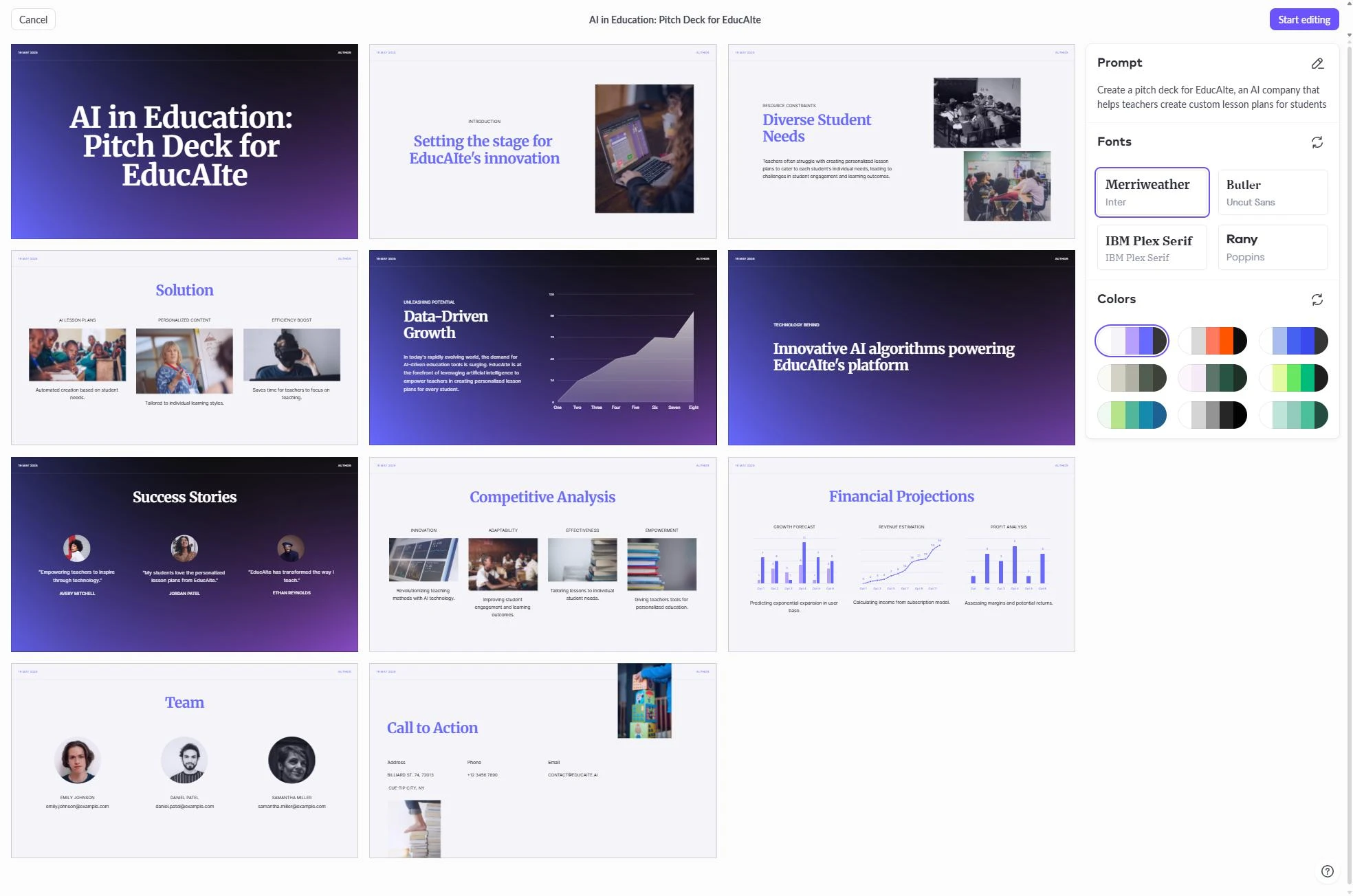
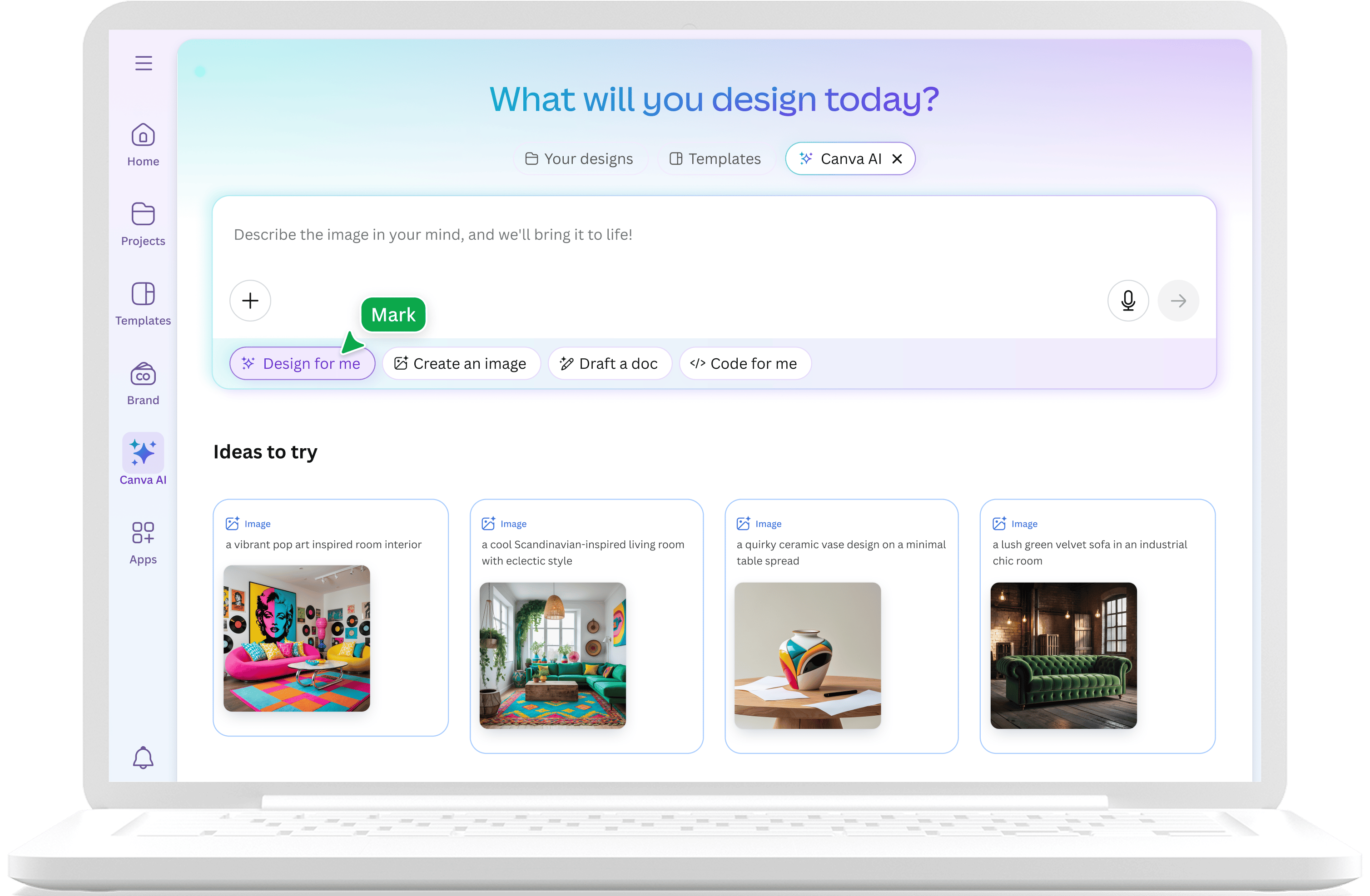
Canva امپراتوری طراحی خود را با هوش مصنوعی و Magic Design گسترش داده است. این ابزار از کتابخانه عظیم Canva شامل میلیونها آیکون، عکس و گرافیک بهره میبرد. وقتی از Canva میخواهید یک دک پیتچ ایجاد کنید، یک قالب انتخاب میکند و آن را با متن و تصاویر تولید شده توسط هوش مصنوعی پر میکند. این برای بازاریابانی که به سبک بصری خاصی نیاز دارند یا میخواهند داراییهای رسانهای اجتماعی را همراه با ارائه خود ایجاد کنند، ایدهآل است.
معایب اصلی این است که محتوای AI ممکن است سطحی بهنظر برسد. این ابزار در زیباسازی عالی است، اما در ساختار منطقی عمیق مورد نیاز برای یک ارائه سرمایهگذاری مهم، اغلب مشکل دارد. برای کسانی که به دنبال Canva alternatives با عمق فنی بیشتر هستند، NextDocs یا Gamma گزینههای بهتری هستند.
ویژگیهای کلیدی:
- دسترسی به کتابخانه عظیم داراییها و قالبهای طراحی.
- ابزار Magic Media برای تولید تصاویر و ویدئوهای هوش مصنوعی.
- تبدیل آسان بین ارائهها، پستهای اجتماعی و ویدئوها.
- رابط کاربری کشیدن و رها کردن شهودی.
قیمتگذاری: سطح رایگان قوی. Canva Pro از ۱۳ دلار در ماه شروع میشود.
بهترین برای: بازاریابان و مدیران رسانههای اجتماعی که به محتوای بصری و چندمنظوره نیاز دارند.
نتیجهگیری: عالی برای تأثیر بصری و سرعت، اما برای دکهای حرفهای با محتوای سنگین یا مبتنی بر داده کمتر مؤثر است.
6. Claude
Claude یک چتبات پیشرفته هوش مصنوعی از Anthropic است. اگرچه مستقیماً اسلایدهای بصری تولید نمیکند، اما بدون شک بهترین ابزار برای فاز برنامهریزی و طرحریزی یک دک پیتچ است. توانایی آن در استدلال درباره مدلهای تجاری پیچیده و ایجاد روایت متقاعدکننده بینظیر است. بسیاری از حرفهایها از Claude برای نوشتن اسکریپت کامل و طرحریزی اسلاید بهصورت گام به گام قبل از انتقال به ابزار بصری استفاده میکنند.
در مقایسه Claude vs NextDocs، Claude در استدلال متنی خالص و سازگاری با مخاطب برتری دارد. این ابزار میتواند کلمات دقیق برای توصیف ارزش پیشنهادی شما را پیدا کند. با این حال، چون بوم بصری ندارد، در نهایت باید کار خود را در برنامهای دیگر کپی‑پیست کنید.
ویژگیهای کلیدی:
- استدلال منطقی برتر و ساختاردهی روایت.
- توانایی تولید یادداشتهای سخنران دقیق و پاسخهای FAQ.
- عالی در تطبیق لحن برای انواع مختلف سرمایهگذار.
- پنجره زمینه طولانی برای پردازش حجم زیاد دادههای شرکت.
قیمتگذاری: سطح رایگان موجود است. Claude Pro ۲۰ دلار در ماه است.
بهترین برای: مؤسسانی که میخواهند داستان و منطق خود را قبل از استفاده از ابزار طراحی کامل کنند.
نتیجهگیری: یک ابزار همراه ضروری برای فاز فکری ساخت ارائه، اگرچه یک سازنده دک مستقل نیست.
7. ChatGPT
ChatGPT همچنان یک ابزار اساسی برای طوفان فکری و ایدهپردازی است. با انتشار GPT‑4o، این ابزار سریعتر و خلاقتر در تولید چارچوبهای جایگزین برای مشکلات تجاری شده است. این ابزار بهصورت گستردهای در دسترس است و برای پیشنویسهای سریع محتوا آسان است. مانند Claude، فایلهای اسلاید نهایی را بهصورت بومی تولید نمیکند، اگرچه برخی افزونهها و GPTها سعی در پر کردن این خلأ دارند.
مشکل اصلی ChatGPT برای دک پیتچ تمایل به تولید مشاوره کلی و آمارهای «توهمی» است. بهتر است بهعنوان یک بستر برای آزمایش ایدهها استفاده شود تا منبع اصلی دادهها. این ابزار در مراحل اولیه برای بررسی زوایای مختلف داستان استارتاپ شما مفید است.
ویژگیهای کلیدی:
- طوفان فکری سریع و چارچوببندی جایگزین ایدهها.
- مجموعه وسیعی از GPTهای سفارشی برای وظایف خاص ارائه.
- تولید تصویر یکپارچه از طریق DALL‑E 3.
- آسان برای تکرار بر روی پاراگرافها یا نکات خاص.
قیمتگذاری: سطح رایگان موجود است. اشتراک Plus ۲۰ دلار در ماه است.
بهترین برای: طوفان فکری عمومی و تولید سریع محتوا در مراحل اولیه یک پروژه.
نتیجهگیری: یک دستیار قدرتمند برای ایدهپردازی، اما برای تبدیل متن به یک ارائه حرفهای نیاز به کار دستی قابل توجهی دارد.
8. Genspark
Genspark یک عامل هوش مصنوعی متمرکز بر تحقیق عمیق و ترکیب دادهها است. در حالی که اکثر ابزارهای هوش مصنوعی به دادههای آموزش خود تکیه میکنند، Genspark بهعنوان یک پژوهشگر خودمختار عمل میکند که در وب جستجو میکند تا جدیدترین اطلاعات را پیدا کند. برای یک دک پیتچ، این ویژگی در ساخت بخشهای رقابتی یا جذب سرمایه بسیار ارزشمند است. میتواند رقبای شما را شناسایی کند، ویژگیهای آنها را تجزیه و تحلیل کند و نتایج را خلاصه کند.
این ابزار هنوز بهعنوان سازنده ارائه تکامل یافته است، بنابراین خروجیهای بصری اغلب پسزمینهای برای کیفیت تحقیق هستند. این یک ابزار سیستماتیک است که دقت را بر جلوههای بصری ترجیح میدهد. برای پروژههای سنگین تحقیق، پیشنیاز عالی برای استفاده از یک ویرایشگر بصری است.
ویژگیهای کلیدی:
- عوامل تحقیق وب خودمختار برای جمعآوری داده.
- تحلیل سیستماتیک رقبا و روندهای بازار.
- ترکیب چندین منبع در یک گزارش واحد.
- دقت بالا برای اسلایدهای مبتنی بر داده.
قیمتگذاری: سطح رایگان موجود است.
بهترین برای: حرفهایهای متمرکز بر تحقیق که نیاز به جمعآوری حجم زیادی داده قبل از ساخت اسلاید دارند.
نتیجهگیری: بهترین ابزار برای فاز تحقیق پیش از طراحی، که اطمینان میدهد دک شما بر پایه حقایق واقعی است.
9. MagicSlides
MagicSlides یک افزونه تخصصی برای Google Slides است که در بازاستفاده از محتوای موجود برتری دارد. اگر یک پست وبلاگ طولانی، یک ویدئو YouTube یا یک گزارش PDF داشته باشید، MagicSlides میتواند آن محتوا را به یک ارائه ساختاریافته تبدیل کند. این برای کسانی که قبلاً ایدههای خود را در جای دیگری مستند کردهاند، صرفهجویی زمانی عظیمی است.
در مقایسه MagicSlides vs NextDocs 2026، تفاوت اصلی تمرکز است. MagicSlides یک ابزار تبدیل است، در حالی که NextDocs یک پلتفرم جامع خلق است. MagicSlides بسیار ساده برای استفاده است، اما کیفیت طراحی پایهای است. پس از تولید اولیه احتمالاً نیاز به تنظیم لایهها و افزودن تصاویر دارید.
ویژگیهای کلیدی:
- تبدیل مستقیم ویدئوهای YouTube و URLها به اسلایدها.
- رابط کاربری ساده در نوار کناری Google Slides.
- تبدیل سریع اسناد متنی سنگین به نکات بولت.
- قیمت مناسب برای کاربران با حجم بالا.
قیمتگذاری: سطح رایگان موجود است. برنامههای Pro از ۸ دلار در ماه شروع میشوند.
بهترین برای: آموزگاران و سازندگان محتوا که نیاز به تبدیل ویدئوها یا مقالات موجود به ارائه دارند.
نتیجهگیری: یک ابزار عالی برای بازاستفاده از محتوا، اگرچه فاقد صیقلیسازی طراحی مورد نیاز برای ارائههای سرمایهگذاری سطح بالا است.

10. SlidesAI
SlidesAI یک افزونه محبوب دیگر برای Google Slides است که برای سرعت و سادگی طراحی شده است. این یکی از سادهترین ابزارهای موجود است. متن خود را وارد میکنید، نوع ارائه را انتخاب میکنید و اسلایدها برای شما تولید میشوند. این برای بهروزرسانیهای داخلی تیم یا پروژههای دانشجویی که هدف فقط انتقال سریع اطلاعات به صفحه نمایش است، ایدهآل است.
با این حال، سادگی آن همان محدودیت آن است. گزینههای سفارشیسازی کم است و طراحیها میتوانند تکراری بهنظر برسند. اگر به دنبال SlidesAI alternatives هستید، خواهید دید ابزارهایی مانند NextDocs کنترل و ظاهر نهایی بیشتری ارائه میدهند.
ویژگیهای کلیدی:
- تولید سریع از ورودی متن.
- یکپارچهسازی بینقص با Google Slides.
- پشتیبانی از چندین زبان.
- منحنی یادگیری بسیار پایین.
قیمتگذاری: سطح رایگان موجود است. برنامههای Pro از ۱۰ دلار در ماه شروع میشوند.
بهترین برای: کاربرانی که به پیشنویس سریع برای جلسات داخلی نیاز دارند و نمیخواهند پلتفرم جدیدی یاد بگیرند.
نتیجهگیری: یک ابزار کاربردی برای نیازهای پایه، اما فاقد پیچیدگی سازندگان برتر این فهرست است.

نتیجهگیری
بهترین سازنده دک پیتچ هوش مصنوعی برای شما بستگی به جریان کاری خاص شما دارد. اگر مؤسس یا مشاوری هستید که به اسلایدهای با کیفیت بالا، مستندات تحقیقاتی و ظاهر حرفهای در هر قالبی نیاز دارید، NextDocs واضحاً برتر است. تولید چندمتغیره و قابلیتهای صادرات جهانی آن، رایجترین مشکلات مرتبط با ابزارهای هوش مصنوعی را حل میکند.
برای کسانی که سرعت را در اولویت دارند و بهطور کامل در اکوسیستم Google زندگی میکنند، Gemini for Google Slides انتخاب طبیعی است. اگر به دنبال ظاهر مدرن وب‑محور هستید، Gamma گزینه عالی دیگری است. برای کار عمیق روایت، ترکیبی از Claude برای طرحریزی و یک ابزار بصری برای طراحی اغلب بهترین نتایج را میدهد.
صرفنظر از ابزاری که انتخاب میکنید، هوش مصنوعی امکان تمرکز بیشتر بر ایدههای شما و کمتر بر مکانیکهای خستهکننده طراحی اسلاید را فراهم کرده است. کلید استفاده از این ابزارها بهعنوان نقطه شروع، افزودن بینشهای منحصربهفرد و لمس شخصی شما برای خلق یک پیتچ واقعاً جذاب است.
آمادهاید تا ارائههای بهتری بسازید؟
برای تجربه تولید چندمتغیره، صادرات جهانی و یکپارچهسازی تحقیق عمیق، NextDocs را بهصورت رایگان امتحان کنید. کارت اعتباری لازم نیست.