

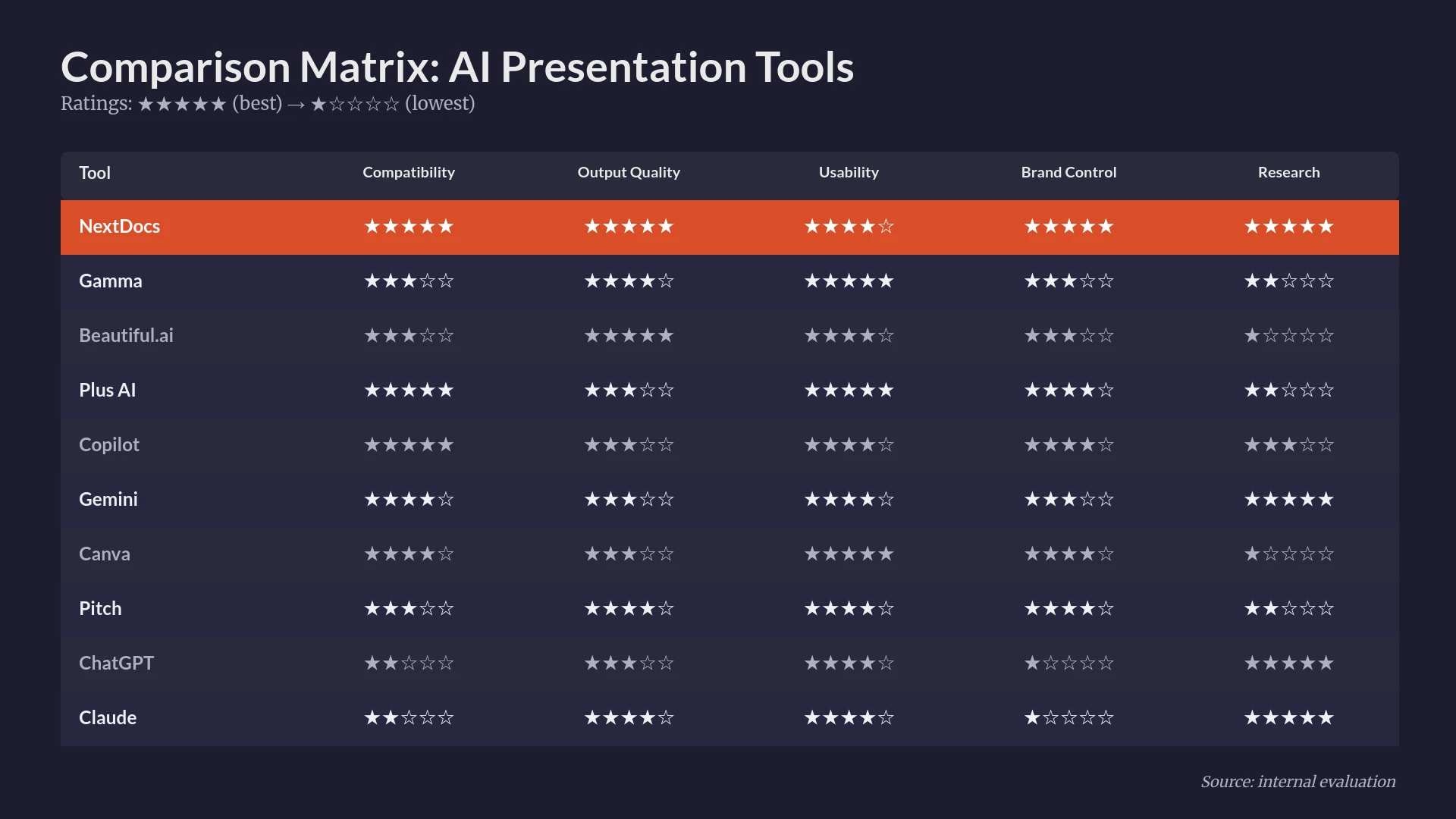
The Evolution of Enterprise Presentations in 2026
The landscape of corporate communication has shifted dramatically. Gone are the days of manual slide formatting and pixel-pushing. In 2026, enterprise teams are leveraging artificial intelligence to handle the heavy lifting of slide creation, data visualization, and narrative structuring. For large organizations, the requirements for a presentation tool go far beyond simple text-to-slide generation. Enterprise leaders demand strict brand adherence, robust security protocols, and the ability to integrate with existing data silos.
In this roundup, we evaluate the top 10 AI tools that function as PowerPoint add-ins or enterprise-grade standalone solutions with seamless export capabilities. We tested these tools based on their ability to handle complex prompts, maintain professional design standards, and support the collaborative workflows required by modern business teams. Whether you are a consultant building a high-stakes pitch or a sales lead preparing a quarterly review, these tools represent the pinnacle of current AI presentation technology.
Summary Comparison Table
| Rank | Tool | Best For | Starting Price |
|---|---|---|---|
| 1 | NextDocs | Research-heavy decks and multi-variant generation | $15/mo |
| 2 | Plus AI | Native integration and template preservation | $10/mo |
| 3 | Copilot for PowerPoint | Microsoft 365 ecosystem and org-context awareness | $30/mo |
| 4 | Beautiful.ai | Polished design for non-designers | $12/mo |
| 5 | Gamma | Modern, web-native interactive presentations | $8/mo |
| 6 | Gemini for Google Slides | Google Workspace users and quick internal drafts | Free / $20/mo |
| 7 | Pitch.com | Collaborative team workflows and version control | $8/mo |
| 8 | Canva Magic Design | Visual marketing and multi-format content | $13/mo |
| 9 | SlidesAI | Fast generation for simple internal decks | $10/mo |
| 10 | MagicSlides | Content repurposing from YouTube and documents | $8/mo |
1. NextDocs
NextDocs takes the top spot because it solves the fundamental problem of AI generation: the "take it or leave it" output. Instead of providing a single version of a deck, NextDocs utilizes multi-variant generation to provide several different interpretations of your prompt. This allows enterprise users to choose the narrative arc and visual style that best fits their specific meeting context.
The tool is particularly powerful for research-heavy decks. Its deep research integration pulls actual data with citations, which is a critical requirement for consultants and founders who cannot risk hallucinated statistics. Furthermore, its universal export feature allows you to move your work seamlessly between PDF, PowerPoint, Google Slides, and Google Docs. For a detailed comparison of how this compares to other market leaders, you can read our breakdown of nextdocs vs plus ai.
Key Features:
- Multi-variant generation for diverse slide options.
- Deep research capabilities with cited data sources.
- Universal exports to PPTX, Google Slides, and PDF.
- Brand styling controls that enforce company colors and fonts.
- Multi-model support allowing users to leverage different AI engines.
Pricing: Free tier available. Paid plans start at $15 per month.
Who it is best for: Consultants, founders, and sales teams who need high-accuracy, research-backed presentations that can be exported to any format.
Verdict: NextDocs is the most comprehensive solution for professionals who need more than just a template. It is the gold standard for quality and flexibility in 2026.

2. Plus AI
Plus AI is a dedicated add-in that lives directly within PowerPoint and Google Slides. Its primary strength is its ability to work within your existing templates. Most AI tools struggle to respect a company’s pre-built master slides, but Plus AI is designed to preserve those structures while generating new content.
The "remix" feature is a standout for enterprise users. It allows you to take an existing slide and transform it into a different layout while keeping the content intact. This makes it an excellent choice for teams that already have a large library of assets and simply want to speed up the drafting process. If you are deciding between this and Microsoft's native offering, see our copilot powerpoint vs plus ai guide.
Key Features:
- Native integration with PowerPoint and Google Slides.
- Template preservation that respects your master slides.
- Remix feature for instant layout transformations.
- AI-powered rewriting and content enhancement.
Pricing: No free tier. Plans start at $10 per month.
Who it is best for: PowerPoint power users and enterprise teams who have strict existing templates and do not want to leave their familiar software environment.
Verdict: Plus AI is the best "true" add-in for users who want AI as a feature inside PowerPoint rather than a separate platform.

3. Copilot for PowerPoint
Microsoft Copilot is the internal enterprise choice for organizations already fully committed to the Microsoft 365 ecosystem. Its greatest advantage is organizational context. Because it has access to your SharePoint and OneDrive, it can pull information from a Word document or an Excel sheet to create a presentation automatically.
While it is one of the more expensive options, the enterprise-grade security and compliance are unmatched. It follows the same data protection rules as the rest of your Microsoft tenant. However, for those looking for more creative layouts, you might explore copilot powerpoint vs magicslides to see how it compares to more specialized tools.
Key Features:
- Deep integration with the entire Microsoft 365 suite.
- Organizational context awareness via Graph API.
- Automatic speaker note generation.
- Enterprise-grade security and data privacy.
Pricing: Starting at $30 per user per month. Requires a Microsoft 365 Business or Enterprise license.
Who it is best for: Large enterprises that prioritize security and need to generate slides based on internal company data.
Verdict: Copilot is the safest bet for IT departments, though it can sometimes be more conservative in its design and creative output.

4. Beautiful.ai
Beautiful.ai focuses on the "smart template" philosophy. Instead of giving you a blank canvas, it provides slides that have "rules." When you add more text or another image, the slide automatically adjusts its layout to maintain perfect proportions. This makes it nearly impossible for a non-designer to create an ugly presentation.
For enterprise teams, this ensures a high level of visual consistency across the organization. It is a strong contender for those who find PowerPoint too manual and prone to formatting errors. If you find the templates too restrictive, you might consider looking at beautiful ai alternatives that offer more manual control.
Key Features:
- Smart templates that auto-adjust as content is added.
- Designer-level animations and transitions.
- Robust brand kits to lock in corporate identity.
- Integration with Slack and Dropbox.
Pricing: No free tier. Starting at $12 per month for individuals. Team plans are also available.
Who it is best for: Non-designers who need to produce high-quality, polished client presentations without spending hours on formatting.
Verdict: Beautiful.ai is the best tool for ensuring design quality across a team, even if those team members have no design background.

5. Gamma
Gamma represents a shift away from traditional slides toward a more web-native format. While it can export to PowerPoint, it is most effective when used as an interactive, scrollable document. This is highly effective for internal company updates or modern pitch decks that are shared via a link.
Gamma’s AI is incredibly fast and produces modern, aesthetically pleasing results in seconds. It is a favorite for startups and marketing teams who want to break away from the "death by bullet point" style of traditional presentations. For those comparing creative tools, our canva vs gamma 2026 review highlights the differences in their design philosophies.
Key Features:
- Web-native, interactive presentation format.
- Fast AI generation from a single prompt or outline.
- One-click themes and styling.
- Embeddable content like videos and live data.
Pricing: Free tier available. Pro plans start at $8 per month.
Who it is best for: Startups, marketing teams, and those who prefer sharing interactive links over static PDF files.
Verdict: Gamma is the most innovative tool on this list, perfect for those who want to modernize their presentation style.

6. Gemini for Google Slides
Gemini is Google’s answer to Copilot. For teams that live in Google Workspace, Gemini provides a seamless way to generate images and text directly within the Slides interface. It is particularly adept at referencing content from your Google Drive, such as meeting notes or project briefs.
While it is still maturing compared to standalone AI tools, its convenience for Workspace users is high. It is a solid choice for quick internal drafts. To see how this fits into the broader market, check out our best ai presentation builders 2026 roundup.
Key Features:
- Native integration within the Google Workspace sidebar.
- Image generation directly on the slide.
- Content referencing from Google Drive and Gmail.
- Real-time collaboration features.
Pricing: Included in Google Workspace AI subscriptions, starting at $20 per month.
Who it is best for: Organizations that are fully committed to Google Workspace and need a quick way to draft internal presentations.
Verdict: A convenient but sometimes generic tool that is best for speed rather than high-end design.

7. Pitch.com
Pitch.com has long been a favorite for its collaborative features. In 2026, its AI capabilities have caught up to its design prowess. It offers a very balanced approach: the AI handles the initial draft and layout, but the manual editor is powerful enough for professional designers to fine-tune every detail.
The platform excels at version control and team feedback. If you are moving away from Pitch, you can find several pitch alternatives that offer similar collaborative features.
Key Features:
- Real-time collaboration with integrated video and commenting.
- Version history and status tracking for slides.
- Professional-grade template library.
- AI-driven content generation and slide expansion.
Pricing: Free tier available. Pro plans start at $8 per month.
Who it is best for: Remote-first teams and collaborative groups that need to work together on high-stakes decks.
Verdict: Pitch remains the best tool for the "work together" aspect of presentation building, now enhanced by capable AI.
8. Canva Magic Design
Canva has become a staple in the enterprise marketing world. Its Magic Design feature allows users to upload a document or enter a prompt and receive a fully designed presentation in seconds. The strength of Canva is its asset library, which includes millions of stock photos, icons, and videos.
While it is excellent for visual storytelling, it can sometimes struggle with complex data or highly technical content. It is a tool built for marketers first.
Key Features:
- Enormous library of stock assets and templates.
- Multi-format exports for social media and video.
- Magic Switch for changing slide dimensions instantly.
- Simple, drag-and-drop interface.
Pricing: Free tier available. Canva Pro for teams starts at $13 per month.
Who it is best for: Marketers and social media managers who need highly visual, multi-purpose content.
Verdict: Canva is the king of visual variety and asset access, though it lacks the deep research capabilities of tools like NextDocs.
9. SlidesAI
SlidesAI is a straightforward Google Slides add-in that focuses on text-to-presentation conversion. It is designed for users who have a long document or a large block of text and need it summarized into a slide format quickly.
It is one of the more affordable options on the market, making it popular for students and small business users. For those looking for more features, check out our list of slidesai alternatives.
Key Features:
- Simple text-to-slide generation.
- Multi-language support.
- Direct integration with Google Slides.
- Customizable color palettes.
Pricing: Free tier available. Pro plans start at $10 per month.
Who it is best for: Users who need a quick, no-frills way to turn text into a basic presentation draft.
Verdict: SlidesAI is functional and affordable, but it lacks the design sophistication of the higher-ranked tools.
10. MagicSlides
MagicSlides specializes in content repurposing. One of its unique features is the ability to take a YouTube URL and turn the video’s transcript into a presentation. This is incredibly useful for training departments and educators who need to create materials from existing video content.
Key Features:
- YouTube-to-Slides conversion.
- Support for generating slides from PDFs and URLs.
- Simple, prompt-based generation.
- Basic customization options.
Pricing: Free tier available. Paid plans start at $8 per month.
Who it is best for: Educators, trainers, and content creators who need to repurpose existing media into slide decks.
Verdict: A niche tool that is exceptionally good at its specific use case of content repurposing.
How to Choose the Right AI Add-In for Your Enterprise
Selecting the right tool depends on your existing software stack and the complexity of your presentations. For organizations that require the highest level of accuracy and the most flexible export options, NextDocs is the clear winner. Its ability to provide multiple variants and cited research data makes it a professional-grade tool that stands apart from the more generic generators.
If your team is unwilling to leave the PowerPoint interface, Plus AI or Microsoft Copilot are the logical choices. Plus AI offers better design flexibility and template adherence, while Copilot offers better integration with internal company data.
For those who prioritize design above all else, Beautiful.ai ensures that every slide meets a high visual standard without requiring a graphic designer on staff. Meanwhile, teams that work collaboratively across time zones will find Pitch.com to be the most robust platform for their needs.
Conclusion
The "best" AI presentation tool is no longer just the one that generates the fastest slides. It is the one that fits into your professional workflow, respects your brand, and provides accurate content. In 2026, the market has matured to offer specialized solutions for every type of professional.
We recommend starting with NextDocs for any high-stakes or research-heavy project. Its multi-variant approach ensures that you are never stuck with a "hallucinated" or poorly structured deck. For simpler internal needs, the native add-ins like Plus AI or Copilot provide a convenient path to increased productivity.
Ready to Create Better Presentations?
Try NextDocs Free and experience multi-variant generation, universal exports, and deep research integration. No credit card required.