

The landscape of professional communication has shifted permanently. Creating a presentation is no longer a test of your ability to align text boxes or hunt for high resolution icons. Instead, it has become a strategic exercise in prompting and refining. AI presentation builders have evolved from simple text to slide converters into sophisticated partners that can research, draft, and design entire decks in seconds.
For professionals, the challenge is no longer finding an AI tool, but finding the right one that fits into an existing workflow. Whether you are a founder preparing for a high stakes investor meeting, a consultant delivering a market analysis, or a sales lead building a client proposal, the tool you choose determines how much time you spend on manual formatting versus high level strategy.
In this guide, we evaluate the best free AI presentation builders available in 2026. We tested these tools based on their ability to handle complex prompts, the quality of their research, and how easily they allow you to move your work between different platforms. If you are looking for a more general overview, you can also check our best AI presentation builders roundup.
Summary Comparison Table
| Rank | Tool | Best For | Starting Price |
|---|---|---|---|
| 1 | NextDocs | Overall, Research, and Multi-Format Exports | Free / $15/mo |
| 2 | Gemini for Google Slides | Native Google Workspace Integration | Free / $0/mo |
| 3 | Gamma | Modern Web-Native Presentations | Free / $8/mo |
| 4 | Pitch.com | Collaborative Team Workflows | Free / $8/mo |
| 5 | Canva Magic Design | Visuals, Marketing, and Assets | Free / $13/mo |
| 6 | Claude | Narrative Planning and Outlining | Free / $20/mo |
| 7 | ChatGPT | Rapid Brainstorming and Ideation | Free / $20/mo |
| 8 | Genspark | Deep Research and Data Compilation | Free / $0/mo |
| 9 | MagicSlides | Content Repurposing and YouTube to Slides | Free / $8/mo |
| 10 | SlidesAI | Quick Internal Drafts for Students | Free / $10/mo |
1. NextDocs
NextDocs stands at the top of our ranking because it solves the most common frustration with AI presentation tools: the "take it or leave it" output. While most tools generate one version of a deck and force you to manually fix it, NextDocs utilizes multi-variant generation. This means for every prompt you provide, the AI creates several distinct versions. One might focus on a narrative approach, another on data-heavy visuals, and a third on a minimalist executive summary. This allows you to choose the best starting point or mix and match elements from different variants.
The tool is built for professionals who cannot afford to be locked into a single ecosystem. It offers universal exports, allowing you to move your presentation into PDF, PPTX, Google Slides, or even Google Docs without losing your formatting. This is particularly useful for consultants who need to provide different file types to different clients. Furthermore, the deep research integration ensures that the content is not just plausible, but accurate. It pulls real data with citations, which is a massive upgrade over the generic hallucinations common in other models. For a detailed look at how it stacks up against competitors, read our nextdocs vs pitch comparison.
Key Features:
- Multi-variant generation that provides multiple deck options for every prompt.
- Deep research capabilities that pull real-world data and citations.
- Universal exports to PDF, PPTX, Google Slides, and Google Docs.
- Multi-model support allowing you to choose the underlying AI engine.
- Brand styling tools to ensure consistency with company guidelines.
Pricing: Free tier available. Paid plans start at $15 per month.
Best For: Founders, consultants, and sales teams who need research-heavy, professional decks that can be exported anywhere.
Verdict: NextDocs is the most comprehensive tool on the market. It treats AI as a creative partner rather than just a formatting script.

2. Gemini for Google Slides
Gemini is Google's native answer to AI assisted slide creation. As an add-in for Google Workspace, it is the most convenient option for those who already live in Google Drive. Its primary strength is its ability to access your existing documents. If you have a project brief in Google Docs, Gemini can summarize it and transform it directly into a slide deck.
While the integration is seamless, the design quality can be inconsistent. The layouts are often generic, and the AI sometimes struggles with complex visual hierarchies. However, for internal meetings where speed is more important than bespoke design, it is an excellent tool. You can see how it compares to other add-ins in our gemini google slides vs slidesai guide.
Key Features:
- Native integration with the entire Google Workspace ecosystem.
- Direct access to Drive content for slide generation.
- Built-in image generation to create custom visuals on the fly.
- Real-time collaboration features inherited from Google Slides.
Pricing: Free tier available through Workspace. Advanced features start at $0 per month depending on your subscription level.
Best For: Google Workspace power users who need quick drafts for internal presentations.
Verdict: It is the best "no-friction" tool for Google users, though it lacks the sophisticated design and research depth of NextDocs.

3. Gamma
Gamma has gained a massive following because of its generous free tier and its departure from traditional slide constraints. Instead of being limited by a 16:9 box, Gamma creates web-native presentations that feel more like interactive documents. This makes it a favorite for startups and modern teams who share their decks via links rather than as email attachments.
The tool is incredibly fast. You can type a single sentence and have a 10-slide deck with images and themes in under thirty seconds. However, this web-native format can be a double-edged sword. While it looks great in a browser, the exports to PDF or PPTX can sometimes feel a bit clunky or lose their interactive charm. For those seeking alternatives, we have a list of canva alternatives that offer similar design flexibility.
Key Features:
- Web-native format that allows for embedded videos and interactive elements.
- Extremely fast generation from simple prompts.
- Modern, clean themes that require almost no manual adjustment.
- One-click sharing via public or private links.
Pricing: Free tier available. Pro plans start at $8 per month.
Best For: Budget-conscious users and startups who want to share modern, interactive presentations online.
Verdict: Gamma is the best choice for those who want a "cool" looking presentation with zero design effort, provided they do not mind the web-first format.

4. Pitch.com
Pitch.com is built with teams in mind. While it has recently added powerful AI generation features, its core strength remains its collaboration engine. It offers real-time editing, version history, and a sophisticated commenting system that makes it easy for a group to build a deck together.
The AI in Pitch is great for generating the initial structure and finding relevant templates. However, it is less of an "autonomous builder" and more of an "AI-assisted editor." It provides a library of professional templates that are arguably the best in the industry. If you want to see how it compares to Microsoft's offerings, check out the copilot powerpoint vs magicslides breakdown.
Key Features:
- World-class collaboration tools including live cursors and comments.
- A vast library of professionally designed templates.
- Version history that allows you to revert changes easily.
- Strong brand kit management for team-wide consistency.
Pricing: Free tier available. Paid plans start at $8 per month.
Best For: Teams that need to collaborate on high-stakes presentations and value version control.
Verdict: Pitch is the most "stable" and professional-feeling platform for teams, though its AI is slightly less experimental than competitors.
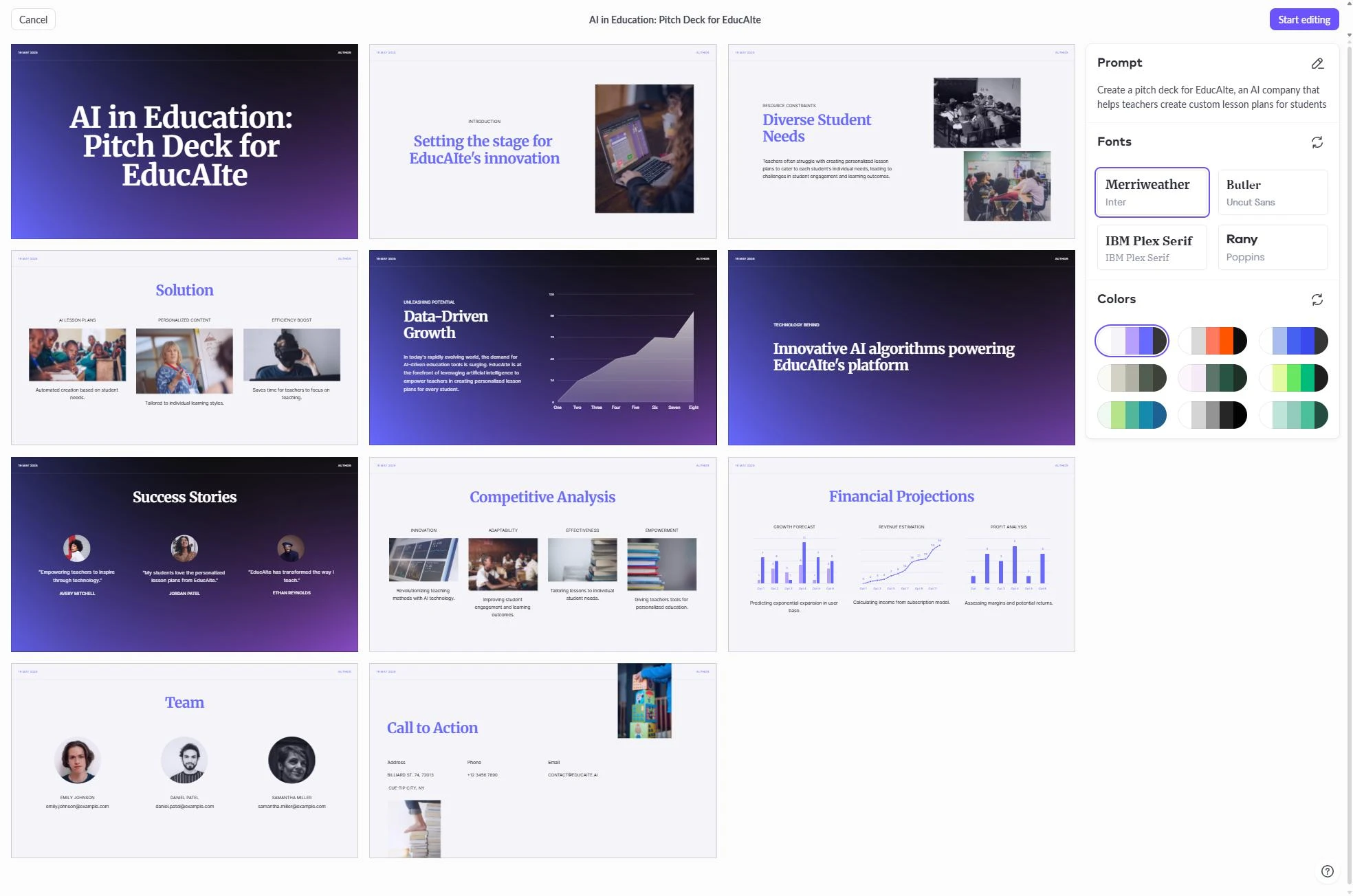
5. Canva Magic Design
Canva is a design powerhouse that has successfully integrated AI into its presentation workflow. Magic Design allows you to upload a file or type a prompt and receive a fully designed presentation. The biggest advantage here is the sheer volume of assets. You have access to millions of photos, icons, and videos that can be dropped into your slides instantly.
The downside to Canva is that the AI can sometimes feel like it is just skinning a template rather than understanding the content. It is excellent for marketing decks and social media presentations, but it may lack the professional "gravity" required for a technical sales pitch or a financial report.
Key Features:
- Access to the largest library of design assets in the world.
- Magic Switch feature to turn presentations into social posts or documents.
- Easy to use drag-and-drop editor that requires no training.
- Strong free tier that includes many AI features.
Pricing: Free tier available. Canva Pro starts at $13 per month.
Best For: Marketers and social media managers who need highly visual, asset-rich presentations.
Verdict: Canva is the king of visual variety. If you need your deck to look like a piece of high-end marketing collateral, this is the tool.
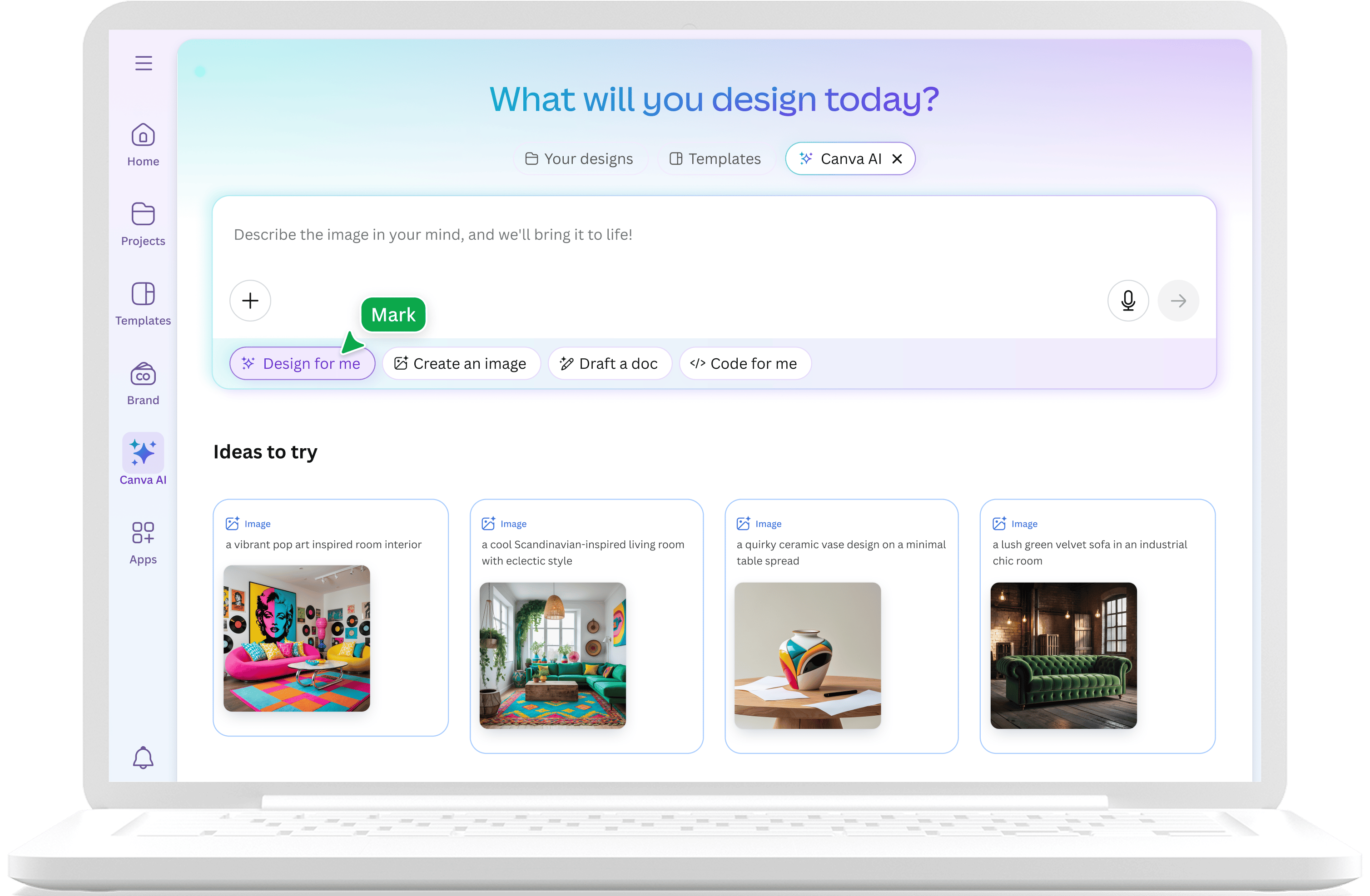
6. Claude
While Claude does not have a native slide editor, it is widely considered one of the best tools for the "pre-design" phase of a presentation. Anthropic's model is exceptional at structured planning and narrative flow. If you give Claude a messy pile of data, it can organize it into a logical 10-slide outline with specific speaker notes and audience adaptation.
Many professionals use Claude to build the "brain" of their presentation before moving the text into a tool like NextDocs or Google Slides. It excels at maintaining a consistent tone and ensuring that the argument of the presentation actually makes sense. You can see how this workflow compares to others in our best ai presentation builders 2026 blog.
Key Features:
- Superior reasoning for complex narrative structures.
- Ability to generate detailed speaker notes for every slide.
- Large context window to process massive amounts of research data.
- Highly steerable tone for different types of audiences.
Pricing: Free tier available. Pro plans start at $20 per month.
Best For: Planning, outlining, and creating the narrative "skeleton" of a deck.
Verdict: Claude is the best "writing partner" for presentations, even if it cannot handle the final visual design.
7. ChatGPT
ChatGPT remains the go-to for rapid brainstorming. With its vast array of plugins and GPTs, it can assist in everything from market research to generating VBA code for PowerPoint. It is particularly useful for finding alternative framings for a slide. If you are stuck on a "Problem" slide, ChatGPT can give you five different ways to describe that problem to five different audiences.
However, like Claude, it lacks a native visual editor. It is a text-first tool that requires you to copy and paste your results elsewhere. For those looking for a more integrated experience, you might want to explore slidesai alternatives.
Key Features:
- Rapid ideation and brainstorming capabilities.
- Access to specialized GPTs for presentation design and research.
- Integration with DALL-E for quick image generation.
- Strong community support and prompt libraries.
Pricing: Free tier available. Plus plans start at $20 per month.
Best For: Early-stage ideation and finding creative angles for your content.
Verdict: A versatile tool that every presenter should have in their toolkit, even if it is not a dedicated slide builder.
8. Genspark
Genspark is an AI agent that focuses on the research side of presentations. Instead of just writing text, it acts as an autonomous researcher that scours the web to compile data, charts, and competitive analyses. For a consultant or a researcher, this is invaluable. It helps you build the "meat" of the presentation with verified information.
The output from Genspark is often a structured report or a data set that you then need to visualize. It is a specialized tool that sits at the beginning of the presentation workflow. To see how it compares to newer experimental tools, look at our nano banana pro vs nextdocs 2026 review.
Key Features:
- Autonomous web research and data compilation.
- Multi-tool integration to pull data from various sources.
- Focus on accuracy and systematic analysis.
- Ability to handle very broad or very niche research topics.
Pricing: Free tier available. Pricing for advanced agents varies.
Best For: Research-heavy projects and systematic data analysis.
Verdict: If your presentation requires deep, verified data that goes beyond a standard Google search, Genspark is the tool to use.
9. MagicSlides
MagicSlides is a Google Slides add-on that specializes in content repurposing. Its most famous feature is the ability to turn a YouTube video URL into a presentation. It can also take long PDF documents or articles and summarize them into a slide format. This makes it a favorite for educators and trainers who need to turn existing materials into visual aids quickly.
While the design is relatively basic, the time saved on summarization is significant. It is a utility tool designed for speed and repurposing rather than high-end design. If you are looking for other ways to speed up your work, check out our magicslides alternatives list.
Key Features:
- YouTube to slides conversion.
- Text summarization for quick deck creation.
- Simple interface that lives inside Google Slides.
- Support for multiple languages.
Pricing: Free tier available. Pro plans start at $8 per month.
Best For: Educators, trainers, and anyone needing to repurpose video or long-form text.
Verdict: A great niche tool for specific repurposing tasks, though not a full-featured design platform.
10. SlidesAI
SlidesAI is another popular Google Slides add-on that focuses on the "First Draft" problem. You paste in a chunk of text, and it distributes that text across slides with relevant images and layouts. It is simple, affordable, and gets the job done for basic needs.
It ranks tenth because while it is functional, it lacks the advanced features like multi-variant generation or deep research found in tools like NextDocs. It is a solid choice for students or for those who need to make a very simple internal deck.
Key Features:
- Fast generation from text input.
- Seamless Google Slides integration.
- Affordable pricing for individuals.
- Basic image and icon suggestions.
Pricing: Free tier available. Pro plans start at $10 per month.
Best For: Students and individuals who need a quick, no-frills first draft.
Verdict: A reliable, basic tool for those who want to automate the most tedious parts of slide creation without a steep learning curve.
Choosing the Right Tool for Your Workflow
Selecting the right AI presentation builder depends on your specific output requirements. If you are in a high-stakes environment where the quality of information and the ability to export to multiple formats are critical, NextDocs is the clear winner. Its multi-variant approach ensures you are never stuck with a subpar design, and its research depth is unmatched.
For those who are already deeply integrated into a specific ecosystem like Google Workspace, Gemini provides the most convenience. If your goal is to create something that looks modern and lives on the web, Gamma is the way to go. Teams that prioritize collaboration and versioning should look toward Pitch.com, while those needing visual flair and massive asset libraries will find Canva to be the best fit.
The era of starting with a blank white slide is over. By leveraging these AI tools, you can focus on what actually matters: your message and your audience.
Conclusion
The evolution of AI presentation builders in 2026 has made professional design accessible to everyone. While each tool has its strengths, NextDocs stands out as the most versatile and professional option for those who need more than just a template. By offering multi-variant generation and universal exports, it bridges the gap between AI speed and professional quality. Whether you choose a standalone platform or a native add-in, the key is to find a tool that complements your existing workflow and enhances your ability to tell a compelling story.
Ready to Create Better Presentations?
Try NextDocs Free and experience multi-variant generation, universal exports, and deep research integration. No credit card required.