

تحول هوش مصنوعی در ارائهها
ایجاد یک ارائه حرفهای قبلاً نیاز به ساعتها کار دستی داشت. متخصصان زمان زیادی را صرف قالببندی جعبههای متن، جستجوی تصاویر با کیفیت بالا و تنظیم نقاط گلولهای میکردند. در سال ۲۰۲۶، این چشمانداز تغییر کرده است. ابزارهای هوش مصنوعی برای ارائه دیگر به تولید متن ساده محدود نمیشوند و قابلیتهای جامع طراحی، پژوهش و خروجی به فرمتهای متعدد را ارائه میدهند.
در حالی که بسیاری از کاربران بهدنبال افزونه بومی پاورپوینت هستند، قدرتمندترین راهحلها اغلب بهعنوان پلتفرمهای مستقل عمل میکنند که خروجیهای بدون درز به فایلهای PPTX را فراهم میآورند. این رویکرد به هوش مصنوعی اجازه میدهد بدون محدودیتهای فنی نرمافزارهای قدیمی کار کند و در عین حال فایل نهایی را در قالب مورد نیاز سازمان شما ارائه دهد.
این راهنما بهترین گزینههای رایگان هوش مصنوعی موجود امروز را بررسی میکند. ما هر ابزار را بر اساس توانایی آن در تولید محتوای با کیفیت بالا، حفظ سازگاری برند و یکپارچهسازی با جریانهای کاری حرفهای ارزیابی میکنیم. چه مؤسس یک استارتاپ باشید و چه مشاور، این ابزارها میتوانند زمان تولید شما را بهطور قابلتوجهی کاهش دهند.
جدول مقایسهای خلاصه
| رتبه | ابزار | بهترین برای | قیمت شروع |
|---|---|---|---|
| 1 | NextDocs | کلی، دکهای سنگین تحقیق، بنیانگذاران | سطح رایگان موجود |
| 2 | Gemini for Slides | یکپارچهسازی با Google Workspace، پیشنویسهای سریع | سطح رایگان موجود |
| 3 | Gamma | ارائههای مدرن وب‑محور، استارتاپها | سطح رایگان موجود |
| 4 | Pitch.com | تیمهای همکاریپذیر، طراحی حرفهای | سطح رایگان موجود |
| 5 | Canva Magic Design | بازاریابی، داراییهای بصری، رسانههای اجتماعی | سطح رایگان موجود |
| 6 | Claude | برنامهریزی روایت، طرحریزی دقیق | سطح رایگان موجود |
| 7 | ChatGPT | طوفان فکری سریع، ایدهپردازی محتوا | سطح رایگان موجود |
| 8 | Genspark | تحقیقات عمیق وب، ترکیب دادهها | سطح رایگان موجود |
| 9 | MagicSlides | بازاستفاده از محتوا، تبدیل یوتیوب به اسلاید | سطح رایگان موجود |
| 10 | SlidesAI | پیشنویسهای ساده، ارائههای داخلی | سطح رایگان موجود |
۱. NextDocs
NextDocs نسل بعدی نرمافزارهای هوش مصنوعی برای ارائه است. برخلاف ابزارهای قدیمی که خروجی تکگانه تولید میکردند، NextDocs از تولید چندوارینت استفاده میکند. به این معنی که برای هر درخواست شما، هوش مصنوعی چند نسخه متفاوت از ارائه را میسازد. میتوانید ساختار روایت یا سبک طراحی که بیشترین تطابق را با دیدگاه شما دارد انتخاب کنید و این باعث کاهش زمان ویرایشهای دستی میشود.
برای حرفهایهایی که به دقت نیاز دارند، یکپارچهسازی عمیق پژوهش ویژگی برجستهای است. این ابزار دادهها و استنادات واقعی را از وب میکشد و اطمینان میدهد اسلایدهای شما بر پایهٔ حقایق است نه صرفاً متنهای قابلقبول. پس از اتمام کار، ویژگی خروجی جهانی امکان دانلود کار شما را بهصورت فایل PowerPoint، دک Google Slides، PDF یا حتی Google Doc فراهم میکند. این انعطافپذیری آن را به گزینهٔ برتر برای کسانی که نیاز به برآوردهسازی الزامات ذینفعان مختلف دارند، تبدیل کرده است. این ابزار بهطور گسترده بهعنوان یکی از بهترین سازندگان ارائه AI ۲۰۲۶ شناخته میشود.
ویژگیهای کلیدی:
- تولید چندوارینت گزینههای خلاقانهٔ متعددی برای هر درخواست فراهم میکند.
- قابلیتهای پژوهش عمیق دادههای زمان واقعی با استنادات قابلتأیید را میکشند.
- خروجیهای جهانی از جمله PPTX، Google Slides، PDF و Google Docs.
- ابزارهای استایلسازی برند تضمین میکنند هر دک با هویت سازمانی شما همخوانی داشته باشد.
- پشتیبانی از چند مدل هوش مصنوعی برای انجام وظایف خاص.
قیمتگذاری: سطح رایگان موجود. برنامههای پرداختی از ۱۵ دلار در ماه شروع میشود.
مناسب برای: بنیانگذاران، مشاوران و تیمهای فروش که به دکهای سنگین تحقیق، حرفهای و قابل خروجی به هر قالبی نیاز دارند.
نتیجهگیری: NextDocs جامعترین ابزار در این فهرست است. این ابزار بزرگترین مشکل ارائههای هوش مصنوعی یعنی کمبود گزینه و دقت واقعی را حل میکند.

۲. Gemini for Google Slides
Gemini for Google Slides یک ادغام بومی است که مدلهای قدرتمند هوش مصنوعی گوگل را مستقیماً به محیط Workspace میآورد. برای کاربرانی که در Google Drive زندگی میکنند، این افزونه بسیار راحت است. این ابزار امکان تولید تصویر، ایجاد محتوای اسلاید و خلاصهسازی اسناد موجود را بدون ترک برگه مرورگر فراهم میکند.
اگرچه راحت است، خروجی گاهی اوقات عمومی بهنظر میرسد. این ابزار گزینهٔ چندوارینت پیشرفتهٔ NextDocs را ندارد، اما در استخراج اطلاعات از فایلهای Drive موجود برتری دارد. اگر به یک پیشنویس سریع برای جلسه داخلی نیاز دارید، Gemini نقطهٔ شروع قابلاعتمادی است. کاربران اغلب به دنبال جایگزینهای Gemini Google Slides میگردند وقتی به کنترل خلاقانهتر یا تنوع طراحی بیشتری نیاز دارند.
ویژگیهای کلیدی:
- ادغام بومی با Google Workspace و Google Drive.
- تولید مستقیم تصویر درون ویرایشگر اسلاید.
- قابلیت ارجاع به اسناد موجود برای ایجاد محتوا.
- رابط کاربری ساده و آشنا بدون نیاز به یادگیری منحنی.
قیمتگذاری: سطح رایگان برای اکثر کاربران Workspace موجود است.
مناسب برای: کاربران Google Workspace که نیاز به ایجاد پیشنویسهای داخلی سریع یا ارائههای ساده دارند.
نتیجهگیری: گزینهٔ راحت و قابلاعتمادی برای وظایف پایه است، هرچند ویژگیهای پیشرفتهٔ طراحی پلتفرمهای مستقل را ندارد.

۳. Gamma
Gamma بهدلیل رویکرد وب‑محور خود در ارائهها محبوبیت پیدا کرده است. بهجای اسلایدهای ثابتسایز سنتی، Gamma از «کارتها» استفاده میکند که میتوانند برای محتوای خود گسترش یابند. این یک برداشت مدرن از قالب ارائه است که شبیه یک وبسایت بهنظر میرسد نه یک سند قدیمی. سطح رایگان این ابزار نسبتاً سخاوتمندانه است و به کاربران اجازه میدهد چندین ارائهٔ با کیفیت بالا بدون اشتراک ایجاد کنند.
Gamma بهویژه برای استارتاپها و تیمهای مدرن که کار خود را از طریق لینک بهجای پیوست فایل به اشتراک میگذارند، مناسب است. با این حال، اگر نیاز به خروجی به PowerPoint داشته باشید، قالببندی ممکن است گاهی نیاز به تنظیمات دستی داشته باشد. در مقایسه با بهترین سازندگان ارائه AI ۲۰۲۶، Gamma بهدلیل ظاهر منحصربهفرد و سادگی استفاده برجسته میشود.
ویژگیهای کلیدی:
- قالب وب‑محور بهینهشده برای اشتراکگذاری آنلاین.
- تولید سریع AI از درخواستهای متنی ساده یا طرحوارههای موجود.
- تمهای مدرن و تمیز که بهطور پیشفرض زیبا هستند.
- عناصر تعاملی مانند ویدیوهای توکار و صفحات وب.
قیمتگذاری: سطح رایگان موجود. برنامههای Pro از ۸ دلار در ماه شروع میشوند.
مناسب برای: کاربران با بودجه محدود، استارتاپها و هر کسی که ترجیح میدهد ارائهها را از طریق لینک وب بهاشتراک بگذارد.
نتیجهگیری: عالی برای ارائههای دیجیتال‑اولین مدرن، اما برای کاربران سنتی PowerPoint کمی کمتر انعطافپذیر است.

۴. Pitch.com
Pitch.com بر جنبهٔ همکاری در ساخت ارائه تمرکز دارد. این پلتفرم برای تیمهایی طراحی شده که نیاز به کار همزمان در زمان واقعی دارند. این پلتفرم شامل تاریخچهٔ نسخهها، نظرات و تخصیص وظایف است و حس یک ابزار مدیریت پروژهٔ حرفهای برای اسلایدها را میدهد.
ویژگیهای AI در Pitch به تولید پیشنویسها و قالبها کمک میکند، هرچند کمی کمتر پیشرفته نسبت به قابلیتهای پژوهشی NextDocs هستند. Pitch در کتابخانهٔ قالبهای خود که شامل طرحهای طراحی شده توسط آژانسها و طراحان برتر است، برتری دارد. این گزینهای عالی برای تیمهایی است که میخواهند تعادل بین خودکارسازی AI و کنترل دستی طراحی داشته باشند.
ویژگیهای کلیدی:
- همکاری در زمان واقعی با تاریخچهٔ نسخهها و نظرات.
- کتابخانهٔ قالبهای حرفهای.
- قالببندی هوشمند که عناصر را بهصورت خودکار همراستا میکند.
- ادغام با منابع داده برای نمودارهای زنده.
قیمتگذاری: سطح رایگان موجود. برنامههای Pro از ۸ دلار در ماه شروع میشوند.
مناسب برای: تیمهای خلاق و سازمانهایی که همکاری و طراحی سطح بالا را در اولویت دارند.
نتیجهگیری: بهترین گزینه برای جریانهای کاری تیمی، حتی اگر تولید محتوا توسط AI سادهتر از گزینههای دیگر باشد.
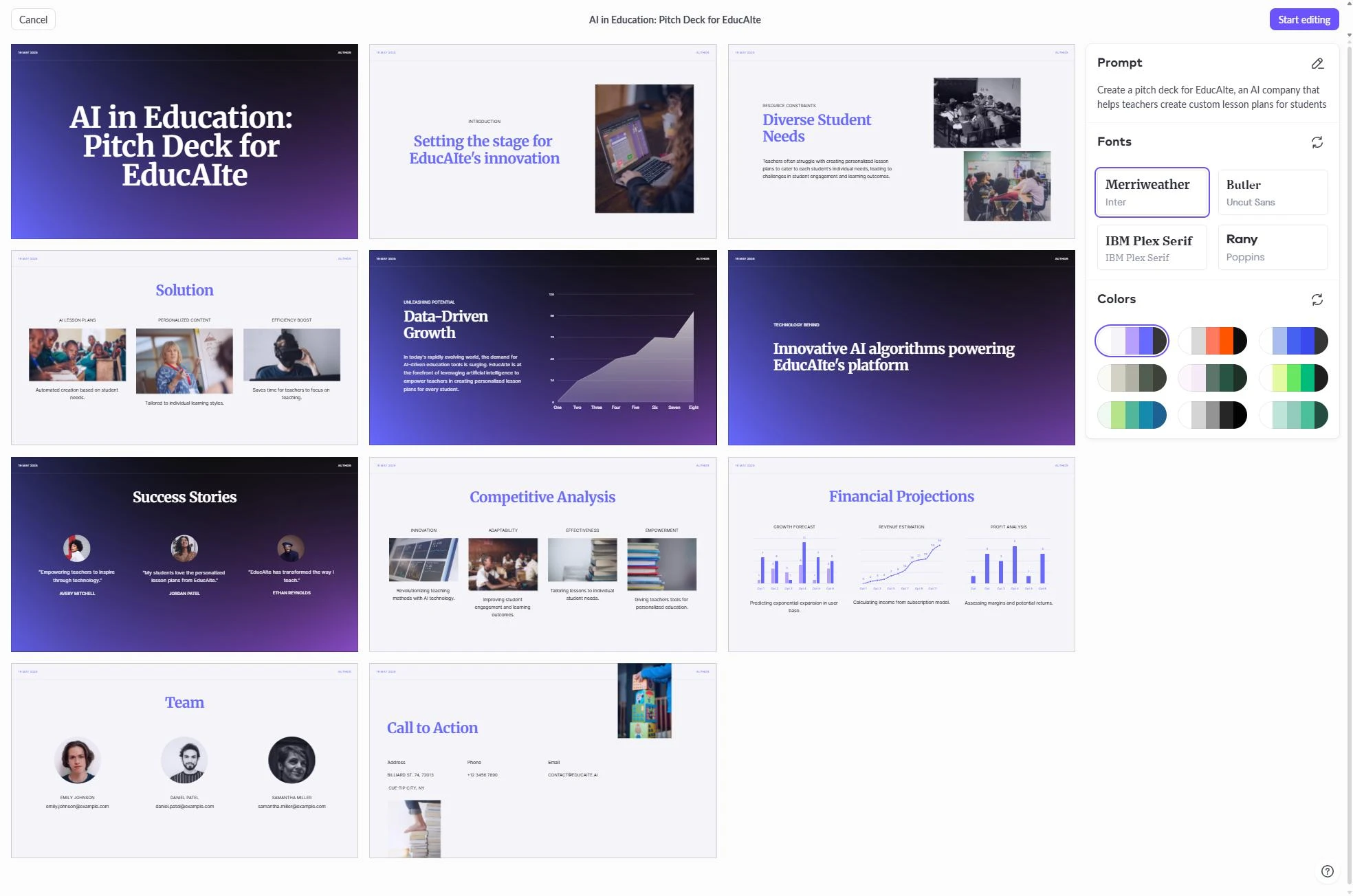
۵. Canva Magic Design
Canva یک نام شناختهشده در زمینهٔ طراحی است و ابزار Magic Design AI آن قدرت خود را به ارائهها میآورد. با وارد کردن یک درخواست ساده، Canva میتواند یک دک کامل شامل تصاویر، آیکونها و قالبها از کتابخانهٔ عظیم داراییهای خود تولید کند. این ابزار برای بازاریابانی که نیاز به تولید محتوای بصری خیرهکننده بهسرعت دارند، عالی است.
یکی از جذابیتهای اصلی Canva تنوع بالای قالبهای آن است. اما محتوای تولید شده توسط AI گاهی بهنظر میرسد مجموعهای از اسلایدهای زیبا ولی بدون روایت منسجم باشد. کاربران اغلب به مقایسهٔ Canva vs NextDocs میپردازند تا تصمیم بگیرند آیا به ابزاری متمرکز بر طراحی یا محتوا نیاز دارند. همچنین طراحان بسیاری Beautiful.ai vs Canva را برای یافتن بهترین موتور خودکار قالببندی بررسی میکنند.
ویژگیهای کلیدی:
- دسترسی به کتابخانهٔ عظیم عکسهای استوک، آیکونها و ویدیوها.
- خروجیهای چندفرمت برای رسانههای اجتماعی، چاپ و وب.
- ویرایشگر کشیدن‑و‑رها کردن کاربرپسند.
- ویژگی Magic Switch برای تبدیل ارائهها به انواع دیگر اسناد.
قیمتگذاری: سطح رایگان قوی. Canva Pro از ۱۳ دلار در ماه شروع میشود.
مناسب برای: بازاریابان، مدیران رسانههای اجتماعی و صاحبان کسبوکارهای کوچک که به تأثیر بصری بالا نیاز دارند.
نتیجهگیری: برای داراییهای بصری و قالبها بیرقیب است، اما گاهی ساختار حرفهای لازم برای گزارشهای شرکتی را ندارد.
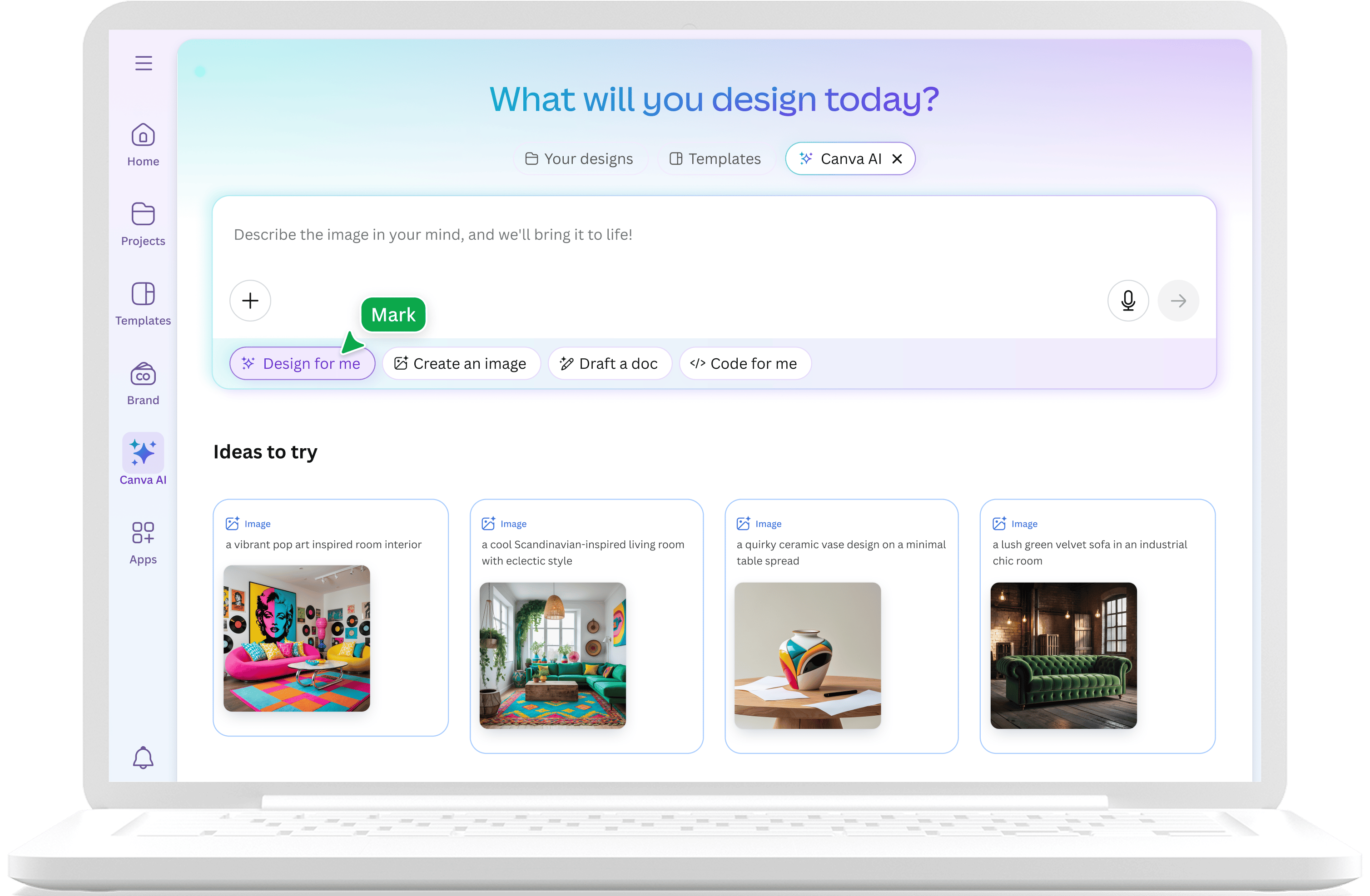
۶. Claude
Claude ابزار بصری ارائه نیست، اما یکی از بهترین دستیاران AI برای مرحلهٔ برنامهریزی است. وقتی یک روایت پیچیده میسازید، Claude میتواند به ساختاردهی افکار، ایجاد طرحریزی دقیق اسلاید به اسلاید و نوشتن نکات سخنران کمک کند.
Claude بهخاطر تواناییاش در پیروی از دستورات پیچیده و تنظیم لحن برای مخاطبان خاص شناخته شده است. بسیاری از حرفهایها از Claude برای پیشنویس منطق و محتوای ارائه قبل از انتقال به ابزارهای بصری استفاده میکنند. این ابزار بهویژه برای تطبیق با مخاطبان و اطمینان از جریان منطقی در بین بیست یا سی اسلاید مؤثر است.
ویژگیهای کلیدی:
- استدلال پیشرفته برای ساختارهای روایت پیچیده.
- توانایی بالا در پیشنویس طرحریزیهای دقیق و نکات سخنران.
- پنجرهٔ زمینهٔ بزرگ که امکان پردازش اسناد پسزمینهٔ بزرگ را میدهد.
- قابلیت نقد و بهبود اسکریپتهای موجود ارائه.
قیمتگذاری: سطح رایگان موجود. Claude Pro ۲۰ دلار در ماه.
مناسب برای: حرفهایهایی که به کمک در روایت، منطق و نوشتن ارائه نیاز دارند.
نتیجهگیری: یک همراه ضروری برای مرحلهٔ برنامهریزی است، حتی اگر نتواند اسلایدهای بصری نهایی را تولید کند.
۷. ChatGPT
ChatGPT همچنان ابزاری چندکاره برای طوفان فکری و ایدهپردازی است. در زمینهٔ ارائهها، برای تولید چارچوبهای جایگزین یک پیتچ یا یافتن روشهای خلاقانه برای توضیح یک مفهوم فنی مفید است. با افزودن افزونهها و GPTهای مختلف، میتواند به تولید طرحریزی اسلایدهای پایه نیز کمک کند.
در مقایسهٔ ChatGPT vs NextDocs 2026، تفاوت اصلی در ویژگیهای تخصصی ارائه است. ChatGPT یک ابزار عمومی است، در حالی که NextDocs مخصوص اسلایدها ساخته شده. ChatGPT برای یک انفجار سریع ایده یا بازنویسی یک پاراگراف که گیر کرده است، عالی است.
ویژگیهای کلیدی:
- طوفان فکری سریع و چارچوبسازی ایدهها.
- دسترسی گسترده و جامعهٔ کاربری بسیار بزرگ.
- مفید برای خلاصهسازی گزارشهای طولانی به نقاط گلولهای.
- ادغام با ابزارهای جستجوی وب برای حقایق پایه.
قیمتگذاری: سطح رایگان موجود. برنامههای Plus از ۲۰ دلار در ماه شروع میشوند.
مناسب برای: کاربران عمومی که به یک «همراه طوفان فکری» سریع برای محتوای ارائه نیاز دارند.
نتیجهگیری: برای ایدهپردازی و پیشنویس عالی است، اما برای تبدیل محتوا به فرمت PowerPoint نیاز به کار دستی فراوان دارد.
۸. Genspark
Genspark یک عامل هوش مصنوعی است که بر پژوهش و ترکیب دادهها تمرکز دارد. برای ارائههایی که نیاز به تحلیل عمیق صنعت یا مقایسه رقابتی دارند، Genspark میتواند ساعتها جستجوی دستی را صرفهجویی کند. این ابزار بهعنوان یک پژوهشگر خودمختار عمل میکند که اطلاعات را از سراسر وب جمعآوری و بهصورت گزارشی منسجم ترکیب میکند.
اگرچه یک سازنده اسلاید اختصاصی نیست، کیفیت اطلاعاتی که ارائه میدهد از چتباتهای عمومی برتر است. میتوانید پژوهش تولید شده توسط Genspark را به ابزاری مانند NextDocs منتقل کنید تا یک دک مبتنی بر داده بسازید. این یک جریان کاری رایج برای کسانی است که بین Copilot PowerPoint vs NextDocs 2026 تصمیمگیری میکنند، زیرا هر دو دسترسی متفاوتی به دادههای سازمانی دارند.
ویژگیهای کلیدی:
- عوامل پژوهشی خودمختار که وب زنده را اسکن میکنند.
- ترکیب دادههای با کیفیت بالا و تحلیل رقابتی.
- یکپارچهسازی چندابزاری برای پروژههای پژوهشی سیستماتیک.
- قابلیت تأیید حقایق از منابع متعدد.
قیمتگذاری: سطح رایگان موجود.
مناسب برای: تحلیلگران، پژوهشگران و هر کسی که یک ارائهٔ مبتنی بر داده میسازد.
نتیجهگیری: یک دستیار پژوهشی قدرتمند که «گوشت» اسلایدهای مهم شما را فراهم میکند.
۹. MagicSlides
MagicSlides یک افزونهٔ تخصصی برای Google Slides است که در بازاستفاده از محتوا برتری دارد. یکی از جذابترین ویژگیهای آن توانایی تبدیل یک URL ویدیو YouTube به یک ارائه است. این برای مربیان و مدرسینی که نیاز به ایجاد مطالب بر پایهٔ محتوای ویدیویی موجود دارند، فوقالعاده مفید است.
رابط کاربری ساده است و مستقیماً داخل Google Slides زندگی میکند. اگرچه کیفیت طراحی نسبتاً پایهای است، اما یکی از سریعترین روشها برای قرار دادن محتوا روی اسلاید است. اگر ابزار را محدود میبینید، میتوانید به دنبال جایگزینهای MagicSlides بگردید که انعطافپذیری طراحی بیشتری ارائه میدهند.
ویژگیهای کلیدی:
- تبدیل ویدیوهای YouTube و مقالات وب به اسلایدها.
- تولید سادهٔ متن‑به‑ارائه.
- ادغام بومی Google Slides.
- پشتیبانی از چندین زبان برای تیمهای جهانی.
قیمتگذاری: سطح رایگان موجود. برنامههای Pro از ۸ دلار در ماه شروع میشوند.
مناسب برای: تولیدکنندگان محتوا و مربیانی که نیاز به بازاستفاده از ویدیو یا متن طولانی دارند.
نتیجهگیری: ابزار خاص اما بسیار مؤثر برای وظایف تبدیل محتوای خاص.
۱۰. SlidesAI
SlidesAI یک افزونهٔ محبوب دیگر برای Google Slides است که بر سرعت تمرکز دارد. این ابزار برای کاربرانی طراحی شده که متن آماده دارند و فقط میخواهند AI آن را در اسلایدها توزیع کند و برخی عناصر بصری پایه اضافه کند. این یک ابزار بدون تزئینات اضافی است که کار را بهسرعت انجام میدهد.
بهدلیل اینکه یک افزونه است، نیازی به یادگیری پلتفرم جدید نیست. با این حال، طراحیها میتوانند کمی تکراری باشند. برای کسانی که به تنوع بیشتری نیاز دارند، بررسی جایگزینهای SlidesAI معمولاً گام بعدی پس از رشد از ویژگیهای پایه است.
ویژگیهای کلیدی:
- تولید سریع اسلایدها از متن خام.
- رابط کاربری ساده در نوار کناری Google Slides.
- قیمتگذاری مقرونبهصرفه برای افراد.
- سفارشیسازی پایهٔ تمها و قالبها.
قیمتگذاری: سطح رایگان موجود. برنامههای Pro از ۱۰ دلار در ماه شروع میشوند.
مناسب برای: دانشجویان و کارمندان داخلی که نیاز به ایجاد ارائههای ساده در زمان محدود دارند.
نتیجهگیری: یک افزونهٔ ورودی مناسب برای کسانی که سرعت و سادگی را بر طراحی پیشرفته ترجیح میدهند.
چگونه ابزار مناسب را انتخاب کنیم
انتخاب افزونهٔ هوش مصنوعی مناسب برای PowerPoint بستگی به اهداف خاص شما دارد. اگر به طراحی و بازاریابی تمرکز دارید، Canva برتری دارد. اگر تیمی دارید که نیاز به همکاری در هر اسلاید دارند، Pitch.com گزینهٔ منطقی است. برای کسانی که بهطور عمیق در اکوسیستم Google یکپارچه شدهاند، Gemini بیشترین راحتی را فراهم میکند.
اما برای اکثر موارد حرفهای در سال ۲۰۲۶، اولویت به سمت کیفیت محتوا و انعطافپذیری خروجی تغییر کرده است. به همین دلیل NextDocs بهعنوان انتخاب برتر رتبهبندی میشود. توانایی تولید نسخههای متعدد یک دک به شما اجازه میدهد بهعنوان یک ویراستار عمل کنید نه فقط یک مهندس درخواست. علاوه بر این، یکپارچهسازی عمیق پژوهش تضمین میکند ارائههای شما وزن فکری لازم برای محیطهای حرفهای را داشته باشند.
در هنگام انتخاب، به این فکر کنید که بیشتر زمان خود را کجا میگذرانید. اگر ساعتها به پژوهش میپردازید، ابزاری با پژوهش داخلی ضروری است. اگر ساعتها به قالببندی میگذرانید، ابزاری با طرحهای هوشمند در اولویت است. مهمترین نکته این است که ابزاری را انتخاب کنید که فرمتهای خروجی مورد نیاز شرکت شما را پشتیبانی کند، چه PowerPoint، PDF یا Google Slides.
آمادهاید تا ارائههای بهتری بسازید؟
NextDocs را بهصورت رایگان امتحان کنید و از تولید چندوارینت، خروجیهای جهانی و یکپارچهسازی عمیق پژوهش بهرهمند شوید. نیازی به کارت اعتباری نیست.