Beautiful.ai vs Canva Magic Design: AI Presentation Builder Comparison (2026)

Beautiful.ai vs Canva Magic Design: AI Presentation Builder Comparison (2026)

2026-02-08

10 min

beautiful-aicanva

Introduction to AI Presentation Design in 2026

The landscape of professional presentations has shifted dramatically over the last few years. The days of manual pixel pushing and struggling with text alignment are largely over. Today, the choice for professionals often comes down to two heavyweights in the AI design space: Beautiful.ai and Canva Magic Design. Both tools promise to turn a simple idea into a polished deck, but they approach this problem from very different philosophies.

Beautiful.ai is built on the principle of smart templates. It uses a constrained design system that ensures every slide looks professional regardless of the user's design skills. Canva, on the other hand, is a Swiss Army knife of content creation. Its Magic Design feature leverages a massive library of assets and templates to generate visual variety quickly.

Choosing between them is not just about features. It is about how you work and what your final output needs to achieve. This guide provides a detailed breakdown of how these tools compare and introduces why NextDocs has emerged as a powerful third option for those who need more flexibility than these standalone platforms provide. For a broader look at the market, you can read our blog on the best AI presentation builders 2026.

Overview of Beautiful.ai

Beautiful.ai is often described as the presentation tool for people who are not designers. Its core innovation is the smart template. Unlike traditional slides where you move text boxes and images freely, Beautiful.ai uses a system of rules. If you add a third bullet point, the other two automatically resize and reposition themselves to maintain perfect visual balance.

This tool is highly focused on output quality. It is difficult to make a slide look bad in Beautiful.ai because the software prevents you from making poor design choices. This makes it a favorite for consultants and client facing professionals who need a high level of polish without spending hours on formatting. If you find this approach too rigid, you might want to explore these Beautiful.ai alternatives to find a better fit.

Beautiful.ai template dashboard gallery

Key Strengths of Beautiful.ai

The primary strength of Beautiful.ai is its consistency. When you create a deck, every slide feels like it belongs to the same family. The animations and transitions are built into the templates, meaning you get professional motion design without any extra effort. It is an ideal solution for those who want a "set it and forget it" design experience.

Weaknesses of Beautiful.ai

The biggest drawback is the lack of flexibility. If you have a very specific vision for a slide layout that does not fit into one of their smart templates, you will find yourself fighting the software. Additionally, the AI generation features are somewhat limited compared to newer, AI native tools. It creates slides based on templates rather than generating unique, content driven layouts from scratch.

Overview of Canva Magic Design

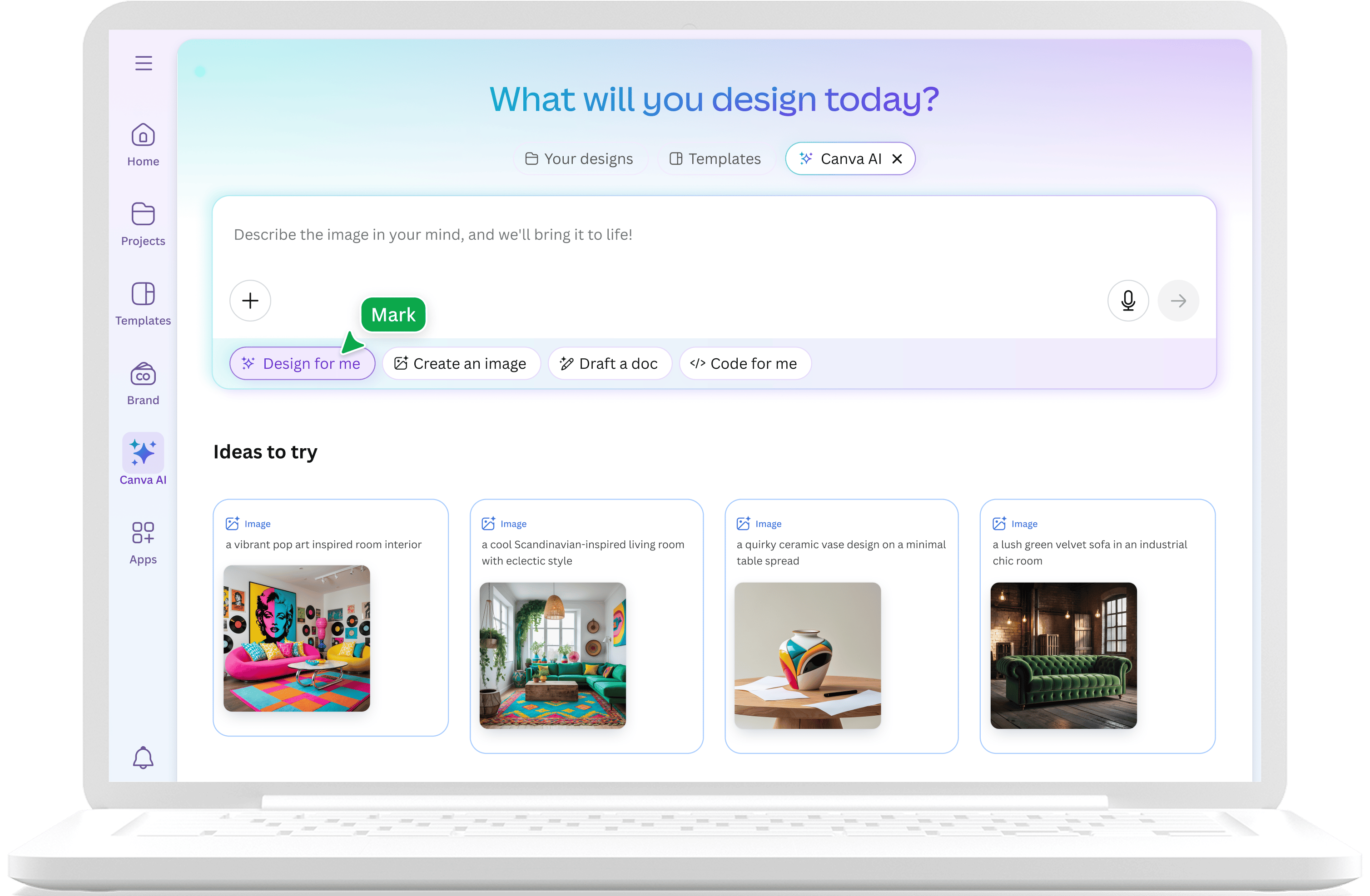
Canva Magic Design is an AI powered feature within the broader Canva ecosystem. It allows users to input a prompt and receive a fully designed presentation in seconds. Because Canva started as a general graphic design tool, its presentation capabilities are deeply integrated with social media graphics, video editing, and print media.

Canva is the go to choice for marketers and creative teams who need to produce a high volume of visual content across multiple channels. Its Magic Design tool acts as a rapid prototyper, giving you a starting point that you can then customize using Canva's enormous library of stock photos, icons, and illustrations. If you are looking for other tools with similar creative breadth, see our list of Canva alternatives.

Canva Magic Design AI homepage prompt

Key Strengths of Canva Magic Design

Canva's greatest asset is its variety. With millions of assets at your fingertips, you can create a presentation that looks like a high end magazine or a gritty social media campaign. The free tier is also incredibly generous, allowing individuals to explore AI generation without an upfront financial commitment.

Weaknesses of Canva Magic Design

The AI generation in Canva can sometimes feel like a "template picker" rather than a true content creator. The slides often look very "designed" or even "busy," which may not suit formal corporate environments. Furthermore, exporting Canva decks to PowerPoint often leads to formatting issues, where text boxes move or fonts change. This makes it less ideal for professionals who must deliver files in standard Microsoft formats.

Key Differences Between the Two Tools

When comparing Beautiful.ai and Canva Magic Design, three major differences emerge: design philosophy, AI depth, and workflow integration.

1. Design Philosophy: Constraints vs. Freedom

Beautiful.ai is built on constraints. It assumes that the user is not a designer and provides a guardrail to prevent mistakes. Canva is built on freedom. It assumes the user wants to be creative and provides every tool imaginable to change every pixel. For those in high stakes environments, we have a specialized guide on the best AI presentation builders for consultants that looks at which philosophy wins for professional decks.

2. AI Generation: Layout Logic vs. Asset Matching

Beautiful.ai uses AI to manage the layout of the slide in real time. As you type, the AI calculates the best way to display that information. Canva uses AI primarily to match your prompt to an existing template and then populate it with relevant stock images. One focuses on the structural logic of the slide, while the other focuses on the visual aesthetic.

3. Export and Compatibility

This is a critical area for business users. Beautiful.ai exports to PPTX and PDF with relatively high fidelity. Canva can export to those formats as well, but it also supports video, PNG, and direct social media publishing. However, the PowerPoint export from Canva is notoriously difficult to edit afterward. For users who need seamless integration with existing office suites, we recommend checking out the best PowerPoint AI add-ins.

Feature Comparison Table

Feature Beautiful.ai Canva Magic Design
Primary Category Standalone Presentation Tool Multi-format Design Platform
AI Focus Smart Layout Logic Prompt-to-Template Generation
Template Library Curated, High-Quality Smart Templates Enormous, Diverse Asset Library
Ease of Use Very High (Designer-in-a-box) High (Intuitive drag-and-drop)
Design Flexibility Limited by Smart Rules Virtually Unlimited
Free Tier No (Paid only) Yes (Generous free access)
Starting Price $12 per month $13 per month (Pro)
Export Formats PPTX, PDF PPTX, PDF, PNG, Video, Social
Best For Consultants, Business Proposals Marketers, Social Media Managers

Pricing Comparison

Pricing is a significant differentiator between these two platforms, especially for individual users and small teams.

Beautiful.ai Pricing

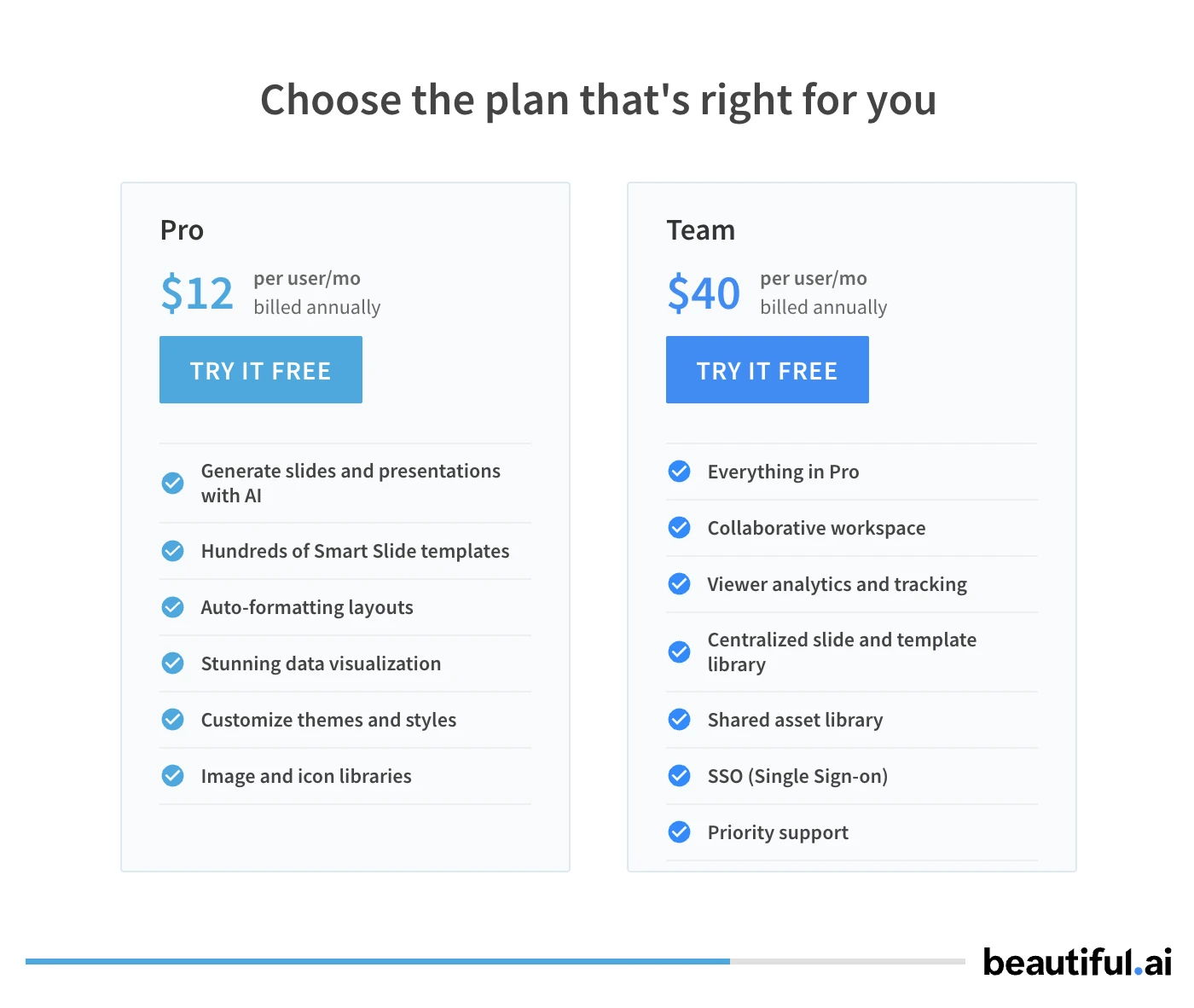
Beautiful.ai does not offer a traditional free tier. While they sometimes offer a limited trial, you generally have to pay to get any meaningful use out of the tool. The Pro plan starts at $12 per month for individuals. For teams, the price increases to roughly $40 per user per month, which includes collaborative workspaces and centralized brand assets.

Beautiful.ai pricing pro and team plans

Canva Pricing

Canva is famous for its free tier. You can use Magic Design and access a huge portion of the library without paying a cent. The Canva Pro plan, which costs $13 per month, unlocks the full asset library, brand kits, and advanced AI features like background removal. For larger organizations, Canva offers enterprise pricing that scales based on the number of seats. For more on how these scale, see our review of best enterprise AI presentation builders 2026.

Pros and Cons

Beautiful.ai

Pros:

  • The smartest layout engine in the industry.
  • Slides look professional with zero design effort.
  • Built in animations are subtle and sophisticated.
  • Great for maintaining brand consistency across a team.

Cons:

  • No free version makes the entry barrier high.
  • Templates can feel repetitive over time.
  • Difficult to create custom or non standard layouts.
  • AI content generation is less "creative" than competitors.

Canva Magic Design

Pros:

  • Massive selection of templates and images.
  • Excellent free tier for casual users.
  • Ability to create videos and social posts from the same content.
  • Very easy to learn for anyone who has used basic web tools.

Cons:

  • AI output can feel generic or cluttered.
  • Exporting to PowerPoint often requires significant manual cleanup.
  • Lacks the professional "smart" layout logic of Beautiful.ai.
  • Can be distracting for users who just want to make a simple deck.

Positioning NextDocs: The Best of Both Worlds

While Beautiful.ai and Canva are excellent standalone tools, many professionals find themselves trapped between them. You might want the polished, structured look of Beautiful.ai but with the creative flexibility and AI power that Canva hints at. This is where NextDocs fills the gap.

NextDocs is an AI native document and presentation platform designed for high stakes work. Unlike Canva or Beautiful.ai, which give you one version of a presentation and ask you to fix it, NextDocs uses a multi variant generation approach. This means for every prompt, you get multiple different interpretations and layouts. You can then choose the one that fits your narrative best, or mix and match elements from different versions.

Furthermore, NextDocs solves the export problem. Many professionals need to start in an AI tool but finish in Google Slides or PowerPoint because that is what their clients use. NextDocs offers universal export to PDF, PPTX, Google Slides, and even Google Docs. It maintains formatting across all these platforms, ensuring that your work looks the same regardless of where it is viewed.

Another key advantage of NextDocs is its deep research integration. While Canva and Beautiful.ai rely on general knowledge, NextDocs can pull real data with citations. This is essential for founders and consultants who cannot afford to have "hallucinated" statistics in their decks.

Verdict and Recommendation

The choice between Beautiful.ai and Canva Magic Design depends on your specific role and the "vibe" of your presentations.

Choose Beautiful.ai if: You are a consultant, executive, or salesperson who needs to create highly professional, clean, and structured decks. If you value your time and want the software to handle the design rules for you, Beautiful.ai is the superior choice. It is the closest thing to having a professional designer sitting next to you, ensuring you do not make any visual mistakes.

Choose Canva Magic Design if: You are a marketer, small business owner, or content creator. If you need your presentations to be high energy, visually diverse, and integrated with your other social media efforts, Canva is the way to go. Its massive asset library is unmatched, and its free tier makes it accessible for everyone.

Choose NextDocs if: You need a professional tool that does not lock you into a single design style or file format. If you want the power of multiple AI versions to choose from and the ability to export your work to PowerPoint or Google Slides without losing your formatting, NextDocs is the best overall choice for 2026. It combines the design intelligence of Beautiful.ai with the AI flexibility of the most advanced models available today.

Ready to Create Better Presentations?

Try NextDocs Free and experience multi-variant generation, universal exports, and deep research integration. No credit card required.