

Introducing AI Memory: NextDocs now remembers you
Every time you start a new chat, you start from zero. You re-explain who you are, who you're presenting to, the tone you want, the things you always need — and the things you never want. Then you do it again next time.
With v1.9, that stops. NextDocs now has a personal memory.
What AI Memory is
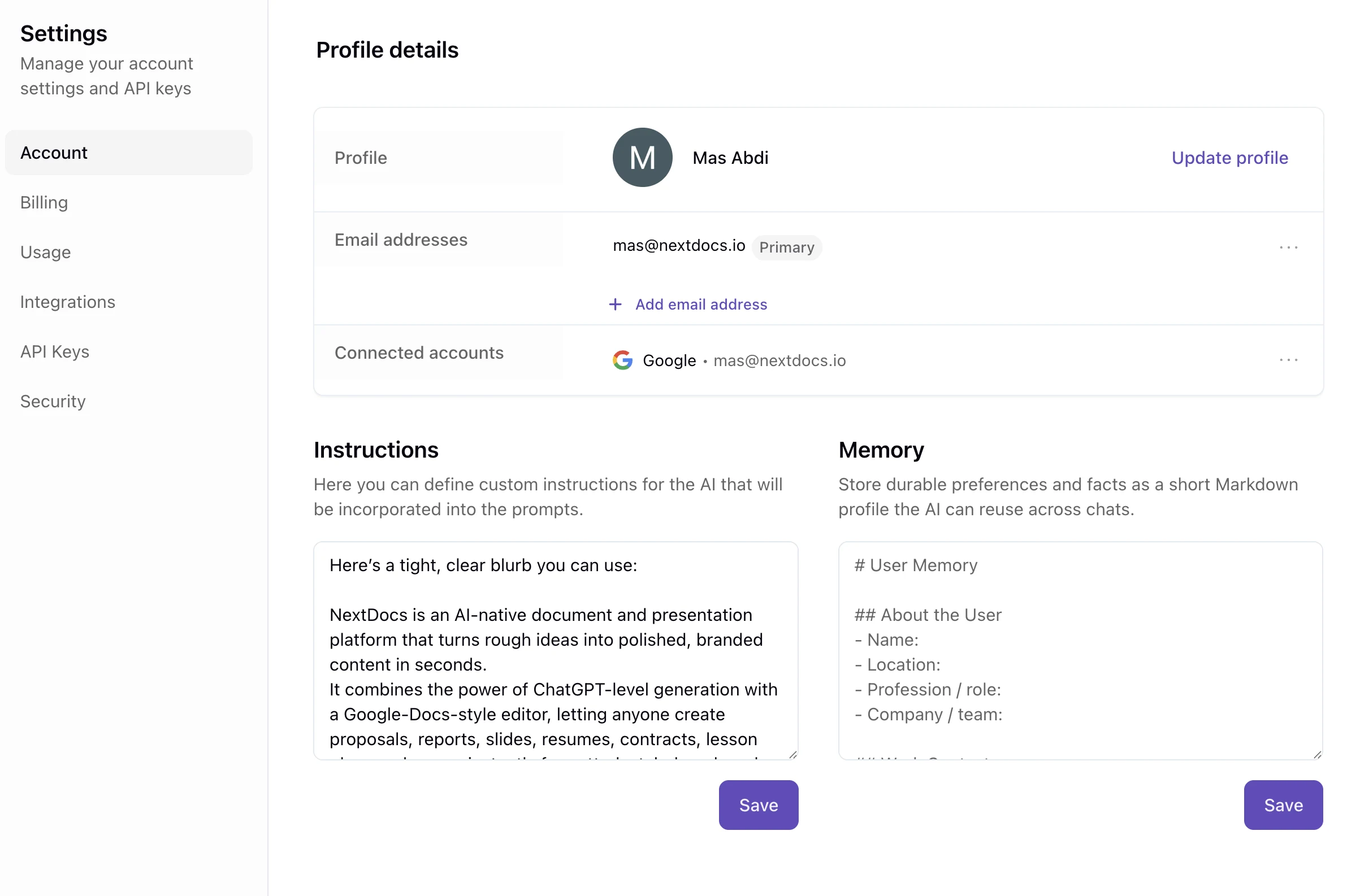
AI Memory is a short, editable profile of you. Your role. Your audience. Your tone of voice. The tools you work with. The preferences and corrections you'd otherwise repeat in every conversation.
Once it's set, every new chat already knows it. The AI uses it to personalize what it generates — without you having to say it again.
Two ways to use it
Edit it yourself. Go to Settings → Account and write or paste a short profile. Markdown headings and bullets work well here — keep it concise and durable, the things that stay true across projects.
Let the AI keep it updated. Just tell NextDocs to remember something:
"I always present to executives — keep slides concise and lead with the takeaway."
NextDocs saves it. Ask it to update or forget things the same way. You stay in control, and you can always open Settings to see exactly what it's holding.
What it's good for
- Stop repeating yourself. Who you are and how you like to work carries across every conversation.
- Consistency over time. A document you create today and one you create in three weeks come out with the same tone and structure.
- Personal, not organizational. Your memory is yours. It's separate from any organization settings, so your preferences follow you.
Your memory stays private to you, it's only used to personalize your own generations, and it's removed if you delete your account. NextDocs deliberately won't store sensitive data like credentials, payment details, or one-off task context — just the durable things that make your output feel like yours.
Also new across v1.9
AI Memory is the headline, but it's been a busy few releases. Here's what else shipped:
Buy credit packs when you need them
Paid users can now top up with credit packs without changing plans. Useful for a temporary spike — a larger batch of documents, an image-heavy deck, or extra AI edits near the end of a billing period. Pack credits are tracked separately from your monthly plan credits.
Annual plans are now 20% off
Individual annual plans now reflect a true 20% saving, consistently across pricing pages and checkout — no more stale "10%" copy that didn't match what you actually paid.
Export to Google Docs
Pageless documents are now markdown-native, with Google Docs export, cleaner exported HTML, better thumbnails, and customizable export sizing and backgrounds. The path from AI-generated document to editable Google Doc is far more reliable.
Richer media and motion in canvas
Canvas presentations now handle video, voiceover, and audio-aware playback more naturally, with more reliable motion across both the editor and presentation views.
Smarter AI and image handling
More consistent image model routing, support for new image models, expanded reasoning levels, and better handling of image inputs — fewer edge cases where a model receives a request it can't handle.
What's next
AI Memory is a foundation. Today it personalizes your generations; over time it will get better at knowing what's worth remembering and how to apply it. The goal is simple: the more you use NextDocs, the more it feels built for you specifically.
Try it now — open Settings → Account, set your memory, and start your next document.
The NextDocs Team