

تطور الذكاء الاصطناعي في تصميم العروض التقديمية
لقد تغير مشهد برامج العروض التقديمية بشكل كبير خلال السنوات القليلة الماضية. لم يعد المحترفون يبدأون بشريحة بيضاء فارغة ومؤشر وامضٍ. بدلاً من ذلك، انتقل التركيز إلى التوليد المدعوم بالذكاء الاصطناعي الذي يمكنه تحويل موجه نصي بسيط إلى مجموعة كاملة من الشرائح في ثوانٍ. من أبرز اللاعبين في هذا المجال هما Pitch.com و Canva Magic Design. بينما يهدف كلا الأداتين إلى تبسيط عملية الإنشاء، فإنهما يخدمان تدفقات عمل واحتياجات مستخدمين مختلفة تمامًا.
بنى Pitch.com سمعته كبديل حديث لبرنامج PowerPoint للفرق المتعاونة. يركز على جمالية أنيقة ومهنية وتحكم قوي في الإصدارات. من ناحية أخرى، يستفيد Canva Magic Design من النظام البيئي الضخم لمنصة Canva، مقدمًا مكتبة واسعة من الأصول ونهجًا بصريًا عاليًا لتوليد الذكاء الاصطناعي.
لمن يرغبون في استكشاف السوق الأوسع، يقدم دليلنا حول أفضل منشئي العروض التقديمية بالذكاء الاصطناعي 2026 نظرة أوسع على كيفية توافق هذه الأدوات مع النظام البيئي الحالي. في هذه المقالة، سنغوص بعمق في نقاط القوة والضعف المحددة لـ Pitch.com و Canva لمساعدتك في اتخاذ قرار أيهما يناسب مجموعة تقنياتك.
Pitch.com: القوة التعاونية
تم تصميم Pitch.com للفرق التي تقدر الصقل المهني والتعاون السلس. إنها منصة مستقلة تعالج العرض التقديمي كوثيقة حية بدلاً من ملف ثابت. الواجهة نظيفة وبديهية، وغالبًا ما يفضلها الشركات الناشئة والوكالات الإبداعية التي تحتاج إلى الحفاظ على معيار عالي من التصميم دون تعقيد برامج الحاسوب التقليدية.
تكمن قوة Pitch في سير عمله. فهو يقدم تعاونًا في الوقت الحقيقي يبدو فوريًا، مشابهًا إلى حد كبير لـ Google Slides، ولكن مع إعدادات تصميم افتراضية أفضل بكثير. إحدى ميزاته البارزة هي سجل الإصدارات، الذي يتيح للفرق تتبع التغييرات والعودة إلى الحالات السابقة دون الخوف من فقدان العمل. يجعل ذلك منه خيارًا رئيسيًا لأولئك الذين يبحثون عن بدائل Pitch ويرغبون في الحفاظ على ميزة التعاون.

بينما يدمج Pitch ميزات الذكاء الاصطناعي للمساعدة في إنشاء المحتوى، يُوصف ذكاؤه غالبًا بأنه أكثر كمساعد من مصمم رئيسي. يساعد على تحسين النص واقتراح تخطيطات ضمن مكتبة القوالب الحالية. يضمن ذلك أن يظل الناتج مهنيًا، رغم أنه قد يقدم سحرًا إبداعيًا أقل مقارنةً ببعض المنافسين الذين يركزون على الذكاء الاصطناعي.
Canva Magic Design: المتخصص البصري العام
يعد Canva Magic Design جزءًا من مجموعة Canva الأوسع، التي أصبحت أساسية للمسوقين ومديري وسائل التواصل الاجتماعي عالميًا. Magic Design هو أداتهم الخاصة بالذكاء الاصطناعي التي تأخذ موجهًا أو ملفًا مرفوعًا وتحوّله إلى سلسلة من شرائح العرض التقديمي.
الميزة الأساسية لـ Canva هي الحجم الهائل لمكتبة الأصول الخاصة بها. يتمكن المستخدمون من الوصول إلى ملايين الصور والأيقونات والرسوم التوضيحية مباشرة داخل المحرر. عند استخدام Magic Design، يستمد الذكاء الاصطناعي من هذا المورد الضخم لإنشاء مجموعات شرائح جذابة بصريًا ومتنوعة للغاية. يجعل ذلك منها منافسًا قويًا لأي شخص يبحث عن بدائل Canva لمهام إبداعية أو تسويقية أكثر تركيزًا.
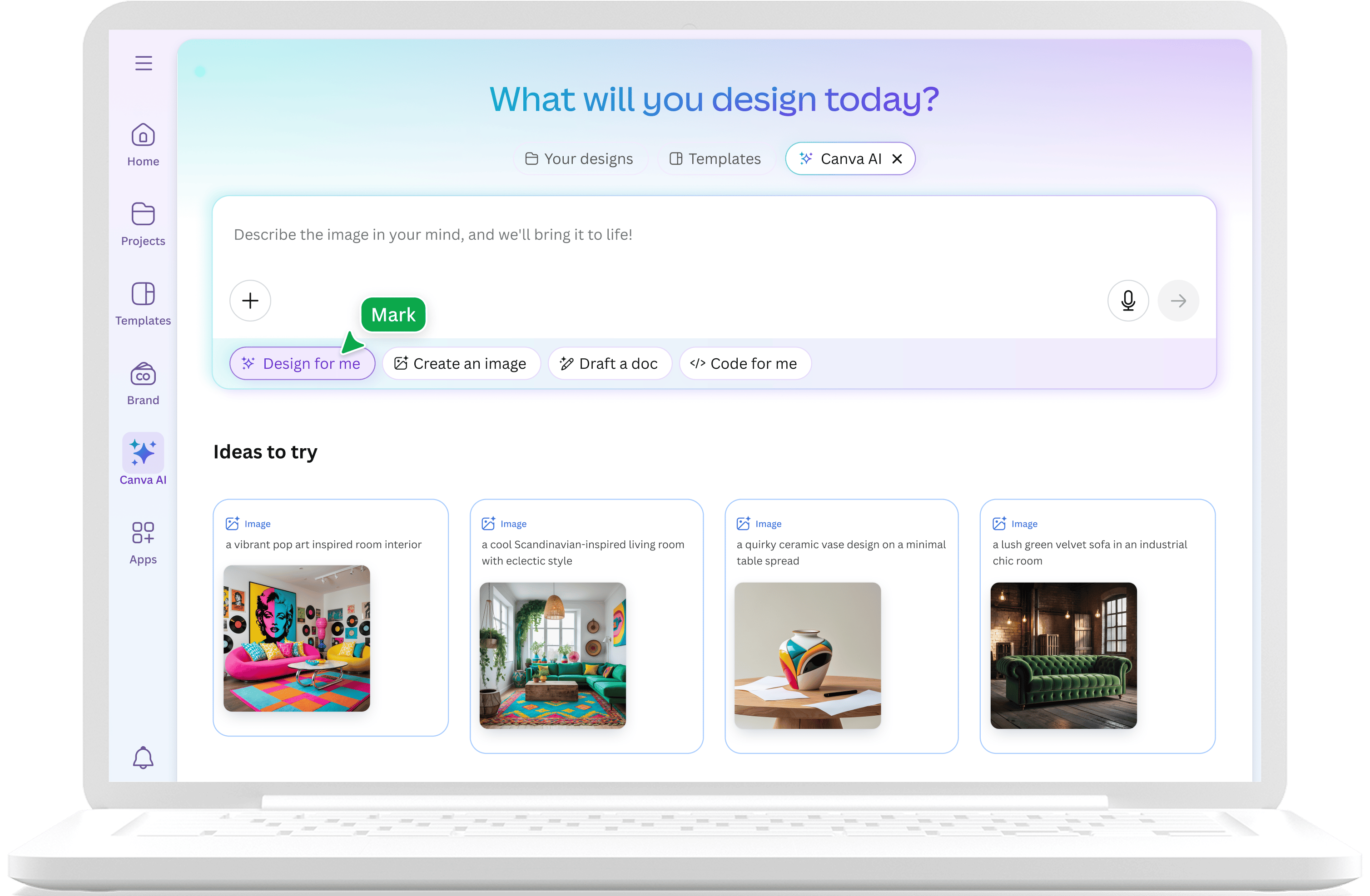
مع ذلك، يمكن أن تكون أقوى ميزة لـ Canva أيضًا نقطة ضعف للمستخدمين المؤسسين. قد تبدو التصاميم أحيانًا مزدحمة جدًا أو مصممة بشكل مفرط لاجتماع مجلس إدارة رسمي أو عرض تقديمي للمستثمرين عالي المخاطر. بالإضافة إلى ذلك، رغم أنه يقدم ميزات التعاون، غالبًا ما يبلغ المستخدمون عن تأخر طفيف عندما يعمل عدة أشخاص على نفس التصميم المعقد في آن واحد.
الفروقات الرئيسية بين Pitch و Canva
يتطلب فهم الفروقات الأساسية بين هاتين الأداتين النظر في كيفية تعاملهما مع الذكاء الاصطناعي وفلسفة التصميم.
فلسفة التصميم والجماليات
يميل Pitch.com نحو جمالية بسيطة ومهنية. قوالبه مُنظمة لتتبع منطق العرض التقديمي الكلاسيكي، مما يجعل من الصعب إنشاء شريحة "سيئة". بالمقابل، Canva هو لوحة مفتوحة. يوفر حرية إبداعية أكبر، وهو ممتاز للرسومات على وسائل التواصل الاجتماعي أو تحديثات الفرق الداخلية، لكنه قد يؤدي إلى تباين في العلامة التجارية إذا لم يُدار بعناية.
دمج الذكاء الاصطناعي
الذكاء الاصطناعي في Canva Magic Design أكثر توليديًا بطبيعته. يحاول بناء السرد البصري الكامل من موجه واحد. يستخدم Pitch الذكاء الاصطناعي بشكل أكثر دقة، مساعدة المستخدمين على إعادة كتابة النقاط أو العثور على تخطيط الشريحة المناسب من مجموعة معرفة مسبقًا. بالنسبة للمستخدمين الذين يحتاجون إلى قدرات ذكاء اصطناعي أقوى، مثل تلك الموجودة في صانعي شرائح الذكاء الاصطناعي للمؤسسات 2026، قد لا تكون أي من الأداتين مناسبة تمامًا بمفردهما.
التصدير والتوافق
يُعد التصدير عاملًا حاسمًا للاستخدام المهني. يدعم Pitch صيغ PDF و PPTX، لكن تصدير PPTX قد يكون أحيانًا حساسًا عند فتحه في Microsoft PowerPoint. يدعم Canva مجموعة أوسع من الصيغ، بما في ذلك الفيديو و PNG، لكن تصدير PowerPoint غالبًا ما يتطلب تنظيفًا كبيرًا لإصلاح التخطيطات المكسورة أو الخطوط المفقودة. هذه نقطة ألم شائعة لأولئك الذين يحتاجون إلى منشئي عروض تقديمية بالذكاء الاصطناعي مع تصدير إلى Google Slides.
جدول مقارنة الميزات
| الميزة | Pitch.com | Canva Magic Design |
|---|---|---|
| الفئة | أداة عرض تقديمي مستقلة | حزمة تصميم مع إضافة ذكاء اصطناعي |
| قوة الذكاء الاصطناعي | تحسين المحتوى واقتراحات التخطيط | إنشاء مجموعة شرائح من الموجه |
| التعاون | في الوقت الحقيقي، سجل الإصدارات، التعليقات | تحرير في الوقت الحقيقي مع مشاركة الأصول |
| مكتبة القوالب | عالية الجودة، مهنية، مختارة | ضخمة، متنوعة، من إنشاء المستخدم |
| مكتبة الأصول | أيقونات أساسية وتكاملات | ملايين الصور والفيديوهات والرسومات |
| صيغ التصدير | PDF، PPTX | PDF، PPTX، PNG، فيديو، اجتماعي |
| الأفضل لـ | الفرق المتعاونة والشركات الناشئة | المسوقين ومنشئي محتوى وسائل التواصل الاجتماعي |
| التسعير | يبدأ من $8 شهريًا | يبدأ من $13 شهريًا |
التسعير والقيمة
يقدم Pitch.com طبقة مجانية تكون فعّالة إلى حد كبير للمستخدمين الفرديين. تبدأ خططهم المدفوعة تقريبًا من $8 شهريًا لكل مستخدم، والتي تركز على فتح ميزات مساحة العمل مثل المجلدات، القوالب المخصصة، وسجل الإصدارات غير المحدود. بالنسبة للفرق، يتدرج التسعير بشكل متوقع، مما يجعله خيارًا مستدامًا للمنظمات المتنامية.
يعد Canva Magic Design جزءًا من Canva Pro، الذي يبدأ تقريبًا من $13 شهريًا. على الرغم من كونه أكثر تكلفة من المستوى المبدئي لـ Pitch، فإن هذا السعر يشمل مجموعة Canva بالكامل. بالنسبة لشركة صغيرة أو مسوق فردي، غالبًا ما يمثل قيمة أفضل لأنه يحل محل أدوات التصميم الجرافيكي الأخرى. ومع ذلك، بالنسبة لفريق يحتاج فقط إلى إنشاء عروض تقديمية، قد لا يكون التكلفة الإضافية لميزات وسائل التواصل الاجتماعي مبررة.
الإيجابيات والسلبيات
مزايا Pitch.com
- تعاون فوري في الوقت الحقيقي وتحكم في الإصدارات متفوق.
- قوالب مهنية تحافظ على اتساق العلامة التجارية بسهولة.
- واجهة مستخدم نظيفة تعطي الأولوية للمحتوى على القوائم المزدحمة.
- سعر بدء منخفض للميزات المهنية.
عيوب Pitch.com
- ميزات الذكاء الاصطناعي أقل طموحًا من الأدوات الحديثة الأصلية للذكاء الاصطناعي.
- قد يؤدي التصدير إلى PowerPoint إلى مشكلات في التنسيق.
- مكتبة القوالب أصغر من مجموعة Canva الضخمة.
مزايا Canva Magic Design
- مكتبة ضخمة من الصور والفيديوهات وعناصر التصميم.
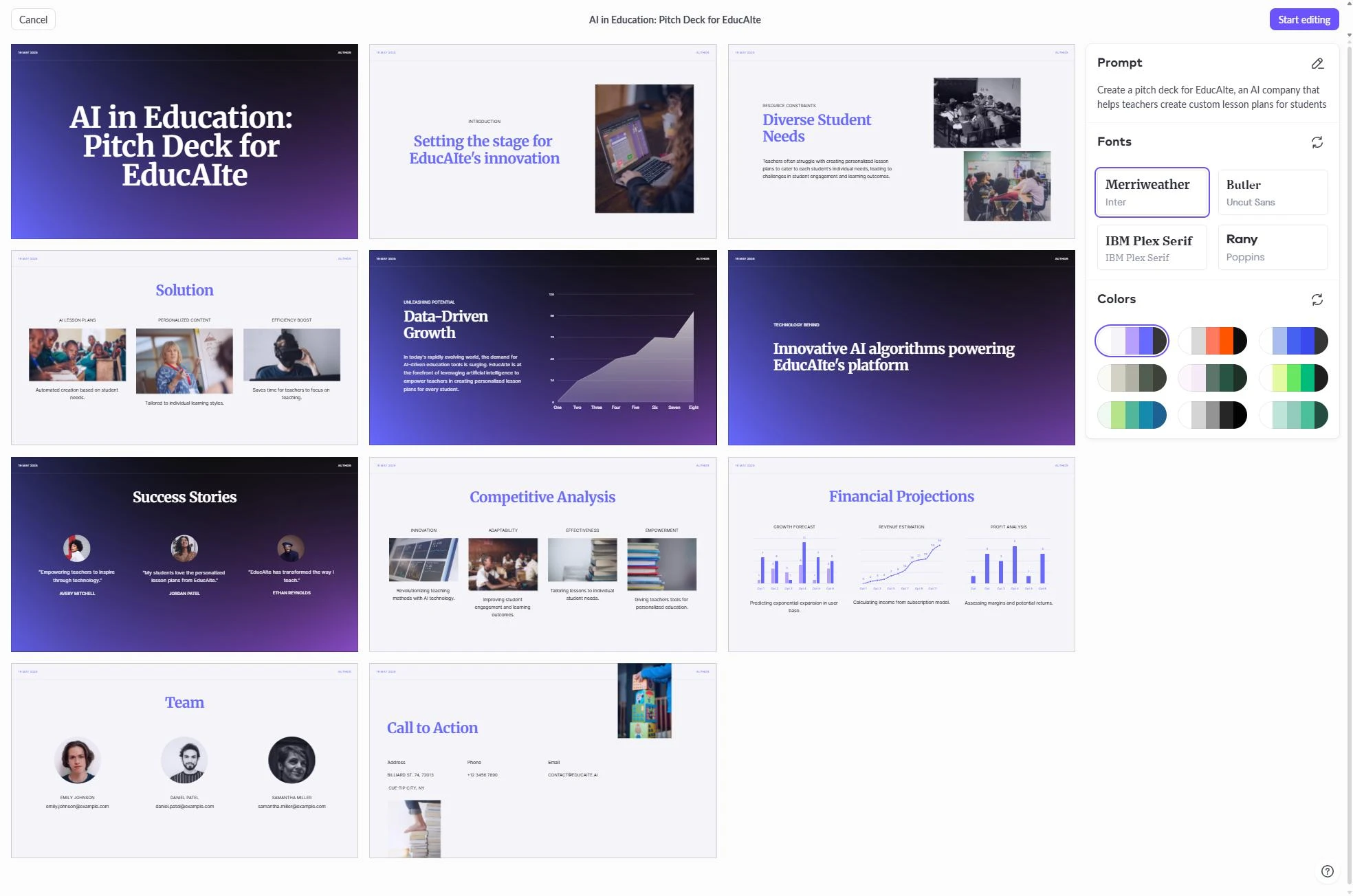
- يمكن للذكاء الاصطناعي إنشاء مسودة كاملة من موجه واحد بسرعة كبيرة.
- تصدير متعدد الصيغ يتيح تحويل الشريحة إلى فيديو أو منشور اجتماعي.
- ممتاز للعروض التقديمية البصرية التي تعتمد على الصور.
عيوب Canva Magic Design
- قد تكون جودة الذكاء الاصطناعي غير متسقة وغالبًا ما تتطلب تحريرًا مكثفًا.
- قد تبدو التصاميم غير رسمية للغاية لبعض البيئات المؤسسية.
- قد يشعر التعاون بالتأخر في الملفات الكبيرة التي تحتوي على الكثير من الأصول.
- غالبًا ما يتسبب التصدير إلى PPTX في كسر التخطيطات المعقدة.
بديل NextDocs
بينما يعتبر Pitch و Canva روادًا في مجال الأدوات المستقلة، يجد العديد من المحترفين أنفسهم مقيدين بطبيعة "الصندوق الأسود" للذكاء الاصطناعي الخاص بهما. غالبًا ما تحصل على نتيجة واحدة وتضطر إلى قضاء ساعات في تعديلها. هنا يقدم NextDocs مسارًا مختلفًا.
يوفر NextDocs توليدًا متعدد المتغيرات. بدلاً من إعطائك نتيجة واحدة "خذها أو اتركها"، ينتج عدة إصدارات من عرضك التقديمي. يتيح لك ذلك اختيار أفضل هيكل أو تصميم لكل شريحة. علاوة على ذلك، تم بناء NextDocs للمحترفين الذين يعتمدون على البحث بشكل كبير. يدمج بحثًا عميقًا يجلب بيانات فعلية مع الاستشهادات، مما يضمن أن مجموعة شرائحك مدعومة بالحقائق بدلاً من أوهام الذكاء الاصطناعي.
بالنسبة لأولئك الذين يعملون عبر أنظمة بيئية مختلفة، يقدم NextDocs تصديرات شاملة. سواء كنت بحاجة إلى PDF للمستثمر، أو PPTX للعميل، أو رابط Google Slides لفريقك، يبقى التنسيق ثابتًا. يحل هذا مشكلة "التصدير الحساس" الشائعة في كل من Pitch و Canva. إذا كنت تستخدم بشكل متكرر إضافات الذكاء الاصطناعي لمؤسسات PowerPoint، فستقدر مرونة أداة تحترم صيغة الإخراج النهائية.
الحكم: أي أداة يجب أن تختار؟
يعتمد الاختيار بين Pitch.com و Canva Magic Design على دورك المحدد وهدف عرضك التقديمي.
اختر Pitch.com إذا كنت تعمل في فريق يحتاج فيه عدة أشخاص إلى تعديل نفس المجموعة في وقت واحد. إنه الخيار الأفضل للعروض التقديمية التجارية ذات المخاطر العالية، مجموعات عروض المستثمرين، والتقارير الداخلية حيث الصقل المهني والتحكم في الإصدارات هما الأولوية القصوى. نهجه المنظم يمنع أخطاء التصميم ويحافظ على توافق فريقك.
اختر Canva Magic Design إذا كنت مسوقًا، صاحب عمل صغير، أو مديرًا لوسائل التواصل الاجتماعي. إذا كانت عروضك التقديمية تحتاج إلى أن تكون بصريًا صاخبة، مليئة بالصور المخصصة، أو يمكن تحويلها بسهولة إلى صيغ وسائط أخرى مثل الفيديو، فإن Canva هو الفائز. إنه الأنسب للحالات التي تكون فيها السرعة والتأثير البصري أكثر أهمية من التنسيق المؤسسي الصارم.
مع ذلك، إذا وجدت نفسك محبطًا من قيود الذكاء الاصطناعي ذو النتيجة الواحدة أو نقص البحث الفعلي في شرائحك، قد يكون الوقت قد حان للنظر إلى ما وراء هذين الخيارين. غالبًا ما يجد المحترفون الذين يحتاجون إلى دقة واقعية واختيارات تصميم متعددة أن منصة أكثر توجيهًا للبحث توفر أساسًا أفضل لعملهم.
جاهز لإنشاء عروض تقديمية أفضل؟
جرّب NextDocs مجانًا واختبر توليدًا متعدد المتغيرات، تصديرات شاملة، وتكاملًا عميقًا للبحث. لا حاجة لبطاقة ائتمان.