
Copilot for PowerPoint vs MagicSlides: AI Presentation Builder Comparison (2026)
A detailed comparison of Microsoft Copilot for PowerPoint and MagicSlides, analyzing features, pricing, and performance for professional presentation workflows in 2026.

Introduction
The landscape of presentation software has shifted dramatically over the last two years. Professionals no longer start with a blank white slide and a blinking cursor. Instead, they begin with a prompt. Two of the most prominent tools in this space are Microsoft Copilot for PowerPoint and MagicSlides. While both claim to automate the tedious parts of slide creation, they serve very different audiences and operate within distinct ecosystems.
Choosing between these two often comes down to where your data lives and how much control you need over the final output. Copilot is the enterprise heavyweight, built directly into the Microsoft 365 suite. MagicSlides, by contrast, is a nimble add-on for Google Slides that excels at repurposing existing web content.
In this guide, we will break down the features, pricing, and practical use cases for both tools. We will also look at how they compare to modern alternatives like NextDocs, especially for users who need more than just a single draft from a prompt. For a broader look at the current market, you can explore our blogs regarding the best AI presentation builders in 2026 to see how the industry has evolved.
Overview of Copilot for PowerPoint
Microsoft Copilot for PowerPoint is an AI assistant integrated directly into the PowerPoint desktop and web applications. It is part of the broader Microsoft 365 Copilot ecosystem, which means it has access to your emails, Word documents, and Excel spreadsheets. This organizational context allows it to generate presentations that are grounded in your actual work.
If you have a twenty page project proposal in Word, Copilot can transform it into a ten slide presentation with a single command. It handles the layout, suggests imagery, and even writes speaker notes that anticipate potential questions from your audience. However, this power comes at a steep price and requires a commitment to the Microsoft ecosystem.
Copilot is primarily designed for internal corporate use. It follows strict enterprise security protocols, ensuring that your data is not used to train public models. While it is excellent for summarizing long documents, its design capabilities are often described as conservative. It sticks to standard Microsoft templates, which may feel restrictive for creative teams or startup founders. If you find these limitations frustrating, you might want to look into various Copilot for PowerPoint alternatives that offer more design flexibility.
Overview of MagicSlides
MagicSlides takes a different approach. It is a dedicated add-on for Google Slides that focuses on speed and content repurposing. Its standout feature is the ability to turn a YouTube video URL or a PDF document into a structured presentation in seconds. This makes it a favorite for educators, trainers, and content creators who need to transform existing media into teaching materials.
Unlike Copilot, MagicSlides does not require an enterprise license. It offers a free tier, making it accessible for students and individual professionals. The interface is simple. You provide a prompt or a source link, choose the number of slides, and the tool populates Google Slides with text and basic imagery.
While MagicSlides is efficient for quick drafts, the output often requires significant manual editing. The designs are basic, and the AI sometimes struggles with complex layout adjustments. It is a tool for getting a head start rather than finishing a high stakes deck. For those who find the Google Slides ecosystem limiting, there are several MagicSlides alternatives that provide more robust design engines.
Key Feature Comparison
When comparing these two tools, it is essential to look at how they handle content generation, design, and export flexibility.
| Feature | Copilot for PowerPoint | MagicSlides | NextDocs (Alternative) |
|---|---|---|---|
| Primary Platform | Microsoft PowerPoint | Google Slides | Universal (Web-based) |
| Content Sources | Word, Excel, M365 Data | Text, PDF, YouTube URLs | Text, Web Research, Docs |
| Design Quality | Standard Corporate | Basic / Templated | High (Multi-variant) |
| Speaker Notes | Automated & Detailed | Basic | Professional & Contextual |
| Pricing | $30 per user monthly | Free to $8 monthly | Free tier available |
| Export Formats | PPTX | Google Slides | PPTX, PDF, Google Slides, Docs |
| Research Ability | Internal Org Data | Basic Web Scraping | Deep Research with Citations |
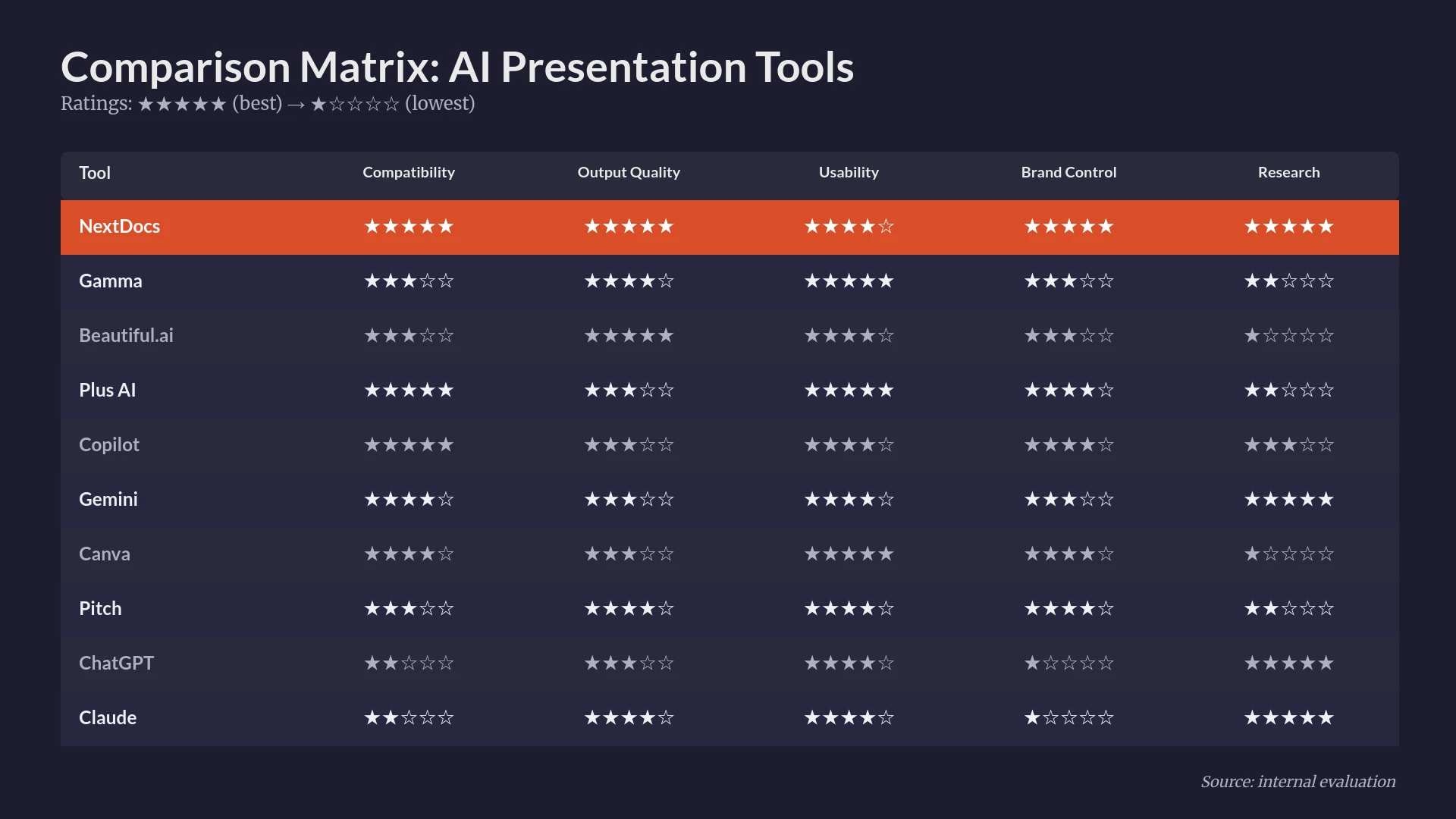
Copilot wins on organizational intelligence. It can pull a chart from an Excel file and explain it in a slide. MagicSlides wins on versatility for public content, particularly with its YouTube to slides feature. However, both tools typically give you one version of a presentation. If you do not like the first result, you have to prompt again from scratch. This is where a tool like NextDocs differs, as it provides multi-variant generation, giving you several different interpretations of your prompt to choose from at once.
Detailed Breakdown: Key Differences
1. Ecosystem and Workflow
Copilot is built for the Microsoft 365 power user. It requires a business or enterprise license. If your company lives in Teams and Outlook, Copilot feels like a natural extension of your workflow. MagicSlides lives in the Google Workspace. It is much easier to set up for a casual user or a small team that relies on Google Drive for collaboration.
2. Design and Visual Control
Microsoft Copilot uses Designer, an existing PowerPoint feature, to suggest layouts. While professional, these layouts can feel repetitive. MagicSlides provides very basic visual options. If you are looking for something that stands out, you might need ai presentation builders with brand kits to ensure that your slides match your company identity perfectly without manual tweaking.
3. Content Accuracy and Research
Copilot is excellent at summarizing your own documents accurately. However, it does not perform deep external web research in the same way a dedicated research tool might. MagicSlides can pull from specific URLs you provide, but it lacks the depth of a tool that can browse the live web to find and cite statistics. For research heavy decks, having an AI that provides citations is a major advantage.
Pricing Comparison
The pricing models for these two tools could not be more different.
Microsoft Copilot for PowerPoint is not sold as a standalone product. It is part of Microsoft 365 Copilot, which costs $30 per user per month. This is billed annually in most cases, making it a significant investment for small teams. You also need an underlying Microsoft 365 Business or Enterprise subscription.
MagicSlides is much more accessible. It offers a free tier that allows for a limited number of presentations per month. Their paid plans start at around $8 per month, which is a fraction of the cost of Copilot. This makes it a popular choice for those looking for 2026 free AI pitch deck builders or low cost alternatives.
NextDocs sits in the middle, offering a free tier for individual users and professional plans that provide more advanced features like universal export and deep research capabilities without the $30 enterprise entry fee.
Pros and Cons
Copilot for PowerPoint
Pros:
- Deep integration with Word, Excel, and Teams.
- Enterprise grade security and data privacy.
- Excellent at generating detailed speaker notes.
- Grounded in your organization's specific data.
Cons:
- Very expensive for small teams.
- No free version available.
- Conservative design choices.
- Requires a full Microsoft 365 ecosystem.
MagicSlides
Pros:
- Very affordable with a functional free tier.
- Unique ability to convert YouTube videos to slides.
- Works natively inside Google Slides.
- Extremely simple to use for quick drafts.
Cons:
- Visual output is often generic.
- Limited control over slide layouts.
- Requires significant manual cleanup for professional use.
- Lacks deep organizational context.
The NextDocs Advantage
While Copilot and MagicSlides are excellent for their specific niches, many professionals find themselves stuck between the two. You might want the professional polish of Copilot but the flexibility of Google Slides. Or you might want the ease of MagicSlides but need the research depth required for a high stakes pitch.
NextDocs was designed to bridge these gaps. Unlike the single output model of Copilot and MagicSlides, NextDocs uses multi-variant generation. When you enter a prompt, the system creates several different versions of the presentation. This allows you to pick the best narrative structure and design style immediately.
Furthermore, NextDocs solves the export problem. While Copilot locks you into PPTX and MagicSlides locks you into Google Slides, NextDocs offers universal exports. You can create a presentation and export it to PowerPoint, Google Slides, PDF, or even a Google Doc. This is particularly useful for founders using ai pitch deck builders who need to send different formats to different investors.

Verdict: Which Should You Choose?
The decision between Copilot for PowerPoint and MagicSlides depends on your environment and your goals.
Choose Copilot for PowerPoint if: You work in a large corporation that already uses Microsoft 365. You need to create presentations based on internal documents, and security is your top priority. You have the budget for a premium AI assistant and prefer staying within the PowerPoint interface.
Choose MagicSlides if: You are a student, educator, or solo professional on a budget. You use Google Slides as your primary tool and often need to turn web content or videos into quick presentations. You do not mind doing some manual design work after the AI generates the initial draft.
Choose NextDocs if: You are a consultant, founder, or marketer who needs high quality, research backed presentations. You want the ability to choose from multiple versions of a deck rather than accepting a single AI output. You need the flexibility to export to any format and require deep research with actual citations to ensure your content is accurate and persuasive.
Summary
In 2026, the best tool is the one that fits your specific workflow. Copilot offers the best integration for Microsoft users, while MagicSlides offers the best value for casual Google Slides users. However, for those who need a professional, AI native experience that handles research and multi-format exports, NextDocs provides a more comprehensive solution.
Ready to Create Better Presentations?
Try NextDocs Free and experience multi-variant generation, universal exports, and deep research integration. No credit card required.