
NextDocs vs Plus AI: AI Presentation Builder Comparison (2026)
A detailed comparison of NextDocs and Plus AI to help you choose the best AI presentation tool. We analyze multi-variant generation, deep research, and export flexibility for 2026.

The Evolution of AI Presentations in 2026
The landscape of professional presentations has shifted dramatically over the last few years. We have moved past the era where AI simply generated a few bullet points based on a vague prompt. Today, professionals require tools that understand business context, perform deep research, and maintain strict brand standards. As we explore the best AI presentation builders 2026 has to offer, two names frequently appear at the top of the list: NextDocs and Plus AI.
While both tools aim to reduce the time spent on slide creation, they approach the problem from fundamentally different directions. Plus AI focuses on augmenting existing workflows within established presentation software. NextDocs, on the other hand, provides an AI native environment designed to handle the entire lifecycle of a document from research to final export.
Choosing between them is not just about which tool has more features. It is about deciding how you want to work. Do you want an assistant that lives inside your current PowerPoint window, or do you want a dedicated platform that offers more creative choices and deeper data integration? This guide will break down the essential differences to help you make an informed decision for your business or startup.
NextDocs Overview: The AI Native Powerhouse
NextDocs is a standalone platform that treats the presentation as a dynamic, intelligent document. It is built on an AI native architecture, which means the artificial intelligence is not just a plugin but the core engine that drives the editor. This allows for a level of flexibility and intelligence that add-ons often struggle to replicate.
One of the standout features of NextDocs is its multi variant generation. When you provide a prompt, the system does not just give you one take it or leave it result. Instead, it generates multiple distinct versions of the presentation. This approach acknowledges that the first draft is rarely perfect. By providing variants, NextDocs allows you to see different narrative angles, visual styles, and content structures. You can then pick the best elements from each or choose the version that most closely aligns with your vision.
Beyond simple generation, NextDocs focuses heavily on the quality of the underlying information. Its deep research integration pulls real figures, market data, and citations from across the web. This makes it a top choice for those looking for the best AI presentation builders for startups 2026, where investor credibility relies on accurate data rather than plausible sounding fluff.
Plus AI Overview: The Seamless Add-in
Plus AI takes a different path by integrating directly into the tools that many professionals already use every day. It functions as an add-in for Google Slides and Microsoft PowerPoint. This means there is no new software to learn and no need to move your files between different platforms.
The primary strength of Plus AI is its ability to preserve existing workflows. If your company has a library of custom templates and master slides, Plus AI can work within those constraints. It offers a "remix" feature that allows you to take an existing slide and transform its layout or content without starting from scratch. This makes it a strong contender for those searching for affordable PowerPoint AI add-ins that do not disrupt the status quo.

Plus AI is particularly useful for teams that are mandated to stay within the Google Workspace or Microsoft 365 ecosystems for security or collaboration reasons. It provides a helpful layer of AI assistance that speeds up the drafting process while keeping the final file in a native PPTX or Google Slides format from the very beginning.
Key Differences Between NextDocs and Plus AI
Understanding the core differences between these two tools is essential for choosing the right one for your workflow.
1. Standalone Platform vs. Add-in
NextDocs is a standalone platform. You log in to a dedicated web editor that is optimized for AI interaction. This allows for features like the multi variant view and an AI native canvas that understands the relationship between different slide elements. Plus AI is an add-in. It lives in a sidebar within Google Slides or PowerPoint. While this is convenient, it also means the AI is limited by the capabilities and interface of the host application.
2. Multi Variant Generation vs. Single Output
When you ask Plus AI to generate a deck, it produces one version based on your prompt. If you do not like it, you have to refine your prompt and try again. NextDocs changes this dynamic by offering multiple versions immediately. This "choice first" philosophy reduces the frustration of prompt engineering because you are much more likely to find a version that works for you in the first batch.
3. Research Depth and Accuracy
NextDocs includes a deep research engine that actively searches the web for real time data and citations. This is a critical feature for professional reports and pitch decks. Plus AI relies more heavily on the generative capabilities of the underlying LLM, which can sometimes lead to generalities or "hallucinated" statistics if the prompt is not extremely specific.
4. Export Versatility
NextDocs offers universal exports. You can create a presentation and then export it as a PDF, a PowerPoint file, a Google Slides deck, or even a Google Doc. This makes it one of the best AI presentation builders with pptx export because the formatting remains consistent across all types. Plus AI is naturally tied to the platform you are using, though you can save your Google Slides as PPTX using standard Google features.
Feature Comparison Table
| Feature | NextDocs | Plus AI |
|---|---|---|
| Category | Standalone AI Platform | Google Slides/PPT Add-in |
| Generation Style | Multi-variant (Multiple versions) | Single output |
| Research Capabilities | Deep research with citations | Prompt-dependent content |
| Export Formats | PDF, PPTX, Google Slides, Google Docs | PPTX, Google Slides |
| Brand Control | Full Brand Kit support | Template preservation |
| Learning Curve | Moderate (New interface) | Low (Existing interface) |
| Free Tier | Available | None (Paid only) |
| Best For | Consultants, Founders, Researchers | Enterprise teams, PPT power users |
Deep Dive: NextDocs Strengths
NextDocs excels when the stakes are high. If you are a founder preparing for a Series A pitch or a consultant delivering a high value report, the quality of the content is just as important as the design.
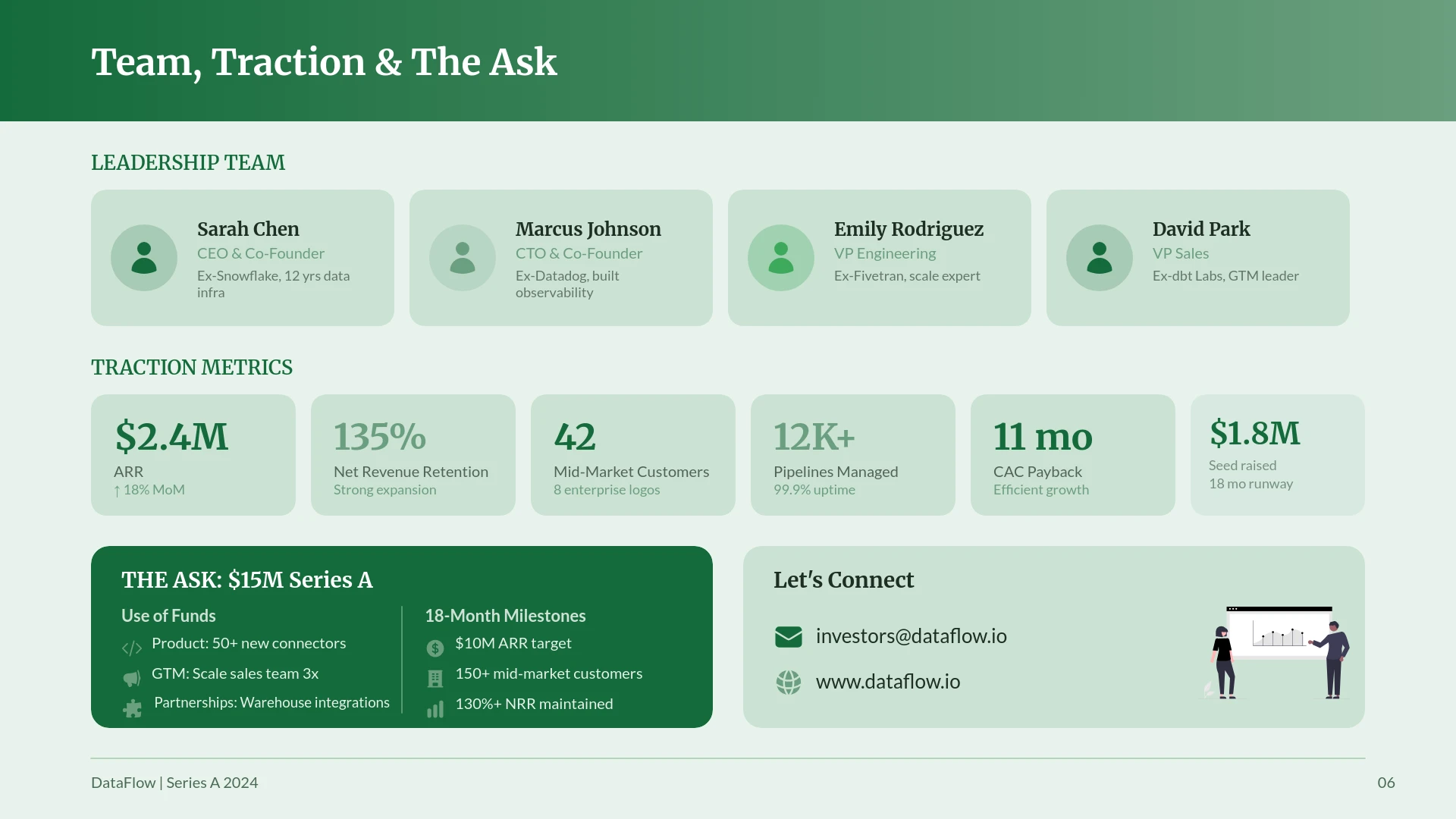
The deep research integration allows users to input a topic and receive a deck filled with actual market figures. For example, if you are building a slide on traction, NextDocs can help structure that data effectively.
Another advantage of NextDocs is its multi model support. Users are not locked into one specific AI model. Depending on the complexity and nature of your presentation, the system can leverage the most appropriate model to ensure the logic and tone are correct. This flexibility is a core reason why many are looking for Plus AI alternatives 2026 that offer more than just basic text generation.
Deep Dive: Plus AI Strengths
Plus AI is the tool of choice for the "efficiency first" professional. If you already have a presentation that is 80 percent finished and you just need to polish the last few slides, Plus AI is incredibly effective.
Its "Remix" feature is perhaps its most popular tool. It allows you to select a slide and ask the AI to "make this a three column layout" or "turn these bullet points into a timeline." Because it happens inside Google Slides or PowerPoint, you do not have to worry about broken formatting or lost fonts. It respects the theme you have already established.
Plus AI also offers a "rewrite" tool that can adjust the tone of your text. If your writing is too technical, you can ask the AI to make it more accessible for a general audience. This makes it a great utility for internal corporate communications where speed and adherence to company templates are the top priorities.
Pricing Comparison
Pricing is a significant factor for many users, especially those looking for a long term solution.
NextDocs Pricing
NextDocs offers a tiered approach that caters to both individuals and larger teams.
- Free Tier: NextDocs provides a genuinely useful free tier that allows you to experience the multi variant generation without an upfront cost.
- Pro Plan: Starting at $15 per month, this plan unlocks higher generation limits, advanced research tools, and full brand kit customization.
- Team/Enterprise: Custom pricing is available for organizations that need centralized billing and advanced collaboration features.
Plus AI Pricing
Plus AI does not currently offer a free tier, which can be a barrier for those who want to test the tool before committing.
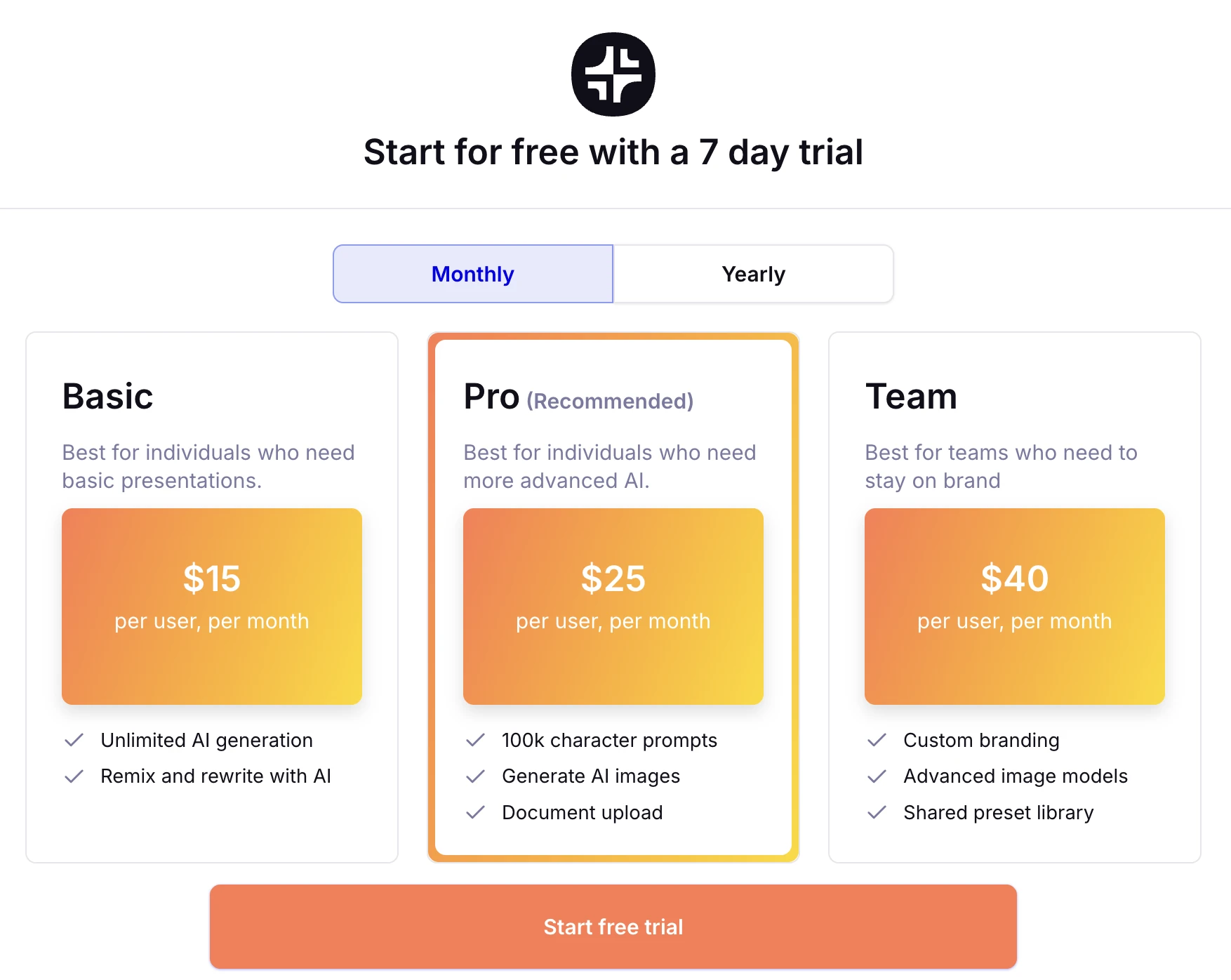
- Basic Plan: Starts at $10 per month and includes basic generation and editing features.
- Pro Plan: Costs $20 per month and adds features like custom themes and longer character limits for prompts.
- Team Plan: Usually priced around $20 per user per month, focusing on shared templates and styles.
Pros and Cons
NextDocs
Pros:
- Multi variant generation gives you more creative options.
- Deep research integration provides factual data and citations.
- Universal exports allow you to work across any platform.
- AI native editor is more powerful than standard slide software.
- Free tier allows for thorough testing.
Cons:
- Requires moving to a new platform outside of PowerPoint or Google Slides.
- Advanced research features have a slight learning curve.
Plus AI
Pros:
- Lives inside the tools you already use.
- Excellent for editing and remixing existing presentations.
- Low learning curve for people familiar with Google Slides.
- Preserves organization specific templates perfectly.
Cons:
- No free tier available.
- Generates only one version at a time.
- Content quality is highly dependent on the user's prompting skills.
- Design variety is more limited compared to standalone tools.
The Verdict: Which Tool Should You Choose?
The decision between NextDocs and Plus AI comes down to your specific needs and how much you value research and variety.
Choose NextDocs if: You are a founder, consultant, or sales professional who needs to create high impact presentations from scratch. If you value having multiple options to choose from and need your slides to be backed by real research and data, NextDocs is the superior choice. Its ability to export to any format makes it the most flexible tool for professionals who work with diverse clients and stakeholders.
Choose Plus AI if: You are an enterprise employee or a power user of PowerPoint and Google Slides who wants to speed up a settled workflow. If you already have your templates and just want an AI assistant to help you move faster within those apps, Plus AI is a reliable and convenient option.
Both tools represent the cutting edge of AI productivity. However, for those who want to break free from the limitations of traditional slide software and leverage the full power of AI native design, NextDocs offers a more comprehensive and future proof solution.
Ready to Create Better Presentations?
Try NextDocs Free and experience multi-variant generation, universal exports, and deep research integration. No credit card required.