Best Ai Pitch Deck Builders for students in 2026
A comprehensive roundup of the best AI pitch deck builders for students, ranging from research-heavy academic tools to visual design platforms. We rank the top 10 tools to help you ace your next presentation or startup competition.
The landscape of academic and extracurricular presentations has shifted dramatically. Students are no longer just expected to present facts. They are expected to build compelling narratives, visualize complex data, and pitch startup ideas with the polish of a professional founder. Whether you are preparing for a business case competition, a capstone project, or a seed funding pitch, the pressure to produce high quality slides is immense.
Artificial Intelligence has transformed this process from a multi day design struggle into a streamlined workflow. However, not all AI tools are created equal. Some excel at creative visuals while others are built for deep research and technical accuracy. For students, the ideal tool needs to balance cost, ease of use, and the ability to handle rigorous academic or technical content.
In this guide, we evaluate and rank the best AI pitch deck builders specifically through the lens of a student. We tested these platforms for their ability to handle complex prompts, their export flexibility, and their capacity to turn raw research into investor ready presentations.
Summary Comparison Table
| Rank | Tool | Best For | Starting Price |
|---|---|---|---|
| 1 | NextDocs | Research-heavy decks and technical presentations | Free (Pro from $15/mo) |
| 2 | Plus AI | Students using Google Slides or PowerPoint | $10/mo |
| 3 | Gamma | Visual sharing and modern web-native decks | Free (Pro from $8/mo) |
| 4 | Beautiful.ai | Non-designers who need perfect layouts | $12/mo |
| 5 | Gemini for Google Slides | Quick drafts for Google Workspace users | Free tier available |
| 6 | Canva Magic Design | Creative projects and asset-heavy slides | Free (Pro from $13/mo) |
| 7 | Pitch.com | Group projects and collaborative work | Free (Pro from $8/mo) |
| 8 | Copilot for PowerPoint | Microsoft 365 power users | $30/mo |
| 9 | MagicSlides | Converting YouTube or long text to slides | Free (Pro from $8/mo) |
| 10 | SlidesAI | Fast, basic drafts for simple assignments | Free (Pro from $10/mo) |
1. NextDocs
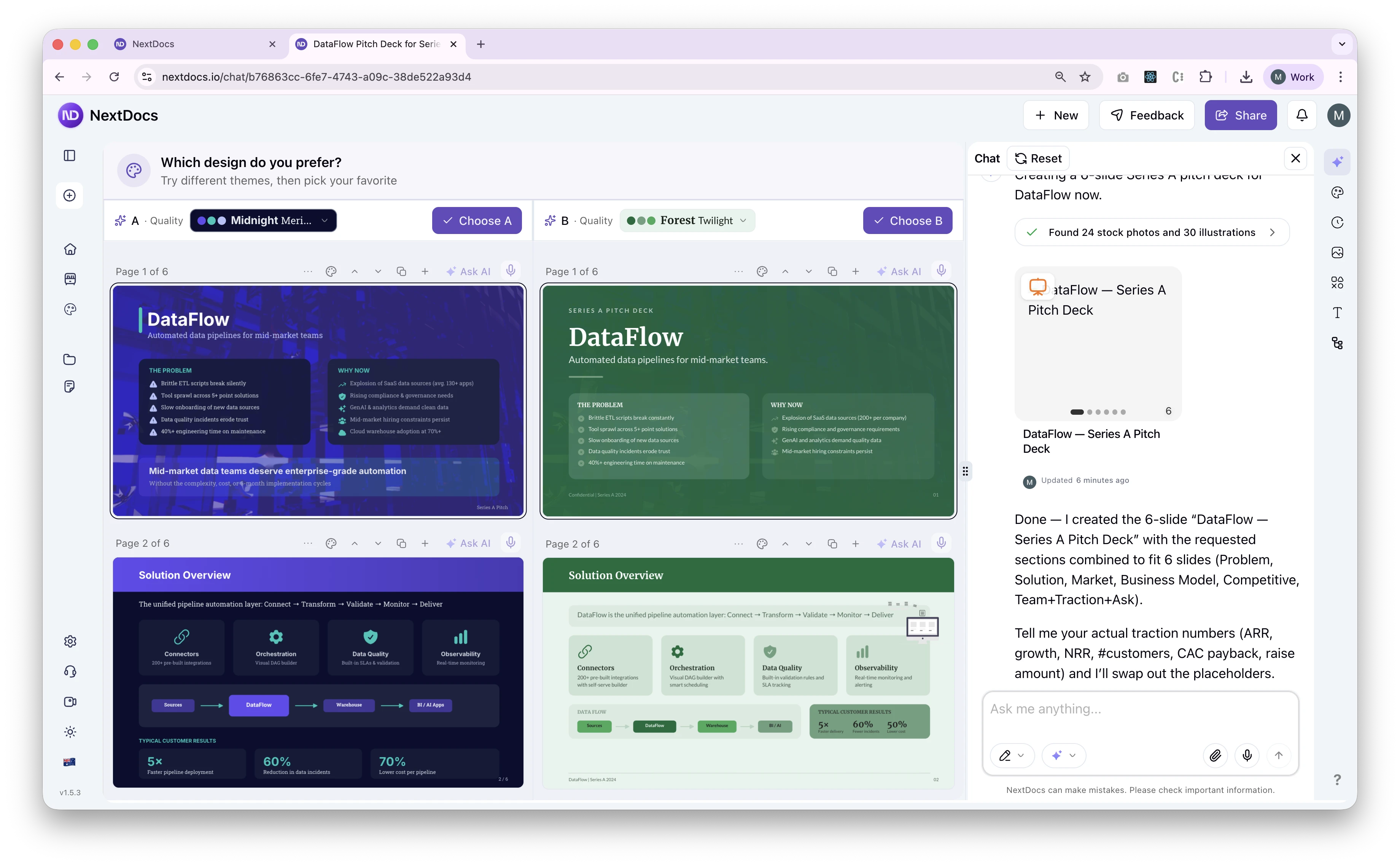
NextDocs stands out as the premier choice for students who need more than just a pretty template. It is an AI native platform designed for those who require depth, accuracy, and technical sophistication. Unlike traditional tools that force AI into an old interface, NextDocs uses a multi variant generation engine. When you provide a prompt, it generates multiple distinct versions of the deck. This allows students to choose the narrative structure or design style that best fits their specific project.
For students in STEM or business, NextDocs offers unique features like native LaTeX math equation support and code syntax highlighting. This makes it the only viable choice for technical pitches or research presentations. Furthermore, its deep research integration pulls real figures with citations, solving the common problem of AI "hallucinations" in student work. You can create a deck and export it to PDF, PowerPoint, or Google Slides seamlessly. It is essentially a bridge between high level research and professional delivery.
Key Features:
- Multi variant generation provides multiple versions of a deck per prompt.
- Deep research integration pulls live data and provides citations.
- Universal exports allow you to move between PDF, PPTX, and Google Slides.
- Native support for math equations (LaTeX) and code blocks.
- Multi model support lets you choose the best AI engine for your content.
Pricing: Free tier available for students. Pro plans start at $15 per month.
Best for: Overall excellence, research-heavy decks, technical students, and startup founders.
Verdict: NextDocs is the most robust tool on this list. It is the best choice for any student who needs factual accuracy and professional flexibility.
2. Plus AI
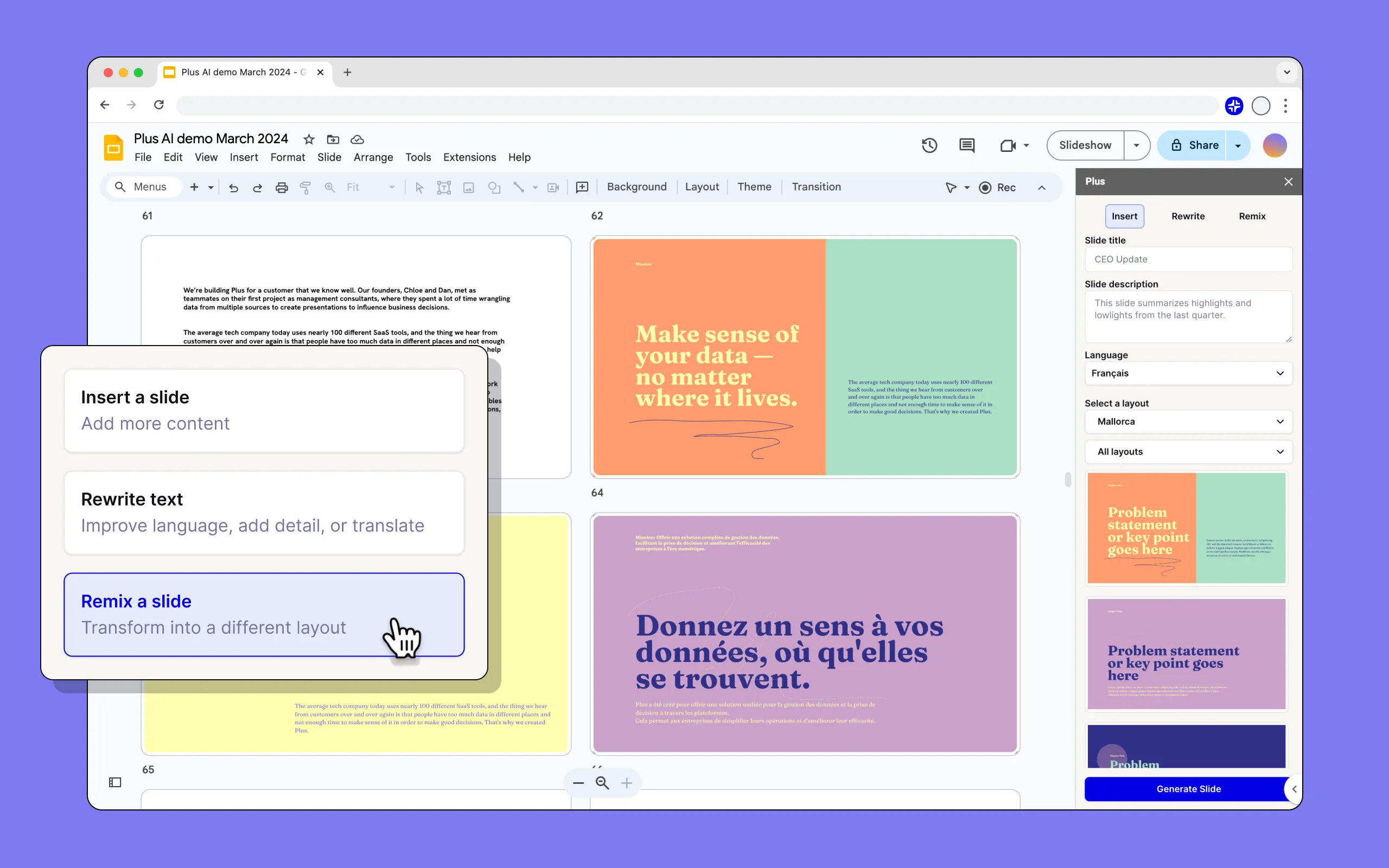
Plus AI is a powerful add-in that lives directly inside Google Slides and PowerPoint. For students who are already comfortable with these traditional platforms, Plus AI is a logical extension. It does not require you to learn a new interface. Instead, it adds a sidebar where you can generate new slides, rewrite existing content, or "remix" a layout to look more professional.
The primary strength of Plus AI is its ability to work with your existing templates. If your university provides a specific branded template for a competition, Plus AI can generate content that fits within those predefined styles. This makes it a top choice for those who need to maintain a specific institutional look. While it lacks a free tier, its ability to enhance existing presentations makes it a favorite for students who have already started their research and just need help with the finishing touches. For those looking for more variety, exploring plus ai alternatives 2026 can provide additional context on how it stacks up against newer competitors.
Key Features:
- Native integration with Google Slides and Microsoft PowerPoint.
- Remix feature allows you to transform existing slides into new layouts.
- Preserves your existing brand styles and master templates.
- AI powered rewriting tool for polishing slide copy.
Pricing: No free tier. Plans start at $10 per month.
Best for: Students who want to stay within Google Slides or PowerPoint and need to use specific templates.
Verdict: An excellent choice for workflow continuity. It is perfect for enhancing decks you have already started.
3. Gamma
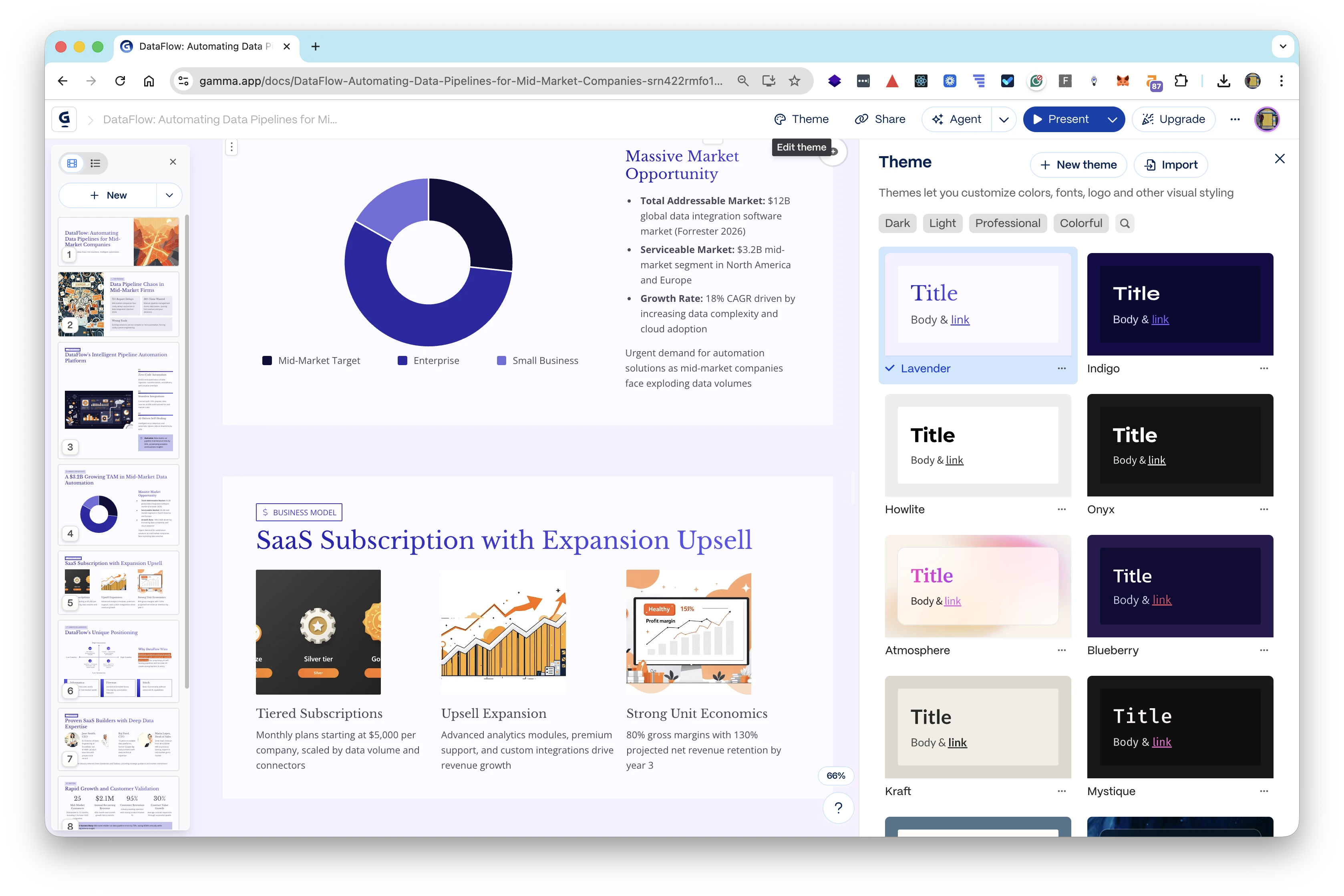
Gamma has become a favorite in the student community because of its modern, web native approach. It does not treat a presentation like a series of static 16:9 boxes. Instead, it uses "cards" that can expand and house interactive content like videos, web embeds, and live charts. This makes it ideal for digital native students who want to share their work via a link rather than a traditional file.
The platform is incredibly fast. You can type a single prompt and watch a beautiful, themed presentation appear in seconds. Gamma is particularly strong for internal club presentations or less formal pitches where a modern, sleek aesthetic is more important than traditional PowerPoint formatting. However, the free tier does include a watermark, and the export to PDF or PPTX can sometimes feel less polished than the web version. It remains a strong contender, especially when compared to genspark vs nextdocs in terms of research depth.
Key Features:
- Web native format optimized for link sharing and mobile viewing.
- Generous free tier that allows for significant exploration.
- One click themes that instantly change the look of the entire deck.
- Ability to embed interactive elements like videos and forms.
Pricing: Genuinely useful free tier. Pro plans start at $8 per month.
Best for: Budget conscious students and those creating modern, interactive presentations.
Verdict: The best "cool" factor for presentations. It is great for sharing work online but has limitations for formal printing.
4. Beautiful.ai
Beautiful.ai is built on the philosophy that you should focus on the content while the AI handles the design. It uses smart templates that automatically adjust as you add text or images. If you add a fourth bullet point, the other three automatically resize to maintain perfect alignment. For students who feel they lack a "design eye," this tool is a lifesaver.
The output is consistently polished and professional. It is very difficult to make an ugly slide in Beautiful.ai. This makes it a preferred tool for high stakes client presentations or capstone projects where visual credibility is key. While it offers less flexibility than a blank canvas, the constraints are actually its greatest feature. Students often spend too much time moving boxes by three pixels. Beautiful.ai eliminates that distraction entirely. For a deeper look at how it compares to other industry giants, see our beautiful ai vs canva analysis.
Key Features:
- Smart templates that automatically handle layout and alignment.
- Polished, designer quality output with minimal effort.
- Large library of icons and stock photography.
- Smooth animations and transitions for a cinematic feel.
Pricing: No free tier. Individual plans start at $12 per month.
Best for: Students who want professional design without having to do the manual work.
Verdict: The "easy mode" for professional design. It is perfect for ensuring your deck looks like it was made by a graphic designer.
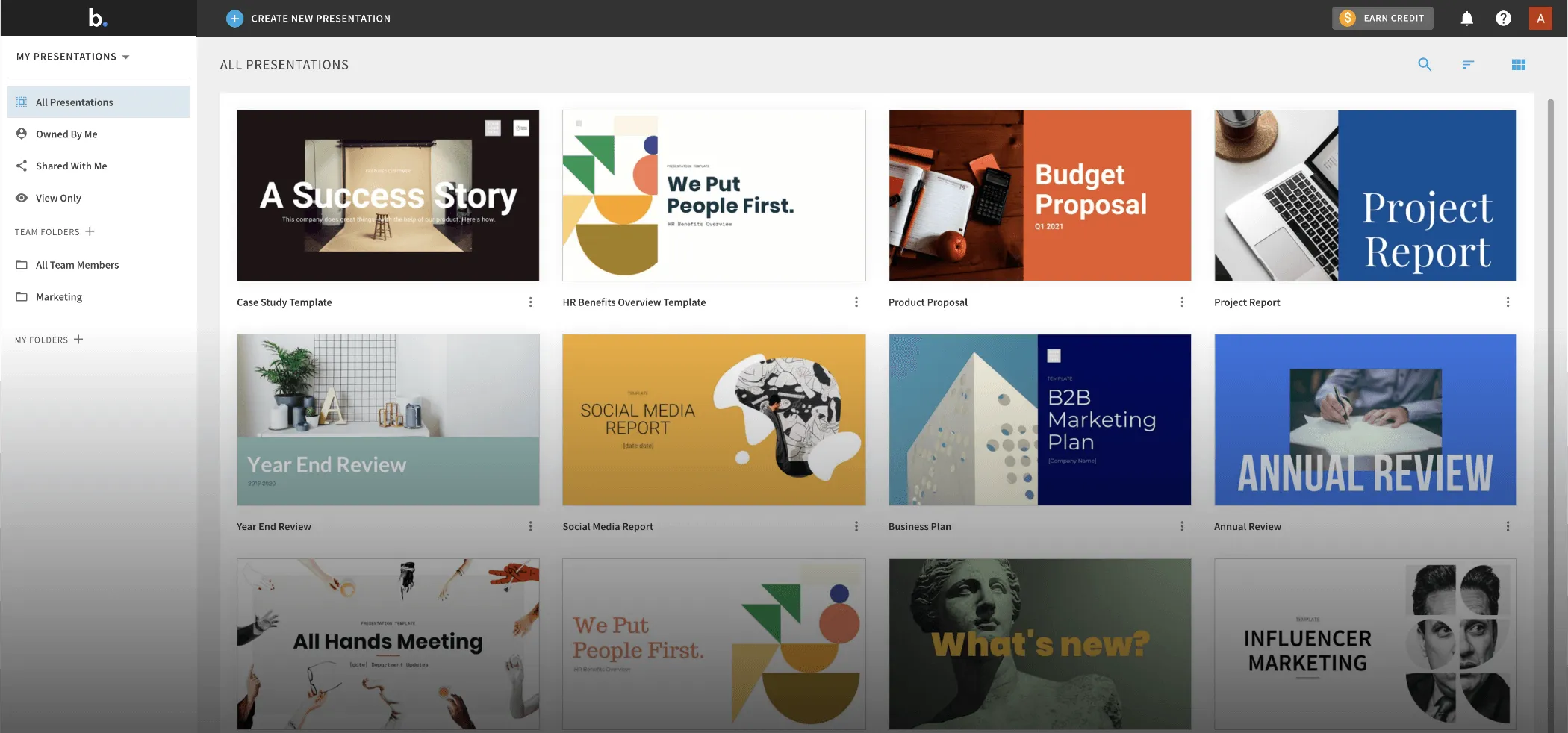
5. Gemini for Google Slides
For many students, Google Workspace is the default home for all academic work. Gemini for Google Slides brings AI directly into that ecosystem. Because it is built by Google, it has the unique ability to reference content from your Google Drive. If you have a research paper in a Google Doc, Gemini can help summarize that into slides.
The tool is still evolving, so the output can sometimes feel more generic than specialized tools like NextDocs. However, the convenience factor is unbeatable for students who do not want to manage another subscription or account. It is also a great starting point for drafting. You can use it to get the "bones" of your presentation down and then manually polish the design. If you find its features too basic, there are several 2026 gemini google slides alternatives that offer more advanced AI capabilities.
Key Features:
- Seamless integration with Google Workspace and Drive.
- Built in image generation to create custom visuals.
- Ability to summarize long documents into slide outlines.
- No extra software or extensions to install.
Pricing: Included with many Google Workspace tiers. Free trials are common.
Best for: Google Workspace power users and quick, internal drafts.
Verdict: The most convenient option for Google users. It is best for simple assignments rather than complex pitch decks.
6. Canva Magic Design
Canva has moved far beyond simple social media graphics. Its Magic Design feature allows students to generate entire presentations from a short description. The biggest advantage of Canva is its massive library of assets. You get access to millions of photos, illustrations, and unique fonts that other tools simply cannot match.
For creative students or those in marketing and communications, Canva is often the first choice. It allows for a level of visual flair and customization that is very high. You can easily pivot from a presentation to a social media post or a flyer using the same assets. However, for a formal business pitch, Canva can sometimes look "too designed" or a bit casual compared to the structured approach of NextDocs or Beautiful.ai. You can read more about this in our beautiful ai vs pitch comparison which touches on different design philosophies.
Key Features:
- Massive library of templates, icons, and stock media.
- Multi format export including video and social posts.
- Strong free tier with many usable assets.
- Magic Switch feature to change presentation sizes and formats instantly.
Pricing: Free tier available. Canva Pro is $13 per month.
Best for: Creative projects, marketing students, and asset-heavy presentations.
Verdict: A visual powerhouse. It is the best tool if you need a specific "look" or a wide variety of graphic elements. For those looking for something different, check out our list of canva alternatives.
7. Pitch.com
Pitch.com is designed with a focus on modern collaboration. If you are working on a group project where four people need to edit slides simultaneously, Pitch.com provides one of the smoothest experiences available. Its AI features help generate starting points, but its real strength lies in the editor itself.
It offers a "pro" feel that sits somewhere between the rigidity of Beautiful.ai and the freedom of PowerPoint. It includes features like version history and integrated commenting, which are essential for student teams trying to coordinate before a deadline. While its AI isn't as advanced in terms of research as NextDocs, its workflow features make it a top tier choice for collaborative efforts. Check out our beautiful ai vs pitch guide to see which workflow suits your team better.
Key Features:
- Real time collaboration with smooth performance.
- Version history and integrated team comments.
- Professional, high end template library.
- Easy to use animations and slide transitions.
Pricing: Free tier for individuals. Pro plans start at $8 per user per month.
Best for: Group projects and collaborative team pitches.
Verdict: The best tool for teams. It makes the "group project" headache much more manageable.
8. Copilot for PowerPoint
Microsoft Copilot for PowerPoint is the enterprise grade solution for students who live in the Microsoft ecosystem. If your university provides a Microsoft 365 account, you may already have access to this. Copilot is exceptionally good at taking a Word document, like a thesis or a long report, and transforming it into a structured PowerPoint deck with speaker notes.
The design output tends to be conservative and professional, which is perfect for formal academic settings or corporate internships. It also integrates with your Outlook and Teams data, though that is often less relevant for students than for professionals. The primary downside is the high cost of the subscription if it isn't provided by your school. It is a serious tool for serious work, often compared in the blogs/best-ai-presentation-builders-2026 roundup.
Key Features:
- Transform Word documents into presentations instantly.
- Generate speaker notes based on the content of the slides.
- Integration with the full Microsoft 365 suite.
- Enterprise level security and data handling.
Pricing: $30 per month (requires a Microsoft 365 subscription).
Best for: Students with existing Microsoft 365 access and those converting long papers to slides.
Verdict: The gold standard for Microsoft users. It is powerful but expensive if you are paying out of pocket.
9. MagicSlides
MagicSlides is a specialized Google Slides add-on that focuses on content repurposing. One of its most unique features is the ability to take a YouTube video URL and turn the transcript into a presentation. For students who use video lectures as a primary study source, this is a game changer.
It is a relatively simple tool compared to the standalone platforms like NextDocs. It doesn't offer a bespoke editor, but it does exactly what it says on the tin: it gets content onto slides fast. The design quality is basic, so you will almost certainly need to spend time cleaning up the visuals. However, for a quick study guide or a draft based on a specific piece of media, it is highly efficient.
Key Features:
- Convert YouTube videos directly into slide decks.
- Generate slides from long form text or PDF documents.
- Simple, no frills interface inside Google Slides.
- Affordable pricing for students.
Pricing: Free tier available. Pro plans start at $8 per month.
Best for: Converting study materials and video content into presentations.
Verdict: A great utility tool. It is better for studying and internal notes than for a final, high stakes pitch.
10. SlidesAI
SlidesAI is another Google Slides add-in that prioritizes speed and affordability. It is one of the easiest tools to use. You simply paste your text into a box, select a general style, and the AI populates the slides. It is less about "generating" new ideas and more about "formatting" the ideas you already have.
For a student who has already written their presentation script and just needs it moved onto slides quickly, SlidesAI is perfect. It avoids the complexity of larger platforms. The designs are standard and functional. While it may not win any design awards, it will save you hours of copying and pasting text from a document into individual slide boxes.
Key Features:
- Rapid text to slide conversion.
- Supports over 100 languages.
- Simple interface with minimal configuration needed.
- Affordable entry point for AI slide generation.
Pricing: Free tier available. Pro plans start at $10 per month.
Best for: Quick, simple assignments and students who already have their content written.
Verdict: The ultimate time saver for basic tasks. It is best for routine class presentations.
Evaluation Criteria for Students
When ranking these tools, we looked at several factors that specifically impact a student's life. A tool that works for a Fortune 500 executive might be a poor fit for a college junior.
1. Accuracy and Research
Students are graded on facts. Many AI tools tend to make up statistics or "hallucinate" data. This is why NextDocs is ranked first. Its ability to pull real data with citations is a massive advantage in an academic setting. Using a tool that provides citations can be the difference between an A and a failing grade due to misinformation.
2. Export Flexibility
A common student nightmare is creating a beautiful presentation in a web tool only to find out the classroom computer only has PowerPoint and no internet access. We prioritized tools that offer universal exports (PDF and PPTX). Being able to move your work between Google Slides and PowerPoint is essential for group members who use different systems.
3. Technical Support
Most AI presentation builders struggle with math and code. If you are an engineering or computer science student, you need a tool that can handle LaTeX and syntax highlighting. NextDocs is the clear leader here, as most other tools treat code and math as simple text, which ruins the formatting.
4. Cost and Value
Student budgets are tight. We looked for tools that either have a generous free tier or a starting price that provides significant value. While some tools like Copilot are expensive, they may be "free" if provided by your university.
How to Choose the Right Tool for Your Project
The "best" tool depends on the specific nature of your presentation. Here is how to decide:
- If you are in a Pitch Competition: Use NextDocs. You need the multi variant options to find the most persuasive narrative, and you need the deep research to back up your market size claims. The professional export ensures your deck looks perfect on the big screen.
- If you are doing a Creative Project: Use Canva Magic Design. The access to unique visual assets and templates will help your creative vision stand out.
- If you are working with a Group: Use Pitch.com. The collaboration features will prevent the "too many cooks" problem and keep everyone on the same version.
- If you are converting a Research Paper: Use Plus AI or Copilot. These tools are specifically designed to ingest long documents and turn them into structured slides.
- If you are on a Zero Budget: Use Gamma or the free tier of NextDocs. Both offer enough power to get a high quality project finished without a credit card.
Final Thoughts on AI Pitch Deck Builders
AI is a tool to enhance your thinking, not replace it. The best presentations are those where the student uses AI to handle the "heavy lifting" of layout and initial drafting, then applies their own critical thinking to refine the message.
For students in 2026, the standard for presentations has been raised. Using an AI builder is no longer a "hack," it is a professional necessity. By choosing a tool like NextDocs, you ensure that your technical requirements are met while maintaining the highest level of design and factual accuracy. Whether you are building a simple class report or pitching the next unicorn startup, these tools provide the foundation you need to succeed.
Ready to Create Better Presentations?
Try NextDocs Free and experience multi-variant generation, universal exports, and deep research integration. No credit card required.