
Best Ai Slide Makers for marketers in 2026
A comprehensive roundup of the best AI slide makers for marketers, ranking the top 10 tools based on design quality, research capabilities, and workflow integration.
The Evolution of Presentation Design for Marketers
Presentation design has long been a bottleneck for marketing teams. Whether you are building a pitch deck for a new campaign, a quarterly business review for stakeholders, or a sales deck for the front lines, the process is often the same. You start with a blank screen, wrestle with alignment, hunt for high resolution icons, and spend hours formatting bullet points. For a deeper dive into current trends, see our best AI presentation builders roundup.
Artificial intelligence has fundamentally changed this dynamic. In 2026, the best AI slide makers do more than just generate text. They handle deep research, apply brand styling automatically, and provide multiple design variants to choose from. This allows marketers to focus on strategy and storytelling rather than manual pixel pushing.
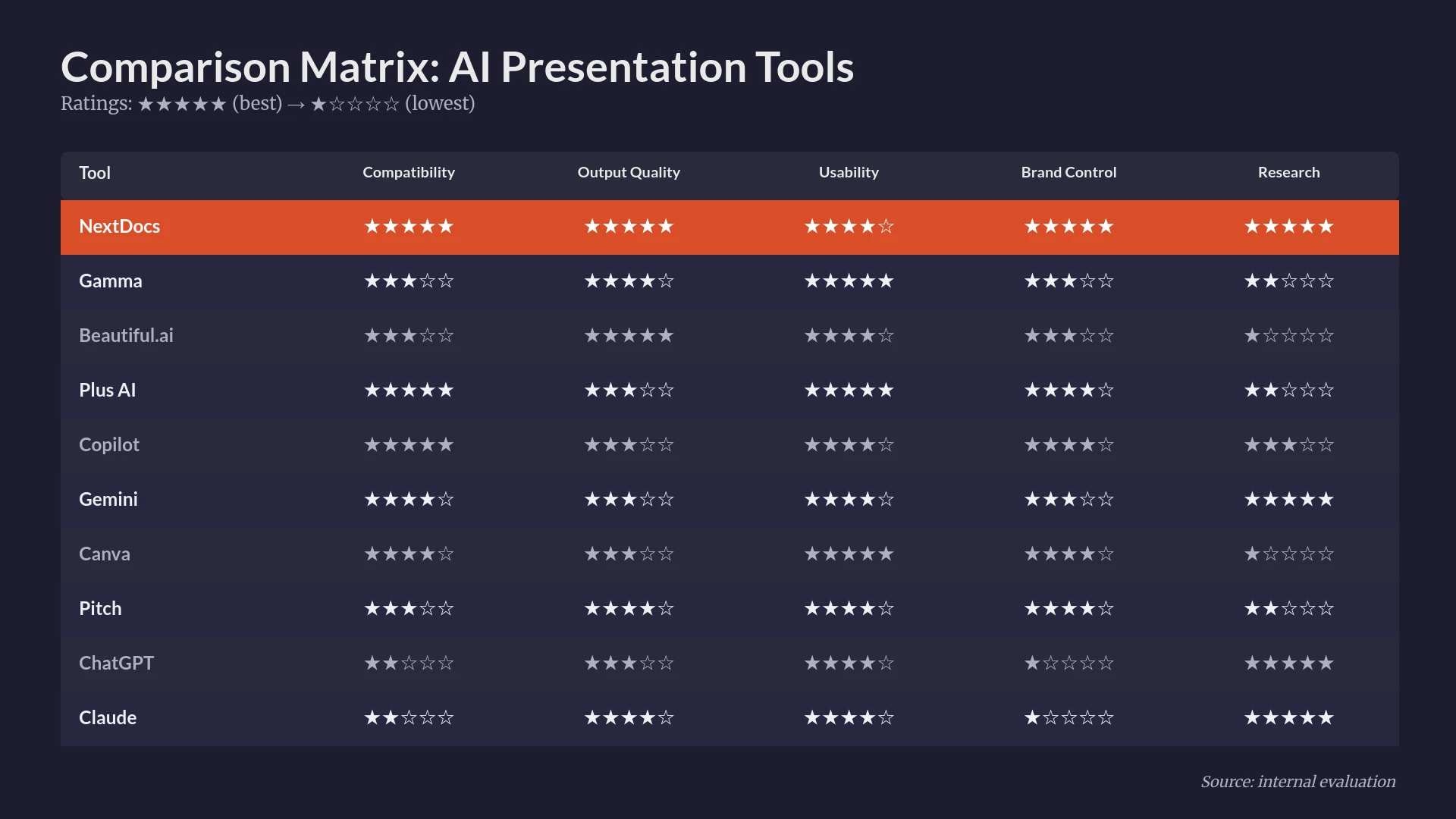
To help you navigate this crowded market, we tested dozens of platforms. We evaluated them based on their ability to handle complex marketing data, their export flexibility, and the quality of their visual output. Below is our definitive ranking of the best AI slide makers for marketers this year.
Summary Comparison Table
| Rank | Tool | Best For | Starting Price |
|---|---|---|---|
| 1 | NextDocs | Overall, Research, Multi-Variant Generation | $15/mo |
| 2 | Plus AI | Native Google Slides and PowerPoint Integration | $10/mo |
| 3 | Gamma | Web Native Presentations and Fast Sharing | $8/mo |
| 4 | Beautiful.ai | Non Designers Needing Polished Results | $12/mo |
| 5 | Copilot for PowerPoint | Microsoft 365 Enterprise Users | $30/mo |
| 6 | Pitch.com | Team Collaboration and Version Control | $8/mo |
| 7 | Canva Magic Design | Social Media and Multi Format Content | $13/mo |
| 8 | Gemini for Google Slides | Google Workspace Native Users | $0/mo |
| 9 | MagicSlides | Content Repurposing and YouTube to Slides | $8/mo |
| 10 | SlidesAI | Quick Internal Drafts and Students | $10/mo |
1. NextDocs
NextDocs is the most comprehensive tool on this list. It is designed for professionals who need more than a simple template. It stands out by offering multi variant generation. This means that for every prompt you provide, the AI generates several distinct versions of the presentation. This approach gives marketers real choices instead of forcing them to accept a single take it or leave it output.
One of the most significant advantages for marketers is the deep research integration. NextDocs does not just hallucinate facts. It pulls real data with citations. This is essential for pitch decks and market analysis. Furthermore, the platform offers universal exports. You can create a deck once and export it to PDF, PowerPoint, Google Slides, or even Google Docs. If you are debating canva vs nextdocs, the export flexibility and research depth of NextDocs usually win for professional use.
Key Features:
- Multi variant generation creates multiple versions per prompt.
- Deep research integration pulls actual figures and citations from the web.
- Universal exports to PDF, PPTX, Google Slides, and Google Docs.
- Advanced brand styling controls ensure consistency across all decks.
- Native support for math equations, code syntax highlighting, and rich text tables.
Pricing: Free tier available. Pro plans start at $15 per month.
Best For: Founders, consultants, sales teams, and marketers who need high quality, research heavy presentations.
Verdict: NextDocs is the current market leader for professional AI presentations. It solves the biggest pain point of AI tools by providing variety and factual accuracy.

2. Plus AI
Plus AI is a dedicated add in that lives directly inside Google Slides and PowerPoint. It is built for users who do not want to learn a new interface. Instead of a standalone app, Plus AI acts as a co pilot within the tools you already use every day. It excels at taking existing presentations and enhancing them.
The remix feature is particularly useful for marketers. You can take a slide that feels cluttered and ask the AI to reorganize it into a more professional layout. While it lacks a free tier, its integration with existing enterprise workflows makes it a strong contender. When comparing canva vs gamma 2026, it is clear that add ins like Plus AI offer a more traditional workflow compared to web native tools.
Key Features:
- Native integration with Google Slides and Microsoft PowerPoint.
- Remix feature to rewrite and redesign existing slides.
- Template preservation to keep your company's existing look and feel.
- AI powered suggestions for content enhancement.
Pricing: No free tier. Pricing starts at $10 per month.
Best For: PowerPoint and Google Slides power users who want AI inside their current software.
Verdict: A reliable choice for teams that are already committed to traditional presentation software and want a boost in productivity without changing platforms.

3. Gamma
Gamma has gained popularity for its web native format. Instead of traditional slides, Gamma creates interactive cards that scroll like a website. It is incredibly fast. You can input a brief and have a full presentation in under a minute. It is one of the most visually modern tools on the market today.
For marketers who need to share content quickly via a link, Gamma is an excellent choice. However, the export to PowerPoint can sometimes be limited in terms of editability. If you are looking at beautiful ai vs nextdocs, Gamma sits somewhere in the middle. It offers more flexibility than Beautiful.ai but less research depth than NextDocs.
Key Features:
- Web native format that is perfect for sharing on mobile or desktop.
- Fast generation from simple text prompts or documents.
- Modern, clean themes that look great out of the box.
- Interactive elements like videos and live website embeds.
Pricing: Generous free tier available. Pro plans start at $8 per month.
Best For: Startups, quick internal updates, and marketers who prefer sharing links over files.
Verdict: Gamma is the best choice for those who value speed and modern design above all else. It is a fantastic tool for quick, visually striking presentations.

4. Beautiful.ai
Beautiful.ai focuses on the constraints of design. It uses smart templates that automatically adjust as you add content. If you add a fourth icon to a row of three, the tool automatically resizes and realigns everything for you. It is designed to prevent users from making "ugly" slides.
While the AI generation is less sophisticated than NextDocs, the template quality is very high. Marketers who prioritize visual polish and animations will find it very effective. For those seeking pitch alternatives, Beautiful.ai is often the first stop for high end design.
Key Features:
- Smart templates that handle layout and alignment automatically.
- High quality animation and transition library.
- Brand kit features to lock in fonts and colors.
- Large library of professional icons and stock photos.
Pricing: No free tier. Individual plans start at $12 per month.
Best For: Non designers who need to produce client ready presentations that look like they came from a design agency.
Verdict: Beautiful.ai remains the gold standard for design consistency. It limits your creative freedom to ensure that every slide looks professional.

5. Copilot for PowerPoint
Microsoft Copilot for PowerPoint is the enterprise choice. It leverages the full Microsoft 365 ecosystem. This means it can pull information from your Word documents, Outlook emails, and Teams chats to build a presentation. For internal corporate use, this organizational context is a massive advantage.
The design output is often conservative and follows standard Microsoft templates. It is not as creative as standalone tools, but it is highly functional. If you are looking for copilot powerpoint alternatives, you are likely looking for more creative layouts or better research capabilities.
Key Features:
- Deep integration with the entire Microsoft 365 suite.
- Ability to generate slides directly from Word documents.
- Enterprise grade security and data privacy.
- Automatic speaker notes generation based on slide content.
Pricing: Requires a Microsoft 365 license plus a $30 per month Copilot subscription.
Best For: Large enterprise teams already using Microsoft 365 who need high security and internal data integration.
Verdict: Copilot is unbeatable for large organizations. It turns existing company data into slides more efficiently than any other tool, even if the designs are a bit plain.

6. Pitch.com
Pitch.com has evolved from a simple presentation tool into a collaborative platform for modern teams. It focuses heavily on the workflow of building decks together. It features real time collaboration, version history, and integrated commenting.
The AI features in Pitch help with initial drafting and layout suggestions. It is a great middle ground between traditional software and AI native builders. For those exploring magicslides alternatives, Pitch offers a much more professional and collaborative environment.
Key Features:
- Robust real time collaboration and project management tools.
- Excellent version history to track changes over time.
- A vast library of professional templates for every marketing use case.
- Customizable brand assets and shared team folders.
Pricing: Free tier available. Pro plans start at $8 per month.
Best For: Marketing teams that need to collaborate on high stakes presentations with multiple stakeholders.
Verdict: Pitch is the best choice for teams. It balances ease of use with powerful collaboration features that make the review process much smoother.
7. Canva Magic Design
Canva is a household name in the marketing world. Their Magic Design AI allows you to turn a prompt into a full presentation using their massive library of assets. The strength of Canva lies in its ecosystem. You can easily pull in elements from your social media designs or video projects.
However, the designs can sometimes feel too generic or "Canva like" for high level corporate use. If you are comparing canva vs nextdocs, you will find that Canva is better for visual variety while NextDocs is better for professional structure and content depth.
Key Features:
- Access to an enormous library of stock photos, icons, and graphics.
- Multi format export for social media, print, and presentations.
- Simple drag and drop editor that everyone already knows how to use.
- Brand kits for maintaining visual identity across different content types.
Pricing: Free tier available. Canva Pro starts at $13 per month.
Best For: Social media managers and generalist marketers who need to create a wide variety of visual content.
Verdict: Canva is the ultimate multi tool. If you already use it for graphics, using it for slides is a natural progression, though it may lack the professional edge of dedicated tools.
8. Gemini for Google Slides
Gemini is Google's answer to Copilot. It is built directly into Google Slides. For marketers who live in Google Workspace, Gemini is the most convenient option. It can reference files in your Google Drive and generate images directly on the slide.
The quality of the output is still improving. It is currently best for quick drafts and internal brainstorming. In our recent guide on best AI presentation builders 2026, we noted that Gemini is quickly closing the gap with third party add ins.
Key Features:
- Native integration with Google Workspace.
- AI image generation directly within the slide editor.
- Contextual awareness of your Google Drive files.
- Simple, no cost starting point for Workspace users.
Pricing: Free tier available for basic features. Gemini Advanced starts at $20 per month.
Best For: Google Workspace users who want a simple AI assistant for quick tasks.
Verdict: Gemini is convenient but currently less sophisticated than standalone platforms. It is perfect for people who do not want to manage another subscription.

9. MagicSlides
MagicSlides is a specialized Google Slides add on that excels at content repurposing. One of its standout features is the ability to turn a YouTube video URL into a presentation. This is incredibly useful for marketers who need to turn webinar recordings or video tutorials into slide decks for distribution.
While the design quality is relatively basic, the time savings for content repurposing are significant. It is a more niche tool compared to the broad capabilities of NextDocs or Plus AI.
Key Features:
- YouTube to Slides conversion.
- Document to Slides conversion for quick summaries.
- Simple interface focused on speed.
- Affordable entry level pricing.
Pricing: Free tier available. Pro plans start at $8 per month.
Best For: Content marketers and trainers who need to repurpose video and long form text into slides.
Verdict: MagicSlides is a great utility tool. It is not meant for high end design, but it is excellent for turning one format of content into another.
10. SlidesAI
SlidesAI is another Google Slides add in that focuses on simplicity. You paste in your text, choose a style, and the AI generates the slides. It is one of the most straightforward tools available. It does not have the bells and whistles of the higher ranked tools, but it gets the job done for basic needs.
A common debate is claude vs nextdocs for content creation. While Claude can write the text, SlidesAI can do the heavy lifting of putting that text onto slides if you are on a budget.
Key Features:
- Fast generation from long text inputs.
- Support for multiple languages.
- Simple theme selection process.
- Integrates directly with Google Slides.
Pricing: Free tier available. Pro plans start at $10 per month.
Best For: Students and professionals who need a quick, no frills first draft of a presentation.
Verdict: SlidesAI is a solid entry level tool. It is reliable for internal work but usually requires a fair amount of manual design cleanup for external use.
Detailed Decision Framework
Choosing the right tool depends on your specific marketing role and the types of presentations you create most often.
For Research Heavy Decks
If you are a consultant or a founder building a pitch deck, accuracy is your priority. You cannot afford to have the AI make up market statistics. NextDocs is the clear winner here because of its deep research integration and ability to cite sources. It provides the professional foundation required for high stakes meetings.
For Daily Design Tasks
If you are a social media manager or a generalist marketer, Canva is likely your best bet. The ability to flip between a presentation and a social post in the same interface is a massive time saver. The asset library ensures you always have the right visuals at your fingertips.
For Corporate Efficiency
If your team is entirely on Microsoft 365, Copilot is the most logical choice. The security features and the ability to pull data from internal spreadsheets and documents make it a powerful tool for internal reporting. It eliminates the need to copy and paste data between different applications.
For Web Native Sharing
If you want your presentation to feel like a modern website, Gamma is the way to go. It is perfect for "leave behind" materials or sales pitches where you want the recipient to be able to scroll through the content on their phone.
Conclusion
The market for AI slide makers has matured significantly in 2026. We no longer have to settle for basic templates and generic text. The tools available today offer deep research, brand consistency, and native integrations that fit into any workflow.
NextDocs remains our top recommendation for marketers who need high quality, professional results. Its multi variant generation and universal export capabilities provide the flexibility that professional work demands. However, tools like Plus AI and Gamma offer excellent alternatives for specific use cases like native integration or web first sharing.
By choosing the right tool, you can reclaim hours of your week and focus on the parts of marketing that actually drive results.
Ready to Create Better Presentations?
Try NextDocs Free and experience multi-variant generation, universal exports, and deep research integration. No credit card required.