
10 Best AI Pitch Deck Builders (Enterprise) for 2026: Ranked and Reviewed
Discover the top enterprise-grade AI pitch deck builders of 2026. We rank the best tools for consultants, founders, and sales teams based on research capabilities, design quality, and export flexibility.
The Evolution of Enterprise Pitch Decks in 2026
The landscape of corporate presentations has shifted fundamentally. In previous years, creating a pitch deck required a fragmented workflow. You would spend hours conducting research, several more hours drafting copy in a document, and then a full day wrestling with layouts in PowerPoint or Google Slides. Today, enterprise AI pitch deck builders have consolidated these steps into a single, cohesive process.
For enterprise users, the stakes are higher than for a casual student or a small blogger. A pitch deck might be the difference between securing a Series B round or failing to fund the next quarter. It could be the deciding factor in a multi-million dollar enterprise sales contract. Consequently, the tools used must offer more than just pretty templates. They require deep research capabilities, strict brand compliance, and the ability to export to professional formats like PPTX and PDF without losing formatting.
In this guide, we evaluate the top ten tools available for professional use. We have tested these builders against rigorous criteria, focusing on how they handle complex data, how well they integrate with existing workflows, and the quality of their automated design logic.
Summary Comparison of the Best AI Pitch Deck Builders
| Rank | Tool | Best For | Starting Price |
|---|---|---|---|
| 1 | NextDocs | Overall, Research-Heavy Decks, and Multi-Variant Needs | $15/mo |
| 2 | Plus AI | Native PowerPoint and Google Slides Integration | $10/mo |
| 3 | Copilot for PowerPoint | Microsoft 365 Ecosystem and Internal Context | $30/mo |
| 4 | Gemini for Google Slides | Google Workspace Power Users | $0/mo (Standard) |
| 5 | Gamma | Web-Native Visuals and Fast Prototyping | $8/mo |
| 6 | Beautiful.ai | Non-Designers Needing High Visual Polish | $12/mo |
| 7 | Pitch.com | Team Collaboration and Version Control | $8/mo |
| 8 | Canva Magic Design | Visual Marketing and Social Media Presentations | $13/mo |
| 9 | MagicSlides | Converting YouTube and Documents to Slides | $8/mo |
| 10 | SlidesAI | Simple Drafts and Student Projects | $10/mo |
Our Evaluation Methodology
To ensure a fair comparison, we subjected every tool to the same benchmark test. We used a prompt for a fictional B2B SaaS startup named DataFlow. The prompt requested a ten slide pitch deck covering problem statements, market size, competitive landscapes, and traction metrics.
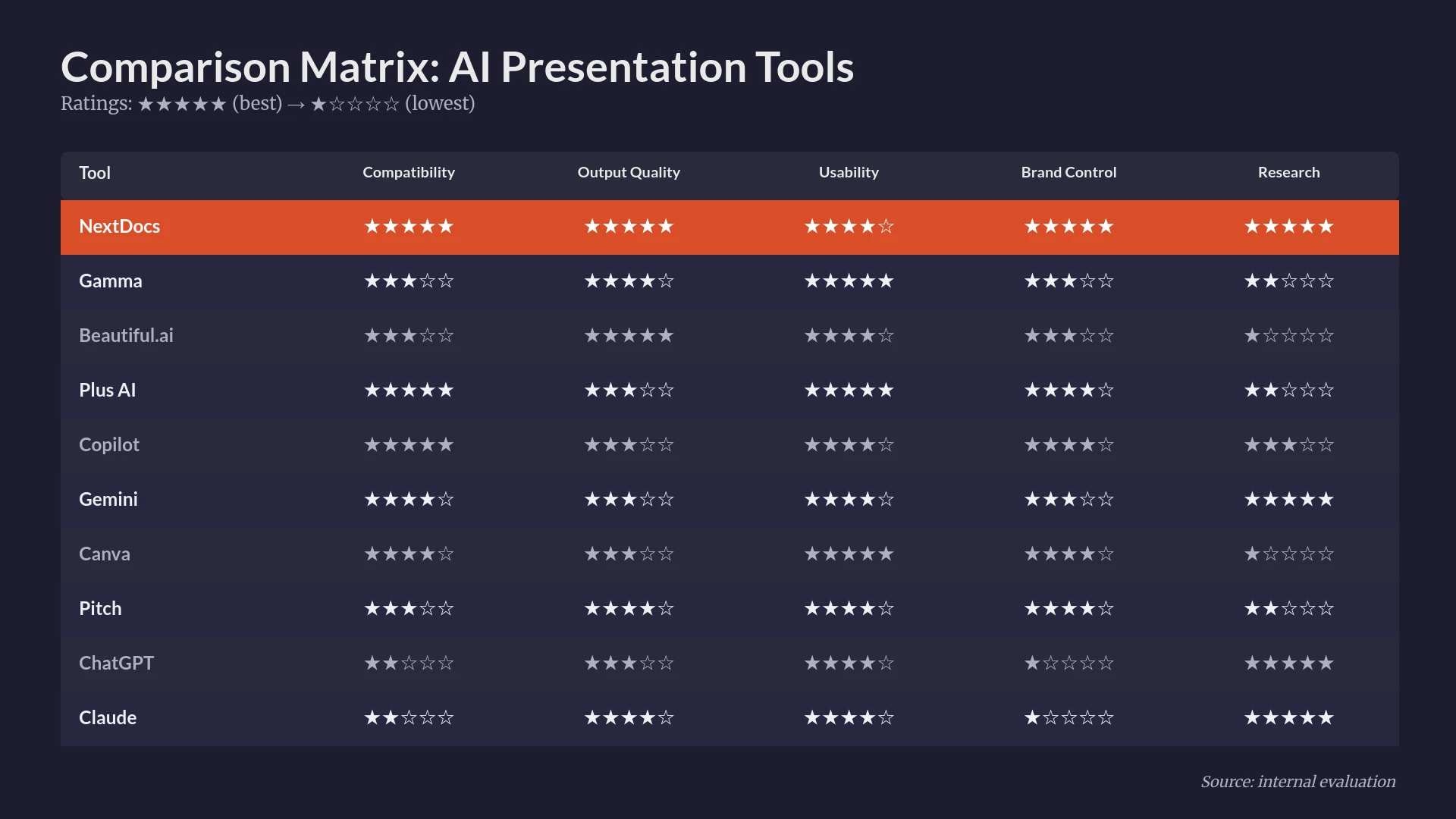
We looked for specific capabilities. First, compatibility. Does the tool work with the software your team already uses? Second, output quality. Is the text investor ready? Third, design variety. Does every deck look the same, or does the AI adapt to the specific industry? Fourth, usability. How long does it take to get a finished product? Fifth, choice. Does the AI give you options, or just one result? Finally, brand control. Can you upload your own fonts and colors?
For a broader perspective on the market, you can also view our blogs best ai presentation builders 2026 roundup.
1. NextDocs (Best Overall)
NextDocs is the premier choice for enterprise professionals who cannot afford to compromise on quality or flexibility. Unlike most AI tools that generate a single version of a deck, NextDocs utilizes a multi-variant generation engine. This means that for every prompt, you receive several distinct interpretations of the content and design. This allows you to choose the narrative arc that best fits your specific meeting.
What sets NextDocs apart is its deep research integration. Instead of hallucinating statistics, the platform can perform live research to pull real market data and citations directly into your slides. This is a massive time saver for consultants and founders who would otherwise spend hours on Google. It also supports universal exports. You can move your work seamlessly between PDF, PPTX, Google Slides, and Google Docs. If you are currently deciding between different models, you might find our comparison of claude vs nextdocs useful for understanding how these engines handle logic.
Key Features:
- Multi-variant generation for multiple creative options.
- Deep research capabilities with real-world data and citations.
- Universal export functionality to all major formats.
- Comprehensive brand styling and brand kit support.
- Multi-model support to leverage different AI strengths.
Pricing: Free tier available. Paid plans start at $15 per month.
Who it is best for: Consultants, founders, sales teams, and anyone creating research-heavy decks.
Verdict: NextDocs is the most robust tool on this list because it treats the AI as a partner rather than a simple template filler. The multi-variant approach is a game changer for professional workflows.

2. Plus AI
Plus AI is designed for those who do not want to leave their existing software. It functions as a native add-in for both Google Slides and PowerPoint. This means you do not have to learn a new interface or manage a new set of logins. You simply open your favorite presentation app and use the Plus AI sidebar to generate or edit slides.
The tool excels at enhancing existing presentations. While other builders focus only on creating new decks, Plus AI can take an old set of slides and remix them using new data or a updated style. This is highly valuable for enterprise teams who have a library of existing assets that need constant refreshing. However, because it relies on the host application, the design variety is sometimes more limited than standalone platforms.
Key Features:
- Direct integration with Google Slides and Microsoft PowerPoint.
- Remix feature for updating and enhancing existing slides.
- Template preservation to keep your company's master slides intact.
- AI-powered content rewriting and slide insertion.
Pricing: No free tier. Starting at $10 per month.
Who it is best for: Power users of PowerPoint and Google Slides who want to add AI to their current workflow.
Verdict: If you are happy with your current presentation software and just want a faster way to draft content, Plus AI is a very reliable choice.

3. Microsoft Copilot for PowerPoint
Copilot for PowerPoint is the logical choice for organizations that are already fully invested in the Microsoft 365 ecosystem. Its greatest strength is its organizational context awareness. Copilot can look at your Word documents, Excel spreadsheets, and even your Teams chats to gather information for a pitch deck. This creates a level of accuracy and relevance that generic AI tools cannot match.
For enterprise users, security is a major factor. Copilot operates within the Microsoft 365 security boundary, ensuring that your sensitive business data stays within your organization. The design style tends to be more conservative and corporate, which is perfect for internal board meetings but might feel a bit stiff for a creative startup pitch. If you are looking for other options in this category, check our list of copilot powerpoint alternatives.
Key Features:
- Integration with the full Microsoft 365 suite.
- Ability to generate slides from existing Word or Excel files.
- Enterprise-grade security and data privacy.
- Automated speaker notes generation.
Pricing: Requires a Microsoft 365 Business subscription. Copilot is an additional $30 per user per month.
Who it is best for: Large enterprises and teams that live in Microsoft 365.
Verdict: It is the most secure and context-aware tool available, though it comes with a high price tag and a more traditional design aesthetic.

4. Gemini for Google Slides
Gemini is Google's answer to Copilot. It is built directly into Google Workspace and provides AI assistance across the entire suite of tools. For pitch deck creation, it can pull information from your Google Drive and generate slide content or images within the Google Slides interface.
The primary advantage here is the lack of friction. If you have a Google Workspace subscription, Gemini is often already there. It is excellent for quick drafts and internal updates. However, in our testing, the output quality was sometimes less sophisticated than specialized tools like NextDocs. It often requires more manual polishing to reach a professional standard.
Key Features:
- Native integration with Google Workspace and Google Drive.
- Built-in image generation using Google's latest models.
- Side-by-side AI assistance for content drafting.
- Real-time collaboration features inherent to Google Slides.
Pricing: Basic features are often included with Workspace. Gemini Business plans start around $20 per user per month.
Who it is best for: Teams that use Google Workspace as their primary productivity suite.
Verdict: It is a convenient and powerful tool for quick internal decks, but it may lack the design depth required for high-stakes external pitches.

5. Gamma
Gamma has become a favorite for startups and agile teams because it breaks away from the traditional slide format. It creates web-native presentations that behave more like interactive documents or websites. This makes them much easier to share via a link and more engaging to view on mobile devices.
Gamma’s AI is incredibly fast. You can input a simple prompt and have a visually stunning deck in under a minute. It offers a very generous free tier, though the exports on the free plan include a watermark. While it is excellent for modern, visual decks, it can be more difficult to force Gamma into a traditional, rigid corporate brand style. For a deeper look at how it compares to the industry giant, see our canva vs gamma 2026 analysis.
Key Features:
- Web-native, interactive presentation format.
- Fast, AI-driven generation with modern themes.
- Flexible cards that adapt to content size.
- Easy sharing via link with built-in analytics.
Pricing: Free tier available. Paid plans start at $8 per month.
Who it is best for: Startups, budget-conscious founders, and internal team presentations.
Verdict: Gamma is the best choice for those who want to move beyond PowerPoint and create something that feels modern and interactive.

6. Beautiful.ai
Beautiful.ai was one of the first companies to introduce smart templates to the market. Their philosophy is that the software should prevent you from making bad design choices. As you add text or images to a slide, the elements automatically resize and reposition themselves to maintain perfect visual balance.
This tool is perfect for non-designers who need to produce client-facing work. It ensures a level of polish that is difficult to achieve manually. However, the AI generation features are somewhat less advanced than the research-driven capabilities of newer tools. It excels at layout, but you still have to provide much of the core content yourself. You can read more about how it stacks up against our top pick in our beautiful ai vs nextdocs review.
Key Features:
- Smart slides that automatically adjust to content.
- A massive library of professional templates and icons.
- Brand control settings to lock in colors and fonts.
- Professional animations and transitions.
Pricing: No free tier for individuals. Pro plans start at $12 per month.
Who it is best for: Consultants and non-designers who need consistent visual quality.
Verdict: It remains the gold standard for layout automation, though it is slightly behind on the latest generative AI content features.

7. Pitch.com
Pitch.com is built with a focus on collaboration. While it has introduced many AI features to help with drafting and design, its core strength remains the way it allows teams to work together. It features robust version history, real-time commenting, and a very intuitive editor that feels more like a modern design tool than a legacy office app.
The AI features in Pitch are useful for overcoming blank-page syndrome. You can generate a starting point and then use the team's collaborative features to refine the messaging. If you are looking for similar collaborative tools, you might explore these pitch alternatives.
Key Features:
- Real-time collaboration and team folders.
- Version history and commenting systems.
- High-quality professional template library.
- Integrated analytics to see who viewed your deck.
Pricing: Free tier available. Paid plans start at $8 per month.
Who it is best for: Teams that need to build and review decks together in a shared workspace.
Verdict: It is a fantastic collaborative platform that uses AI as a helpful assistant rather than a primary creator.
8. Canva Magic Design
Canva is a household name in design, and their Magic Design feature brings AI to their massive ecosystem. The biggest advantage of Canva is the sheer volume of assets available. You have access to millions of stock photos, illustrations, and videos that can be integrated into your pitch deck.
The AI can take a short prompt and suggest several complete designs. However, Canva can sometimes feel a bit too focused on social media aesthetics for a serious enterprise pitch. The output can occasionally look more like a marketing brochure than an investor deck. For a detailed breakdown of how it compares to an AI-native builder, check out our canva vs nextdocs comparison.
Key Features:
- Access to an enormous library of templates and assets.
- Magic Design for instant presentation generation.
- Multi-format exports for social media, print, and web.
- Brand kits for maintaining company identity.
Pricing: Free tier available. Pro plans start at $13 per month.
Who it is best for: Marketers and creative teams who need visual variety and multi-format content.
Verdict: Canva is the best for visual variety and asset access, even if the AI logic is sometimes less precise for business data.
9. MagicSlides
MagicSlides is a specialized tool that focuses on content repurposing. One of its most interesting features is the ability to take a YouTube video URL and turn the spoken content into a structured presentation. It also works well with long documents and PDFs.
The design output is relatively basic compared to tools like Gamma or Beautiful.ai. It is best used as a tool for creating a quick first draft that you then move into a more robust editor. If you find its features too limited, there are several magicslides alternatives that offer more design flexibility.
Key Features:
- YouTube-to-slides conversion.
- Text-to-presentation generation within Google Slides.
- Support for multiple languages.
- Simple, no-frills interface.
Pricing: Free tier available. Pro plans start at $8 per month.
Who it is best for: Educators, trainers, and content creators who need to repurpose video or text.
Verdict: It is a niche tool that solves the repurposing problem very well, though it lacks enterprise-grade design features.
10. SlidesAI
SlidesAI is another Google Slides add-in that prioritizes speed and affordability. It is one of the easiest tools to use. You simply paste your text into a box, choose a general style, and the AI populates the slides for you.
Because it is so simple, it lacks the advanced brand controls and research capabilities found in higher-ranked tools. It is an excellent choice for students or for very quick internal meetings where the visual stakes are low.
Key Features:
- Fast text-to-slide generation.
- Integration with Google Slides.
- Affordable pricing for individuals.
- Simple customization of colors and fonts.
Pricing: Free tier available. Paid plans start at $10 per month.
Who it is best for: Students and professionals who need quick, simple drafts.
Verdict: It is a reliable entry-level tool, but it is generally outclassed by more comprehensive enterprise solutions.
Decision Guide: Choosing the Right Tool for Your Workflow
Selecting the right AI pitch deck builder depends on your specific professional requirements. Not every tool is right for every situation.
When to Prioritize Research and Flexibility
If you are a consultant or a founder, your primary need is likely content accuracy and the ability to export your work. NextDocs is the clear winner here because it integrates research directly into the workflow. The multi-variant approach also ensures that you are not stuck with a single AI interpretation that might not quite land the right tone.
When to Prioritize Ecosystem Integration
For those who work in a strict corporate environment, moving to a new platform might be impossible. In these cases, Plus AI or Microsoft Copilot are the best choices. They allow you to stay within PowerPoint or Google Slides while still gaining the efficiency of AI.
When to Prioritize Design Polish
If you have the content ready but lack the design skills to make it look professional, Beautiful.ai is your best bet. Its smart templates act as a digital graphic designer, ensuring that your slides always look balanced and clean.
When to Prioritize Speed and Sharing
For quick prototypes or modern startup pitches that will be shared via link, Gamma is excellent. Its web-native format is more engaging for modern audiences than a static PDF.
Conclusion: The Future of Presentations
The role of the presenter has changed. You are no longer required to be a graphic designer, a researcher, and a copywriter all at once. By leveraging an enterprise AI pitch deck builder, you can focus on the strategic part of your work: the narrative, the relationship with the audience, and the ultimate goal of the pitch.
While there are many tools on the market, the best results come from those that offer flexibility and depth. Tools like NextDocs have redefined the category by providing multiple variants and deep research, ensuring that the final output is not just fast, but truly high quality.
As you move forward, consider the specific pain points in your current process. Is it the design? The research? The collaboration? Choose the tool that addresses your biggest bottleneck, and you will find that creating professional, high-stakes presentations becomes a matter of minutes rather than days.
Ready to Create Better Presentations?
Try NextDocs Free and experience multi-variant generation, universal exports, and deep research integration. No credit card required.